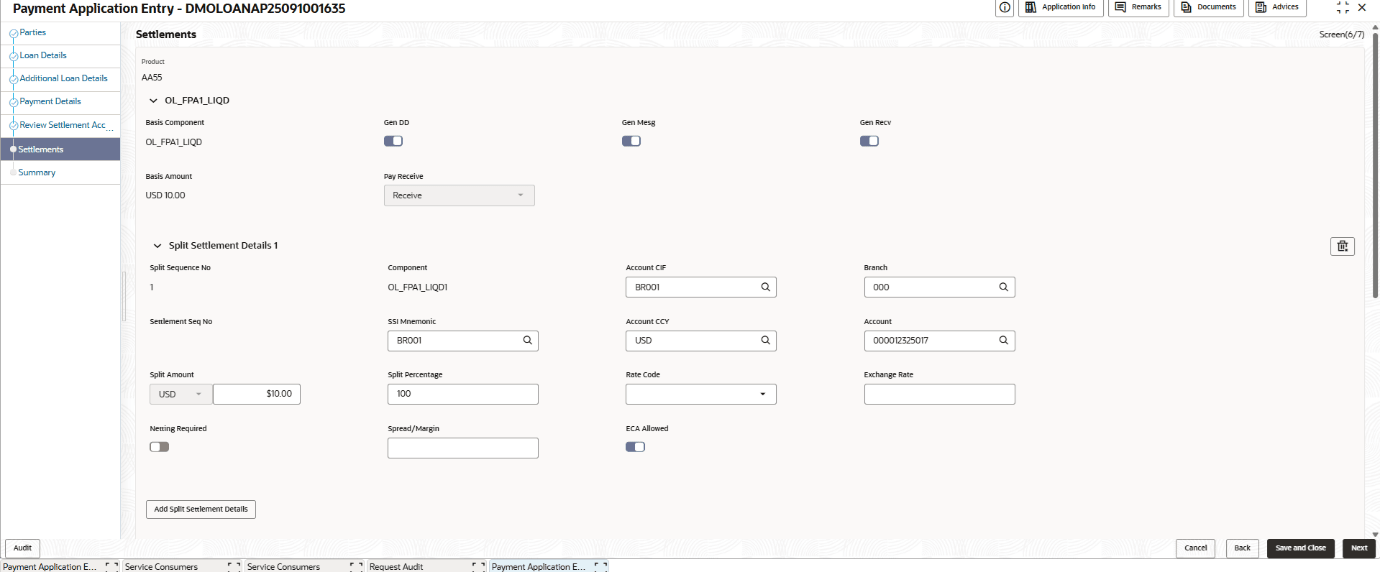
1.1.1.2 Settlements

This topic describes the systematic instructions about settlements data segment.

The Settlement data segment captures all settlement-related details. Additional split settlements can be configured for each settlement component.

ECA blocking can be configured at the settlement component level. If the ECA-enabled property is set to false, ECA blocking cannot be applied. If it is set to true, users are allowed to enable or disable the ECA block.

ECA (External Credit Approval) enabled ensures that sufficient funds are available in the customers account to cover the transaction amount before final accounting entries are posted. In the current scope, if sufficient funds are not available, the system does not show any error on the user interface. Instead, the shortfall is recorded at the backend for follow-up processing, and the transaction continues without any interruption on the UI

The Party details for the application is displayed in the Entry Stage.
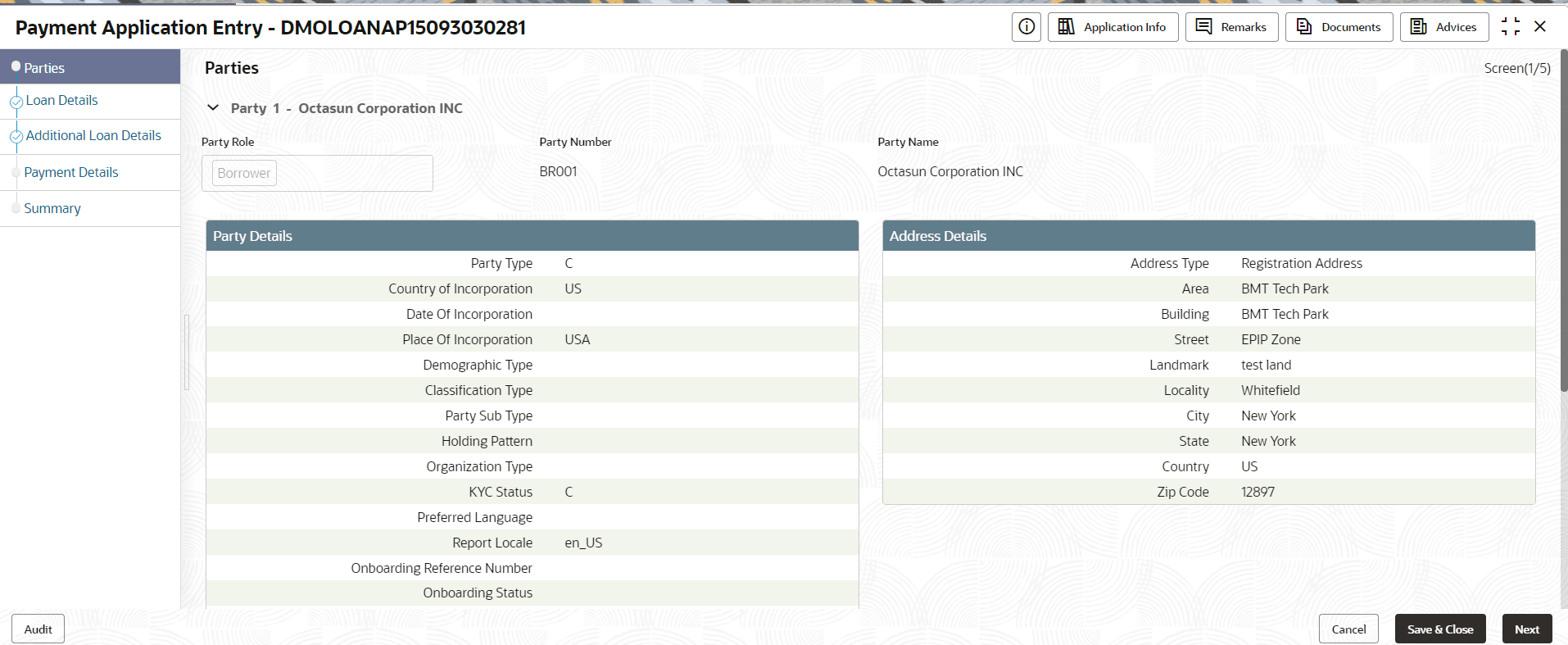
For information on the screen fields, refer to the field description table below.

Table 1-3 Parties- Field Description

Field Description
Party Role Displays the role of the Party.
Party Number Displays the Party Number of the Party.
Party Name Displays the Party Name of the Party.
Contact Role Displays the Contact role.
  1. The Settlements details for the application is displayed in the Entry stage.
    The Settlements screen displays.
  2. On Settlements screen, specify the fields. For more information on fields, refer to the field description table.

    Table 1-4 Settlements - Field Description

    Field Description
    Product Displays the product code of the contract/loan for which the settlement is being captured.
    Basis Component Displays the basis component.
    Gen DD Select the toggle to generate a demand draft / instrument (if applicable in your setup).
    Gen Mesg Select the toggle to generate settlement/payment message depending on configuration.
    Gen Recv Select the toggle to generate receipt/acknowledgment for the settlement as configured.
    Basis Amount Displays the total amount for the selected basis component to be settled.
    Pay Receive Select whether this settlement leg is a Pay or Receive transaction.
    Split Sequence No Displays the sequence number of the split line within this settlement (used when amount is split across multiple accounts/beneficiaries).
    Component Displays the specific component tied to this split line (often defaults from Basis Component).
    Account CIF Select the Customer Information File (CIF) / customer identifier associated with the settlement account.
    Branch Select the branch code where the settlement account is maintained/processed.
    Settlement Seq No Sequence identifier for the settlement instruction line (used to order/identify settlement legs).
    SSI Mnemonic Select the mnemonic for Standard Settlement Instructions (SSI) to pick predefined settlement details.
    Account CCY Select the currency of the settlement account.
    Account Select the settlement account number to be credited/debited for this split.
    Split Amount Enter the amount allocated to this split line, including currency selector and numeric amount.
    Split Percentage Enter percentage allocation for this split line (commonly totals 100% across splits).
    Rate Code Select the exchange rate code to apply when currency conversion is required (per treasury/rate setup).
    Exchange Rate Enter the explicit exchange rate to apply (may auto-populate based on Rate Code or allow manual entry per permissions).
    Netting Required Select the toggle to indicates whether netting should be applied (offsetting payables/receivables if enabled).
    Spread/Margin Enter the additional spread/margin to apply over the base exchange rate (if applicable).
    ECA Allowed Select the toggle indicating whether ECA handling is allowed for this settlement leg.
    Add Split Settlements Details Adds another split line to distribute the basis amount across multiple settlement instructions.