2.7 Automotive Details
This topic explains the systematic instructions for automobile details screen.
Use Automobile Details screen to capture the automobile financing. These details can be used by Relationship Manager and Credit Manager to analyse the credit worthiness of the automobile.
- On the Homepage, from Corporate Lending, under Operations, click Bi-lateral and then click Loan Origination.
- In Loan Origination, click the Automotive
Details tab and provide the required details.The Automotive Details screen displays.
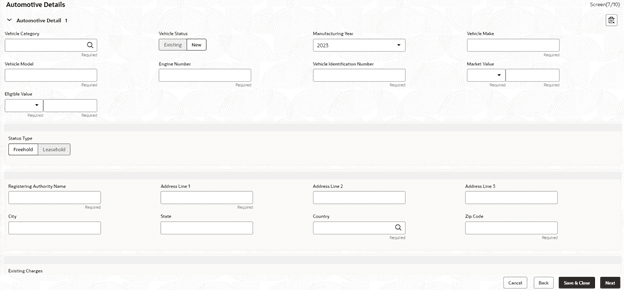
- In the Automotive Details screen, provide the required
details.
Note:
The fields marked as Required are mandatory.For more information on fields, refer to the field description table.
Table 2-7 Automotive Details - Field Description
Field Description Vehicle Category Select the category of the vehicle from the list of values. Vehicle Status Select the status of Vehicle. The available options are: - New
- Existing
Manufacturing Year Enter the manufacturing year of the vehicle. Vehicle Make Enter the manufacturer of the vehicle. Vehicle Model Enter the model of the vehicle. Vehicle Identification Number Enter the identification number of the vehicle. Market Value Enter the market value of the vehicle in figures along with currency code. Eligible Value Enter the eligible value of the vehicle in figures along with currency code. Ownership Status type Select the ownership status. The available options are: - Freehold
- Leasehold
Registering Authority Name Enter the name of the registering authority. Address Line 1-3 Enter the address details of the registering authority. City Enter the name of the city. State Enter the name of the state. Country Select the country code from the list of values. ZIP Code Enter the ZIP code of the address. Existing Charges Select the appropriate option if the existing charges are applicable.
Parent topic: Data segments
