2.2 Business Activity Details
This topic explains the systematic instructions for business activity screen.
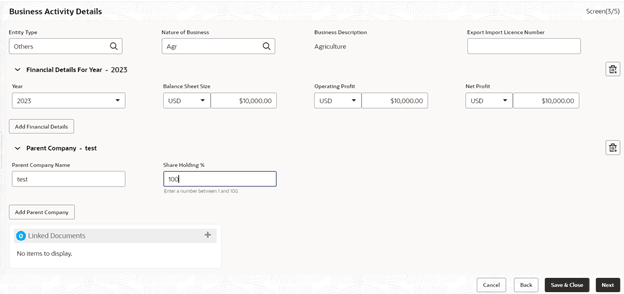
Use Business Activity Details screen to capture the nature and activity of the business for the customer who has requested for the loan. User can update details as entity type, nature of business, current profit and loss, and current balance sheet size and so on. Allows user This information can be used by Relationship Manger or credit manager which will help then to determine the terms and condition on which loan can be granted.
- In the Loan Origination, click Business
Activity Details tab and provide the required details.The Business Activity Details screen displays.
Note:
The fields marked as Required are mandatory.For more information on fields, refer to the field description table.
Table 2-2 Business Activity Details - Field Description
Field Description Entity Type Select the entity type of the customer from the drop-down list. Nature of Business Select the core activity/ nature of Business of the customer from the drop-down list. Current Year Enter current year for which the details are updated in this segment. Currency Select a balance sheet currency from the drop-down list. Balance Sheet Size Enter the current year balance sheet size in figures. Currency Select a currency in which the Operating profit to be specified from the dropdown list. Operating Profit of the Year Enter the current year operating in figures. Currency Select a currency in which the net profit to be specified from the drop-down list. Net Profit of the Year Enter the current year net profit in figures. Export Import License Number Enter the export import license number of the customer. Parent Company Name Enter the name of the Parent Company. Share Holding % Specify the shareholding percentage of the company.
Parent topic: Data segments