All operations on a loan (input, modification, reversal, manual liquidation or
manual rollover) have to be authorized:
- By a user other than the one who carried out the operation
- Before you can begin the end-of-day operations
When you invoke a loan for authorization, as a cross-checking mechanism, to
ensure that you are calling the right loan, you can specify that the values of
certain fields should be entered before the other details are displayed. The
complete details of the loan is displayed only after the values to these fields
are entered. This is called the
re-key option. The fields
for which the values have to be given are called the
re-key fields.
If no re-key fields have been
defined, the details of the loan is displayed immediately once the
authorizer calls the loan for authorization.
The re-key option also
serves as a means of ensuring the accuracy of
inputs.
Example
At the ABC Corporation, Mr. Trevor Atkins
inputs a loan of 1M USD, which has an interest of 20% and a tenor of one month.
The loan involves a product for which the re-key fields assigned are the loan
amount and the currency. Now, Mr. Atkins makes a mistake and enters the loan
amount as 10 M USD.
When Mr. Jeffrey Hunt, who has rights to authorize the
loan, selects the loan for authorization and indicates the re-key fields of
loan amount and currency as 1M, and USD respectively (based on the loan
document), the loan details are not displayed.
The loan details are
not be displayed if:
- The value in the field that has to be re-keyed has been entered
wrongly at the time of loan processing.
- The re-key value is input wrongly at the time of authorization.
Now, if Mr. Trevor Atkins had input the loan currency as GBP
instead of USD, then also, Mr. Jeffrey Hunt would have been denied access to the
loan when he attempted to call it by entering the correct data in the re-key
fields. When this happens, Mr. Hunt can inform Mr. Atkins of the mistake and
have it rectified.
It could also be that Mr. Atkins has correctly captured the
principal of the loan as 1M and the authorizer and Mr. Hunt makes an error
while entering the re-key value. Assume Mr. Hunt enters the value as 10 M.
In such a case also, the details of the loan is not displayed for
authorization.
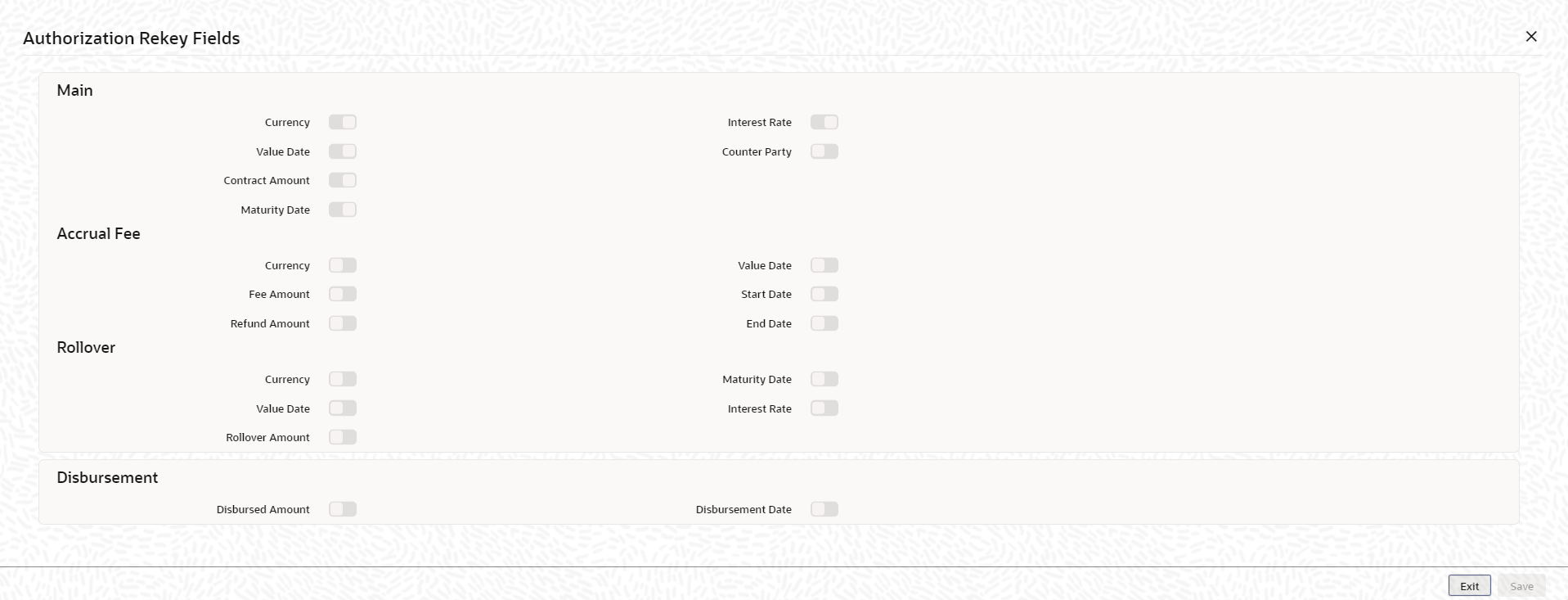
You can specify any or all of the following as re-key
fields:
- Main
- Currency
- Value Date
- Contract Amount
- Maturity Date
- Counter Party
- Interest Rate/Amount
- Accrual Fee
- Currency
- Fee Amount
- Refund Amount
- Value Date
- Start Date
- End Date
- Rollover
- Currency
- Value Date
- Rollover Amount
- Maturity Date
- Interest Rate
- Refinance Rate