- Product Definition
- Product Definition
- Maintaining multi-level authorization of a contract
- Product Transaction Limits maintenance
1.15.1 Product Transaction Limits maintenance
To capture details of product transaction limits maintenance screen
Specify the User ID and Password, and login to Homepage.
- On the Homepage, Type OLDPLMNT and click next
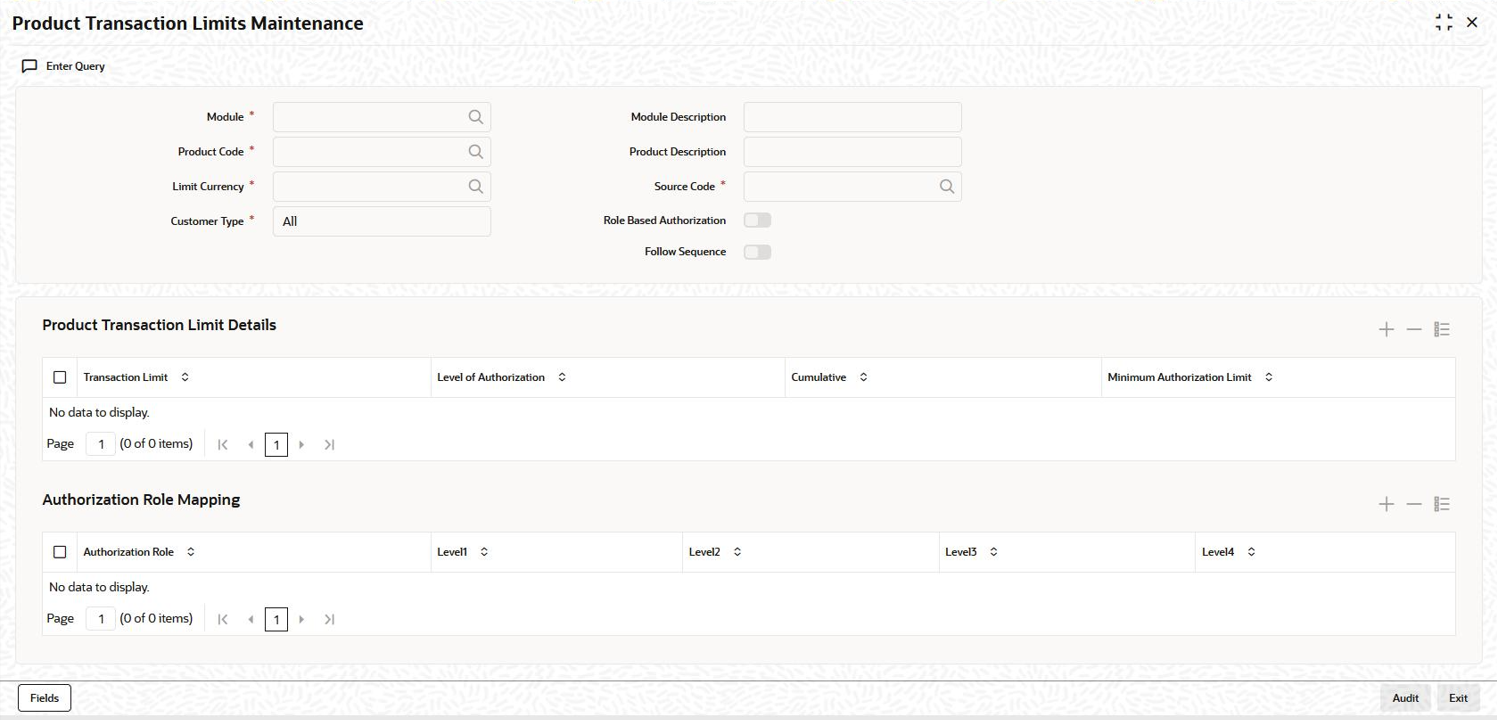
arrow.The Product Transaction Limits Maintenance screen is displayed.
Note:
The fields which are marked in asterisk red are mandatory fields.Figure 1-16 Product Transaction Limits Maintenance
- In Product Transaction Limits Maintenance screen, you
need to maintain specific combination of fields so that the transactions
belonging to this combination can be authorized based on the authorization
hierarchy. The specific combination of fields are Module,
Product, Limit Currency,
Customer type and Source
Code.
Table 1-9 Product Transaction Limit Maintenance
Field Description Module Specify the module for multi-level authorization. The list displays all the modules maintained in the system which require multilevel authorizations. Product Code Select the product code from the option list. The list displays all the product codes maintained in the system which require multilevel authorizations. Limit Currency Select the limit currency from the option list. The list displays all the limit currency maintained in the system which require multilevel authorizations. Customer Type You can select the customer type either as ALL, Corporate, Individual, or Bank Customer. Module Description The module description appears based on the module selected. Product Description The product description appears based on the product selected. Source Code Specify the source code as FLEXCUBE in case of external system then source code is EXTSYS. Role Based Authorization If this check box is selected, then Level 1, Level 2, Level 3, or Level 4 should be selected. Follow Sequence This option is applicable only if role based authorization is selected. When this option is selected, the system allows you to authorize the transaction only in sequence with the roles are specified. - In Product Transaction Limit Details section, you can
specify transaction limit and authorization levels based on that authorization
hierarchy.
Table 1-10 Product Transaction Limit Details
Field Description Transaction Limit If the transaction is booked in excess of the maintained transaction limit then an appropriate message indicating the levels of authorization appears. Level of Authorization Indicates the number of users to be involved in the contract authorization. Cumulative Select this check box to indicate whether shared authorization to be allowed for a contract’s transaction amount. Minimum Authorization Limit This field is applicable only when the Cumulative check box is selected. The amount cannot be greater than the transaction limit. This amount is used to validate authorizer limit while authorizing the contract. - In Authorization Role Mapping section, you can define
the user roles involved in authorizing the transaction. Role details should be
provided for primary rule. Optionally, an
alternate rule can also be set up for the
combination.
Table 1-11 Authorization Role Mapping
Parent topic: Maintaining multi-level authorization of a contract