- Bilateral Loans
- Processing Upfront Fee Accruals
- Transferring Memo Interest to FAS91 Fee
- Associating the Accrual Fee Component
5.6.2 Associating the Accrual Fee Component
After defining a fee component, you need to link the fee component to a product
in Oracle Lending.
Specify the User ID and Password, and login to Homepage.
From the Homepage, navigate to Bilateral Loans Product Definition screen.
- From the Bilateral Loans Product Definition screen,
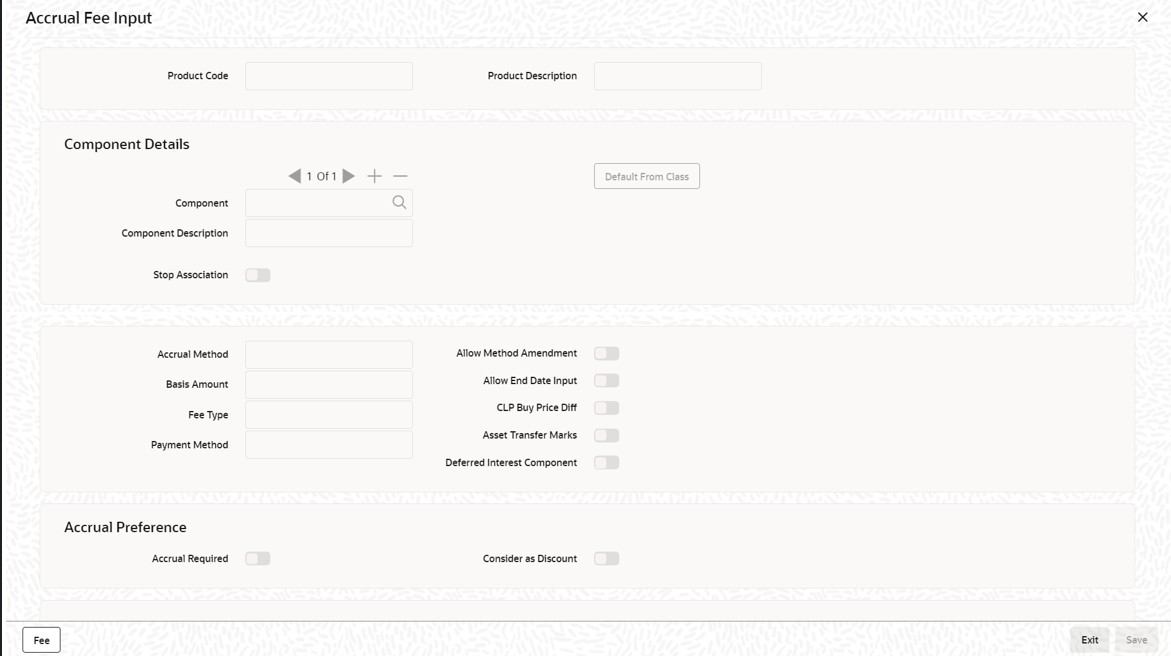
click on Accrual Fee Details tab.The Accrual Fee Input screen is displayed.
- Click Add row to add fee components. Click Default From Class to associate the required fee component with the product. System defaults the parameters of the selected fee component. However, you can change the parameters according to your requirements.
- You can specify below details in this screen. For information on fields, refer
to the field description table.The system posts the following accounting entries:
Table 5-1 Accrual Fee Input
Field Description Accrual Method Specify the accrual method from the adjoining drop-down list. This list displays the following values: - Straight Line
- Yield
- Flat Amount
Basis Amount Select the basis amount on which the fee component should be calculated from the adjoining drop-down list. This list displays the following values: - Expected balance
- Expected Outstanding Facility
- Expected utilized Facility
Fee Type Specify the fee type from the adjoining drop-down list. This list displays the following values: - Income
- Expense
Payment Method Specify the fee type from the adjoining drop-down list. This list displays the following values: - Discounted
- Bearing
Allow Method Amendment Select this check box to indicate that the amendment method is allowed for the accrual fee component. Allow End Date input Select this check box to indicate that the fee component (if applicable for the product involved in the contract) cease to be associated with a contract on the contract ‘End Date. CLP Buy Price Diff Select this check box to indicate that the difference between the PAR price (100%) and actual buy price is booked as fee against that component. Note:
- For the Commitments associated with the CLP positions, system maintains separate Income and Expense type of amortization FEE components to handle the amortization FEE amount computed based on the price difference between the Buy Price and Par value (100%). In case of premium price quotation for the Buy trades, expense type of amortization FEE is created and Income type is used for Discount Price quotation.
- These Income and Expense components should be unique for a commitment product. Such Amortization FEE components are identified by flag CLP Buy Price Diff. In a CLP commitment product, system allows one income and one expense type of Amortization FEE components with the flag CLP Buy Price Diff
Asset Transfer Marks Select this option to indicate that the amortization fee component is of the asset transfer marks type. This is defaulted to the component level when details of the amortization fee are being entered. Accrual Required You have the option to accrue the fee earned on syndication contracts. To do this, you have to check this option. Consider as Discount Select this check box to indicate that the discount accrual to the component is applied. Deferred Interest Component Select this check box to indicate that this component should represent deferred interest. When the loan status changes to Performing from Non-performing, the system checks the value of the backend parameter ALLOW_REPERFORMING_LOAN_FUNC. If the value of this parameter is Y, the system performs memo interest reversal. Amortization fee liquidation is done on deferred fee interest component for the memo interest amount that is moved to Real GL as part of the reversal. Note:
You can maintain only one deferred interest component for a product.For normal amortization FEE component of income type:Accounting Role Dr / Cr Amount Tag CUSTOMER Dr. Component_LIQD FEE_Received_In Advance Cr. Component_LIQD For normal amortization FEE component of expense type:Accounting Role Dr / Cr Amount Tag CUSTOMER Dr. Component_LIQD FEE_Paid_In Advance Cr. Component_LIQD For amortization FEE components of Income type (CLP Buy Price Diff):Accounting Role Dr / Cr Amount Tag SLT-PREM-DISC Dr. Component_LIQD FEE_Received_In Advance Cr. Component_LIQD For amortization FEE component of expense type (CLP Buy Price Diff):Accounting Role Dr / Cr Amount Tag SLT-PREM-DISC Dr. Component_LIQD FEE_Paid_In Advance Cr. Component_LIQD
Parent topic: Transferring Memo Interest to FAS91 Fee