3.2 Setting Product Preferences
The attributes specific to a loan product are defined in the Bilateral
Loans Product Preferences screen.
Specify the User ID and Password, and login to Homepage.
From the Homepage, navigate to Bilateral Loans Product Definition screen.
- From the Bilateral Loans Product Definition screen,
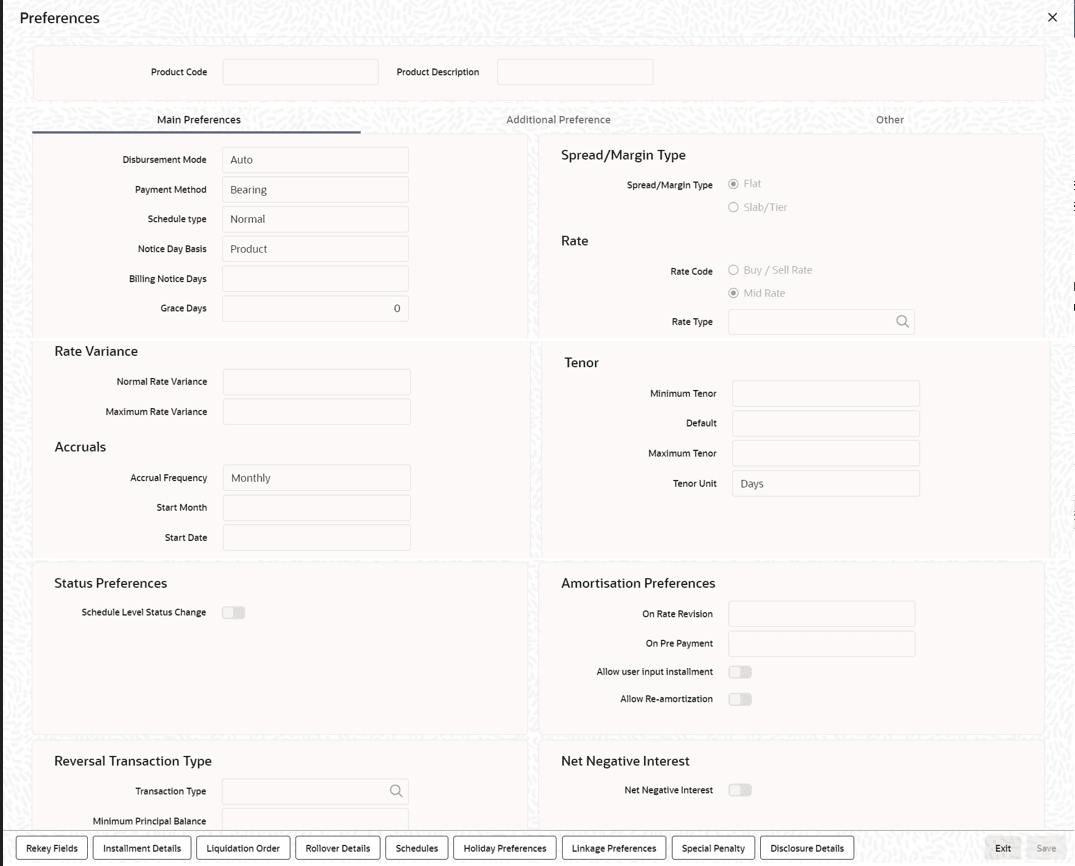
click Preferences.The Preferences screen is displayed.
Figure 3-2 Preferences
- Specify the Payment Method
- Indicating the Schedule Type
- Setting Billing Notice Days
- Specifying Grace Days to Penalty
- Indicating Values to be Rekeyed during Authorization
- Setting the Accrual Frequency
- Specifying Tenor Related Details
- Specifying Exchange Rate Variance
- Specifying if Status Processing for Contract Schedules is Required
- Specify Interest Details
- Specify Additional Preference
- Identifying the Rate Code to be Used for Loans in Foreign Currency
- Indicating the Rate Type
- Open Line Loan Details
- Holiday Preferences
- Other Preferences tab
- Identify Products for Agency Contract Creation
- Specifying the Reversal Transaction Type
- Discount Multiple Schedules for Discounted Loans
- Indicating the Annual Effective Rate (TEA) for loans
- Enabling the Customer Effective Loan Rate Option
- Allowing Forward Dating
- Prioritizing the Liquidation of Components
- Tracking Status Changes for Loans
- Disclosure Details Maintenance
- Map Product to Disclosure Details
- Specify Special Penalty Components
- UDFs Maintenance
- UDF Upload
Parent topic: Defining Attributes Specific to Loan product