9.2 Features of the Product Roll-over Details Screen
When defining a product, you have to specify whether loans involving the product
can be rolled-over. If rollover has been allowed for a product, all the loans involving
the product can, by default, be rolled-over.
The rollover details for the product that you are defining
can be specified in the Product Rollover details screen. Click
Rollover Details button in the Product
Preferences screen to invoke this screen.
Note:
However, a loan involving such a product is rolled-over only if it is not liquidated, on its Maturity Date. You can choose not to rollover a loan involving a product with the rollover facility. This can be indicated when processing the loan.Note:
If you want contingent entries to be posted, then select Cont Booking For Addl Amt Only check box. This is applicable only if the Rollover Mechanism is New Version and Rollover Method is Normal. If contingent entries are booked for a contract, the system does not allow VAMI, PYMNT, and REVN events.Specify the User ID and Password, and login to Homepage.
From the Homepage, navigate to Bilateral Loans Product Definition screen is displayed.
From the Bilateral Loans Product Definition screen, click Preferences.
- From the Preferences screen, click Rollover
details.The Rollover Details screen is displayed. The following are the features of the product roll-over details screen.
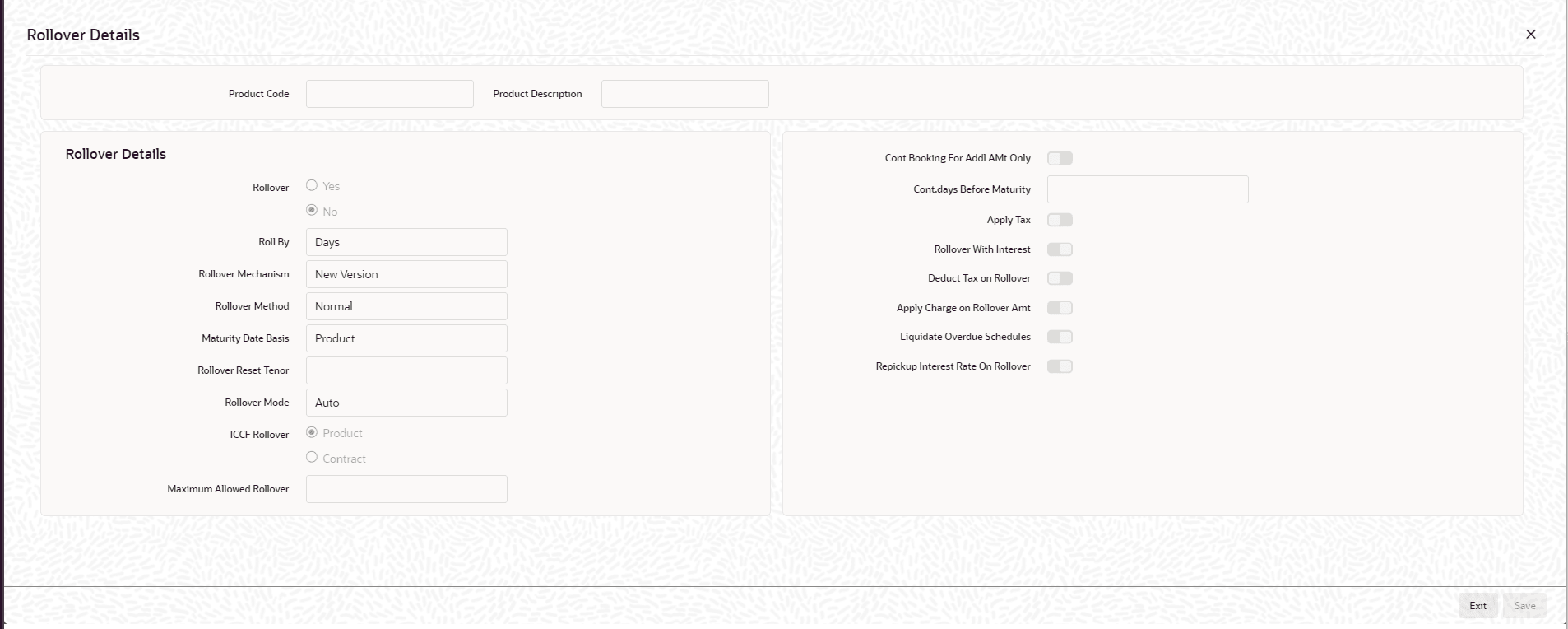
- Specifying whether Rollover is Applicable
- Specifying the Rollover Mechanism
- Specifying the Rollover Method
- Mode of roll-over
- Roll-over of Interest, Charge and Fee Components
- Maximum Allowed Rollover
- Maturity Date Basis
- Applying Tax on Roll-Over
- Deduct tax on Roll-Over
- Contingent Entries for Additional Amount
- Applying a Charge on the Roll-Over Amount
- Liquidating Overdue Schedules
- Interest Rate on Rollover
- Indicating the Values to be Re-keyed during Authorization
Parent topic: Rolling-over a Loan