4.12 Maintaining Transaction-specific MIS Refinancing Rates

You can choose to perform MIS Refinancing on a daily basis for all loan contracts, only if this option has been enabled in the Bank-wide Preferences screen. If the MIS refinancing has been set to a daily frequency, you have to indicate the refinance rate pick up specification through the transaction MIS sub-screen while processing the contract.

Specify the User ID and Password, and login to Homepage.

From the Homepage, navigate to Loans and Commitment - Contract Input screen.

  1. On the Loans and Commitment - Contract Input screen, click MIS tab.
    The MIS screen is displayed.

    Note:

    The fields which are marked in asterisk red are mandatory fields.
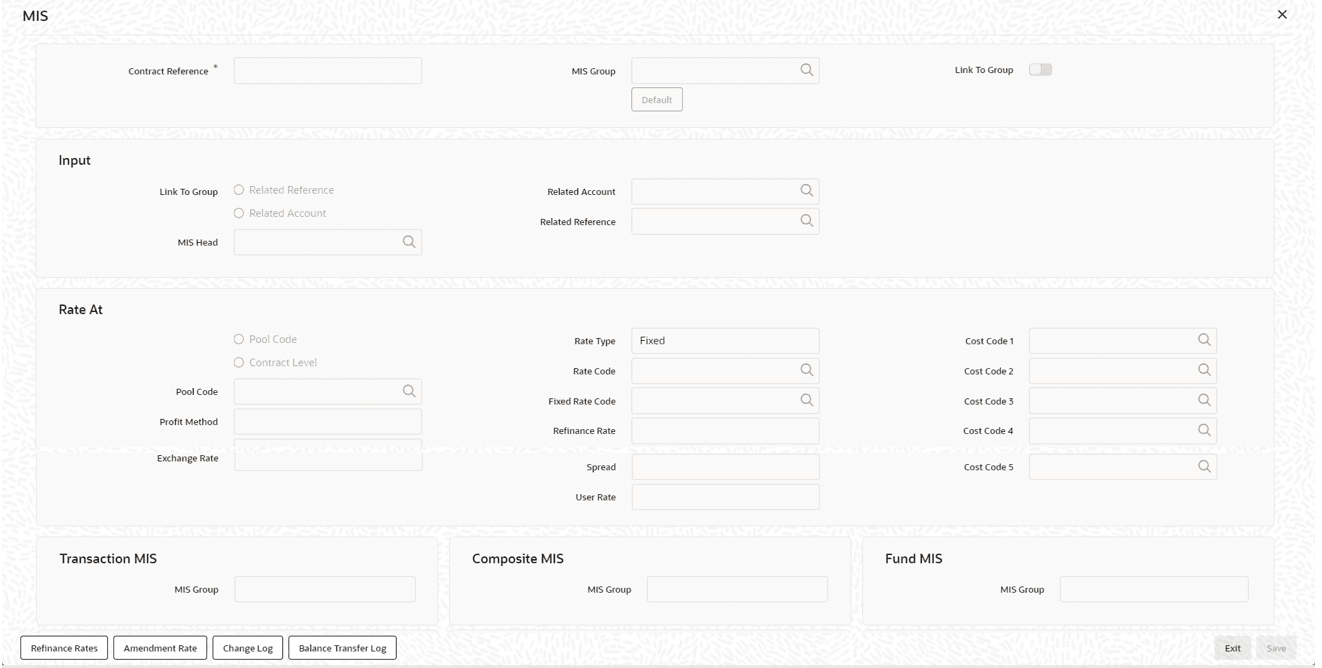
  2. In this screen, the transaction type of MIS class, the cost code and pool code is taken from the product under which the contract is processed. The composite MIS code is taken from the definition made for the customer, on behalf of whom the contract is being processed.
    As part of specifying the MIS refinance specifications you have to indicate whether the system should pick up the MIS Rate associated with the pool linked to the contract or whether you would like to maintain a rate specific to the contract. You can indicate your choice by selecting any one of the following options:
    • Pool Code – indicating that the MIS Rate maintained for the pool code should be used for refinancing.
    • Contract Level – indicating that you would like to maintain a specific MIS Rate for the particular contract.
    • If you specify that the system should pick up the refinancing rate specific to the contract you have to indicate the rate type, which is to be used for refinancing. The options available are:
      • Fixed
      • Floating Automatic – indicating that the system should pick up the refinancing rate associated with the reference number of the contract. Since the contract is linked to a Rate Code the system picks up the rate associated with the rate code when the End of Day processes are run to refresh the various rates.
      • Floating Periodic – you can select this preference only if you are maintaining rate refinance details for the Loans module. The periodic revision rates maintained at the product level are picked for refinancing purposes.

      Note:

      If you have indicated that the rate maintained for the pool to which the contract is linked should be picked up for refinancing, you need not specify the Rate Type. The rate applicable on the pool is made applicable on the contract as well.