4.3.1.2 Mode of Liquidation
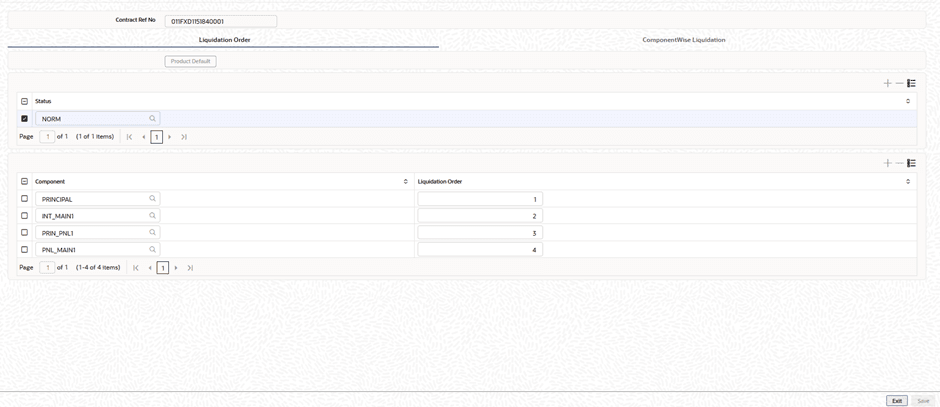
In addition to specifying the liquidation type, the contract inherits the Allow Liquidation Order at Contract attribute from the product. If this preference is enabled, users can maintain a liquidation order for the contract’s components that is different from the order defined at the product level. This allows for contract-specific sequence of component liquidation during auto liquidation of schedules. If the attribute Allow Liquidation Order at Contract is enabled, it is required to maintain the liquidation order for the contract.
If Auto liquidation has been set for the contract, then all components of the loan are liquidated automatically when each schedule is liquidated. The order in which the components are liquidated is determined by the order defined at the contract level, if specified. If not, the liquidation order defined at the product level will be used.
If Manual liquidation has been set for the contract, then a manual liquidation must be performed for each schedule, and all components of the loan must be liquidated manually.
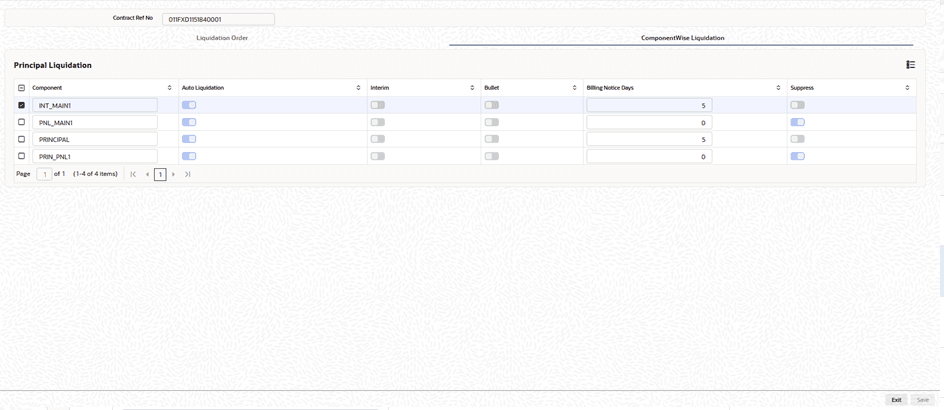
If Component liquidation has been set for the contract, then you can select the components that must be automatically liquidated and specify the order in which the automatic liquidation take place. In such a case, only those components so selected are liquidated automatically in the order specified. The other components that are not selected must be liquidated manually.
The system enables the Liquidation Preferences button for all types of liquidation mode during contract booking as well as contract amendment. Specifications for the liquidation order of the components need to be provided in the Liquidation Order screen. For Component liquidation, the specifications made for the product can be viewed in the Component-Wise Liquidation screen when you enter a contract.
Specify the User ID and Password, and login to Homepage.
From the Homepage, navigate to Loan and Commitment-Contract Input screen.
On the Loan and Commitment-Contract Input screen, click Schedules tab.
- On the Schedules screen, click Liquidation
Preferences.The Liquidation Order screen is displayed.
Parent topic: Setting Loan Schedule Preferences