7.3 Set Product Schedule Preferences
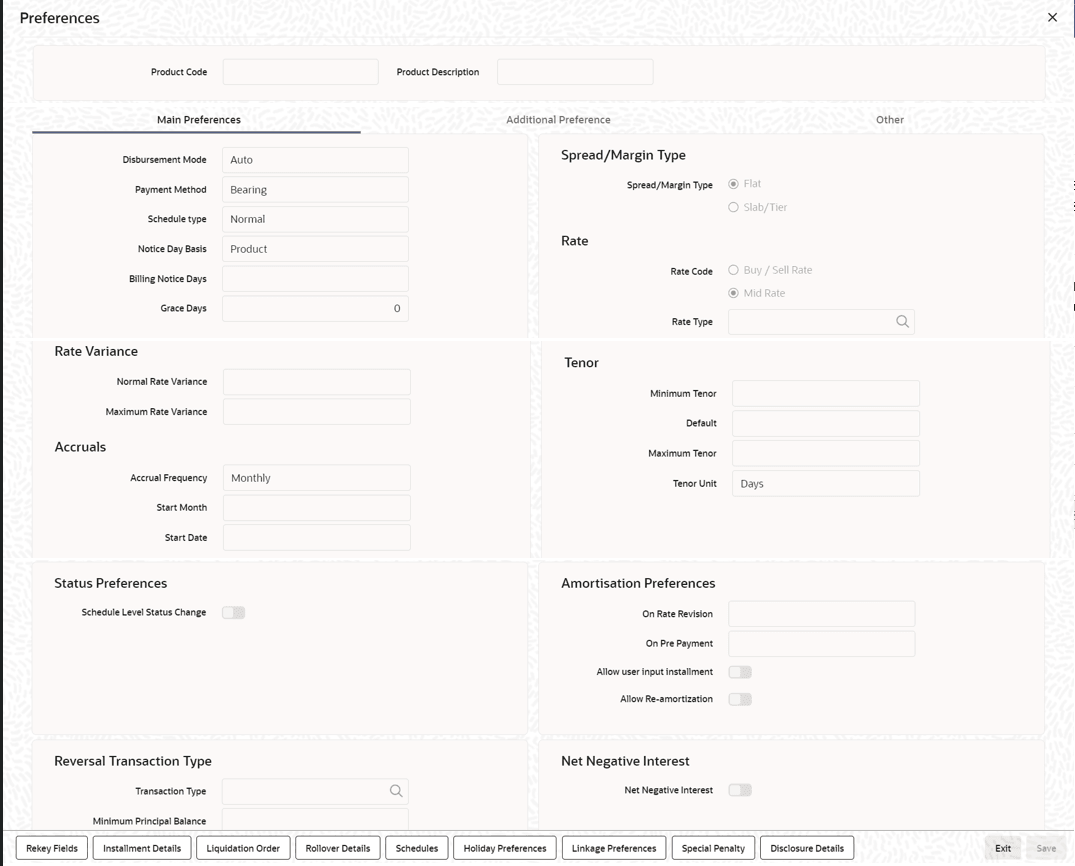
From the Homepage, navigate to Bilateral Loans Product Definition (OLDPRMNT) screen.
- From the Bilateral Loans Product Definition screen,
click Preferences.The Preferences screen is displayed.
- Components of a loan can be liquidated automatically or manually. On the other
hand, you can also indicate that certain specific components must be liquidated
automatically. In the Bilateral Loans Product Definition
screen you have to indicate whether the mode of liquidation of repayment
schedules are to be automatic.Specify Auto liquidation if you want the components of a loan (involving a product) to be liquidated automatically.
In this case, a schedule is liquidated automatically on the day it falls due, during beginning of day processing (by the Automatic Contract Update function).
Now, consider the following situation:- You have indicated automatic liquidation
- The schedule date falls on a holiday
- You have specified (through the Contract Preferences screen) that the holiday be ignored while calculating the schedule date.
- If you specified that processing has to be done on the last working day before the holiday for automatic events right up to the day before the next working day, the schedule falling on the holiday is liquidated during end of day processing on the last working day before the holiday.
- If you specified that processing has to be done only up to the System Date, then only those events scheduled for today (the last working day before the holiday) are processed. The events of the holiday are processed on the next working day after the holiday, during beginning of day processing.
If the funds are insufficient, the liquidation is done to the extent of the available balance in the repayment account. The components are liquidated in the order that you specify. This is reported in the Exception Report generated at the end of every day, automatically (by the Automatic Contract Update function).
If you have not specified that the funds be verified, and there are insufficient funds in the repayment account:- The repayment account is put into a debit balance (if you have allowed overdraft) and the schedules for the components liquidated to the extent of the debit balance that you have allowed for the account. You can liquidate beyond the allowed debit balance for an account. The system, however, display an override message, which is recorded for audit trail purposes. Debit interest, as specified for the type of account (current or savings), is applied on the debit balance.
- If the repayment account has not been defined with overdraft, the liquidation is not processed.
Example
You can indicate that the repayment schedules for the principal have to be liquidated automatically if you are sure that your customer can repay the schedule amount on time. Another scenario where you could define automatic schedules could be when the customer has a deposit the interest from which, is servicing his loan.- Recomputing schedules after a repayment in advance
You have to specify whether the interest on the future schedules of a loan has to be recalculated in case a prepayment is made on a schedule (that is, the principal repayment is made before its due date).
Example
Parivallal Express Services has taken a long-term loan with the following terms:- Initiation on: 01 January '98
- Maturity on: 31 December '01
- Principal: USD 360,000
- Interest: fixed at 15% per annum
- Repayment: a principal of USD 10,000 every month, with interest
The prepayment of the principal entails a change in the subsequent interest schedule amounts. This is because, when the interest amount for each repayment is calculated on initiation of a loan, it is on the Expected Balance as of a payment date.
Thus, in this case, the interest amount for the first repayment is 15% p.a. on 360,000; for the second repayment is 15% on 350,000, and so on.The prepayment changes the expected balance (in this case, USD 40,000 has been paid back instead of the scheduled USD 10,000). Thus, the interest applicable for the subsequent schedules are less, as the actual balance is less than the expected balance.
The recalculation of the subsequent interest schedules are done only if you have specified that schedules have to be redefined on a prepayment. Otherwise, the interest amounts for the subsequent schedules are the same as that calculated based on the earlier expected balance.Note:
The subsequent interest schedules are redefined. The subsequent principal schedules are marked as paid to the extent of the prepayment. In the case of an amortized schedule, the amount of repayment for the schedule immediately after the prepayment is different from the rest of the schedules. - Liquidating back valued schedules during initiation
You have to indicate whether for a back-dated loan that has schedules prior to today’s date, the schedules have to be liquidated when the loan is initiated. A back dated loan is one, which has an initiation date, which falls before today’s date.
Example
Loans can be initiated,- As of today
- A date in the future
- As of a date in the past
Suppose that there has been an interest payment schedule for 30 September 1997, for 500 USD. If you specify that back valued schedules should be liquidated, accounting entries are passed to liquidate this schedule (too), when the loan is initiated. If you specify that back dated schedules are not to be liquidated, only accrual entries are passed till today.
Note:
The entries associated with each event (initiation and liquidation in this case) are passed only if they have been defined for the product. Further, the accounts used are the ones defined for each entry. - Specifying the payment method
You have to specify whether the payment method for the interest components is to be bearing, discounted, or true discounted. This cannot be changed at the time of processing a loan.
- Bearing
The interest is liquidated on schedule payment date(s).
Example
You have advanced Ms Yvonne Cousteau a loan of USD 10,000, under the ‘Short Term Loans for Individuals’ scheme, at 10% interest, for a year.Now, under the bearing type of interest payment method, the nominal (USD 10,000), which becomes the principal in this case, is advanced to Ms Cousteau and the interest on it is collected over the one year, which is the tenor of the loan.
- Discounted
In this interest payment method, the interest is deducted at the time of initiating the loan.
Example
Carrying forward the example of Ms Yvonne Cousteau’s loan of USD 10,000, under the scheme Short Term Loans for Individuals, at 10% interest for a year, under the discounted type of interest payment, the total interest (Actual/Actual) calculated for the tenor of the loan, USD 1,000, is deducted from the principal (USD 10,000) and only USD 9,000 is advanced. - True discounted
In this interest payment method, the interest is calculated on the principal in a manner differing slightly from the discounted method. The interest rate is applied on the Principal instead of the Nominal, as is done in the discounted method.
Example
You have advanced Mr. Brian Williams a loan of USD 10,000 under the scheme Short-term Loans For Industries at 10% interestX for a year. Under the true discounted type of interest payment, the interest amount in absolute terms in not USD 1,000 but lesser than that. This is because the interest rate of 10% is not applied on USD 10,000 but on the actual amount disbursed (derived by the system) which is USD 9090.91. - Specifying the component
You can define different repayment schedules for the different components according to your needs. First of all, you should specify the component for which you want to define the schedule. All components - the principal and any other component depending upon your ICCF definition for the loan — are available in the form of a picklist. You have to define schedules for each of them.
If you indicated (in the Product Preferences screen) that the Schedule Payment Type is amortized, then, you have to specify the frequency not for the principal but for the amortized principal (principal + total (main) interest accrued on the loan, equally spread out across the number of schedules). In the picklist, you see Amortized displayed and you have to define the frequency for this.When defining repayment schedules for specific loans, the amount of repayment needs to be specified only for the principal. The interest, commission, and fee amounts to be calculated by the system automatically, depending on the repayment date and the principal (amount). However, for loans with special interest, you also have to provide the interest amount.
If you are entering a loan contract for which you need to define installment schedules, you have to select installment as the component. To define installment schedules the contract must be linked to a product for which installment schedules are allowed.For more information, refer to Defining Attributes Specific to Loan Product topic in this manual.
- Setting the reference date
You can indicate whether the dates of repayment schedules should be calculated based on the Value Date (date of initiation of the loan) of the loan involving the product, or a Calendar Date.
If you specify that the Reference is the Value Date (date of initiation of the loan), the dates for schedule repayments are based on this date and the frequency.If the Reference is specified as the Calendar Date, the dates for schedule repayments are based on the Start Date (specified by you), the Month and the Frequency. The following example illustrates this concept:
Example
A loan starts on 15 September 1997 and the frequency of repayment is monthly. If the Reference is specified as Value Date, the monthly schedule dates fall due on 15 October 1997, 15 November 1997, and so on, till the loan matures.If the Reference is specified as Calendar Date, and the Start Date is fixed as 1 October 1997, the first repayment date is 1 October 1997. The subsequent repayment dates are 1 November 1997, 1 December 1997, and so on, till the loan matures. In this case, the interest days for the first repayment is from 15 September 1997 to 30 September 1997.
If Reference is set to Value Date (loan initiation date), you need to specify only the Frequency (monthly, quarterly, and so on.) and the unit of frequency (if you specify the frequency as monthly and the unit as 1, it means one schedule for one month). The system sets the schedule according to the Frequency and Unit of Frequency you have specified, beginning on the Value Date.Example
If the Value Date of a loan is 10 December 1997 and you indicate the frequency as monthly and unit as 1, then the first schedule is liquidated on 10 January 1998, the next one on 10 February 1998, and so on.For the same loan if you were to define a fortnightly schedule, you indicate the frequency as daily and unit as 15. The first schedule, in this case, is liquidated on 25 December 1997, the next one on 10 February 1998, and so on.
- Specifying the frequency of schedulesFor a periodic schedule, you can indicate the frequency of repayment for each component. This could be:
- Daily
- Weekly
- Monthly
- Quarterly
- Half-yearly
- Yearly
- Bullet
- Specifying the frequency unit
You can specify the number of units for the frequency you have set for a particular component.
Example
If you want a payment every 15 days, you have to specify,- The frequency as Daily.
- The units as 15.
- The frequency as weekly
- The unit as three
- Specifying the Start Date
If you have set the Reference as Calendar Date, and the frequency as weekly, quarterly, half yearly or annual, indicate the month in which the first schedule falls due.
If you have set the Reference as Calendar Date, you should indicate the date on which the schedule should fall due. Specify 31 to indicate that the schedule should fall due on the last day of the month (that is, 31 for months with 31 days, 30 for months with 30 days and 28 or 29, for February).The schedule repayment dates are computed using the Frequency, (Start) Month and the (Start) Date.
Example
You have defined the frequency as quarterly, specified March as the first month, and given the date as 31.The repayment schedules are 31 March, 30 June, 30 September, and 31 December. For a loan starting anytime before 31 March, the first liquidation is on 31 March. The Number of interest days are calculated from the Value Date to 31 March. From then on, it follows the quarterly cycle.
Similarly, you have defined the frequency for another product’s default schedules as half yearly; indicated the month as June; and given the date as 31.For a loan that is initiated anytime before June, the first liquidation takes place on 30 June and the next one on 31 December. For a loan initiated after 30 June, the first liquidation takes place on 31 December, and so on. The start month and date indicate the first schedule, so that subsequent schedules can be automatically set from that point on.
A schedule date:- Should be later than or the same as the Value Date.
- Cannot be beyond the Maturity Date.
- Defining Principal schedules for discounted loans
For a discounted loan, you can define repayment schedules for the principal component.
You can specify the default schedules for the principal component in the Product Default Schedules screen when you define the product, and these schedules are defaulted to discounted loan contracts involving the product.
When you initiate a discounted loan in the Loans Contract Online screen, which uses a product for which principal component schedules have been defined, the principal schedules are applied by default, from the product definition. You can make changes to these schedules for the contract.Note:
After a discounted loan is authorized, you cannot subsequently amend any repayment schedules for principal component that have been defined for the loan. - Define IBAN for the Settlement Account (Dr)
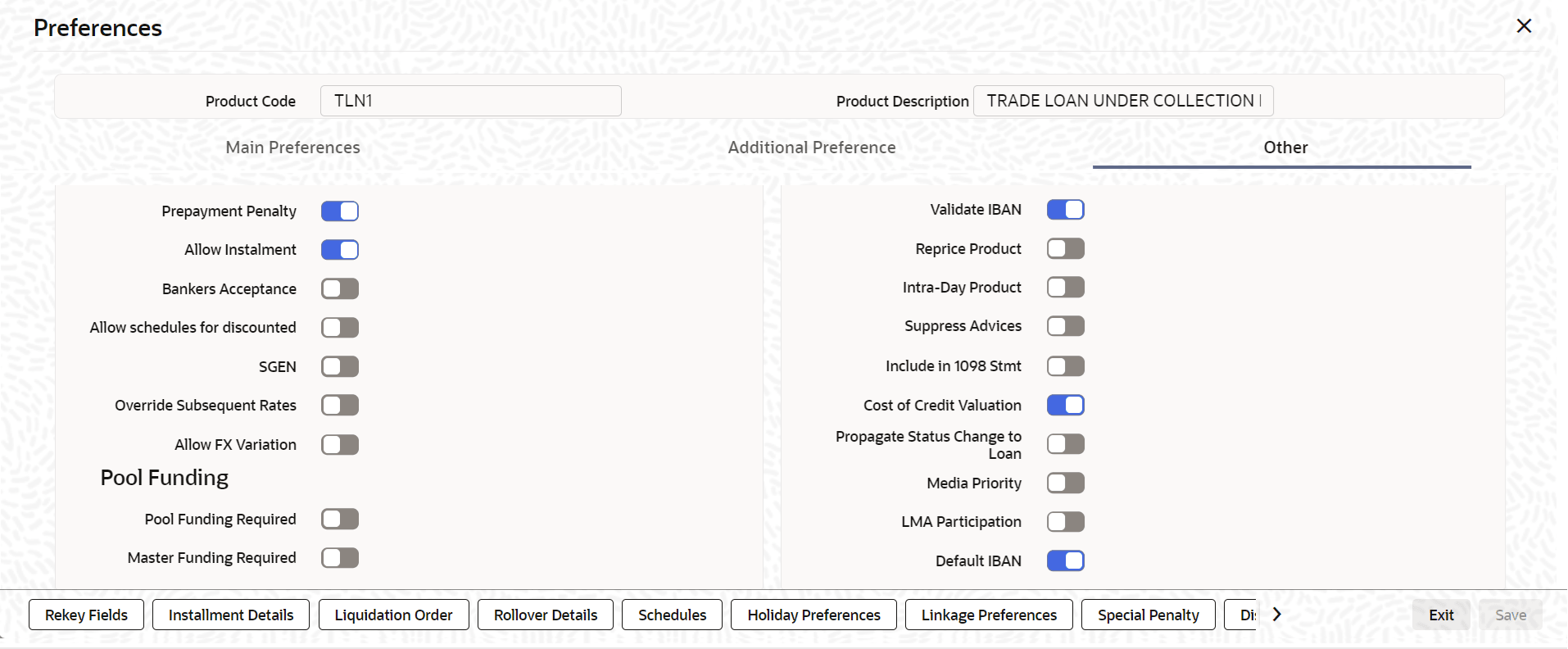
At the Preferences sub-screen in the Other tab of the bilateral loans, you can decide whether to turn on or turn off the Default IBAN toggle for each product level.
By default, this field will be turned off at the product level.
Default the IBAN in the Settlement Sub Screen During Contract CreationExample
You have enabled the Default IBAN toggle in the OLDPRMNT preferences screen. When using the Loans and Commitment Contract Input screen (OLDTRONL) to create a contract, the Settlement sub-screen will automatically populate the settlement account (Dr) with IBAN on line 1 of the ordering customer for the PRINCIPAL Component.
When there are multiple settlement accounts in the split settlement details for each account, the IBAN will be entered into the ordering customer 1 field.
If the settlement account (Dr) is changed to GL, the system will alert to the user with the message, “OL- IBAN041 -Settlement Account is changed to GL for the PRINCIPAL component”.
Default the IBAN in the Settlement sub screen during Value Dated AmendmentExample
You have enabled the Default IBAN toggle in the OLDPRMNT preferences screen. When you amend in the Loans and Commitment Value Dated Amendment screen (OLDVAMND), the Settlement sub-screen will automatically populate the settlement account (Dr) with IBAN on line 1 of the ordering customer for the PRINCIPAL_INCR Component.
When there are multiple settlement accounts in the split settlement details for each account, the IBAN will be entered into the ordering customer 1 field.
If the settlement account (Dr) is changed to GL, the system will alert the user with the message, “OL- IBAN041 -Settlement Account is changed to GL for the PRINCIPAL_INCR component”.
Default the IBAN in the Settlement sub screen during Roll OverExample
You have enabled the Default IBAN toggle in the OLDPRMNT preference screen. During the Rollover of the contract in the Loans and Commitment Contract screen (OLDTRONL), the Settlement sub-screen will automatically populate the settlement account (Dr) with IBAN on line 1 of the ordering customer for the PRINCIPAL_ADDL Component.
When there are multiple settlement accounts in the split settlement details for each account, the IBAN will be entered into the ordering customer 1 field.
If the settlement account (Dr) is changed to GL, the system will alert the user with the message, “OL- IBAN041 -Settlement Account is changed to GL for the PRINCIPAL_ADDL component”.