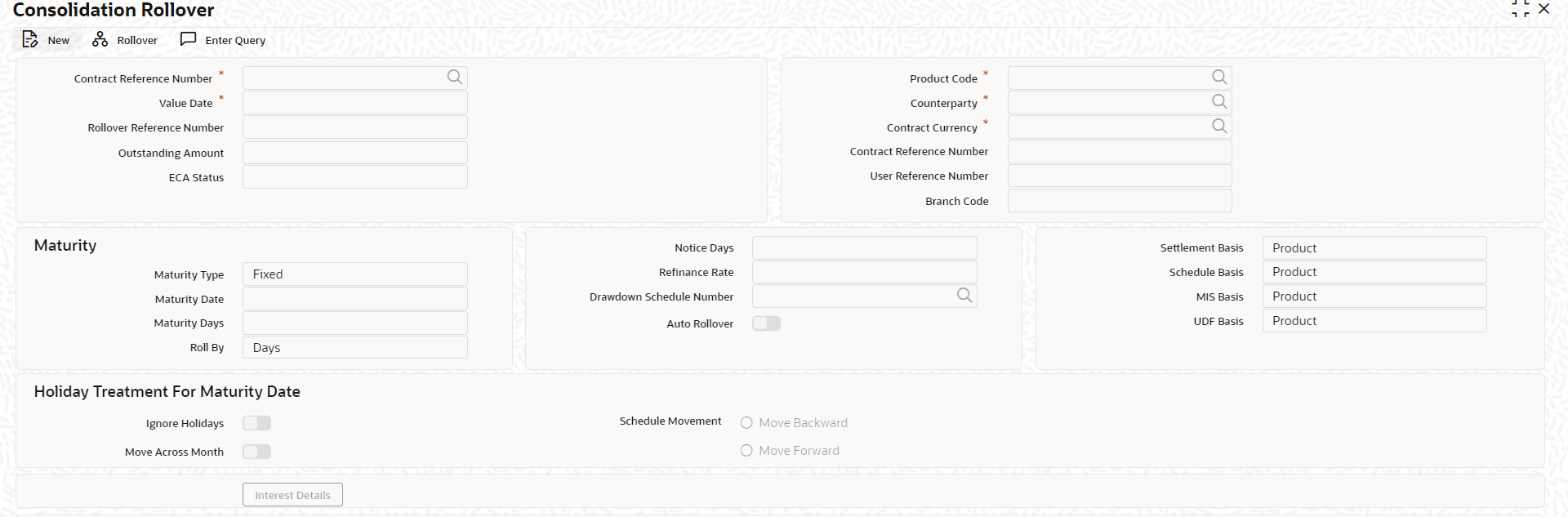
| Maturity Details |
You can indicate whether the consolidated contract has a fixed maturity date, or matures at call or notice. For contracts maturing at notice, you can indicate the applicable notice days.
( Note: For fixed maturity type contracts, you can specify the maturity date. For fixed maturity type contracts, you can specify the number of days to be added to the value date to arrive at the maturity date. You can select all the future dated maturity contracts greater than or equal to the value date. That is you can select future maturity contracts along with the matured contracts.
For the future date maturing contracts, the system liquidates the interest amount accrued till date and contract gets liquidated. Based on the amount settled till date, the interest amount is settled and future date schedules are deleted. In addition, ROLL event is fired and accounting entries are passed for ROLL event for different maturity contracts.)
|
| Schedule Basis |
You can indicate whether the repayment schedules for the consolidated contract must be defaulted from the loan product or from the driver contract. |
| The Mode of Rollover |
You can indicate whether the rollover consolidation must be initiated automatically for the selected contracts. The mode of rollover also depends on whether the mode of liquidation of the loan is automatic or manual. This preference can be set just as you would do for a normal rollover, as explained in previous sections. |
| Settlement Basis |
You can indicate whether settlement details for the consolidated contract must be defaulted from the loan product, or the driver contract. |
| MIS Basis |
You can indicate whether MIS details for the consolidated contract must be defaulted from the loan product, or the driver contract, |
| UDF Basis |
You can indicate whether user-defined fields for the consolidated contract must be defaulted from the loan product, or the driver contract. |
| Refinance Rate |
You must indicate the refinance rate for the consolidated contract |
| Holiday Treatment |
You can indicate whether the system must check for maturity dates of the consolidated contract falling on holidays |
| Interest Components for the Consolidated Contract |
You can define the interest components to be applicable for the consolidated contract.
The interest rate can be defaulted from either the loan product, or the driver contract, or a special rate can be entered. If a special rate is to be entered, you can specify the required rate in the Rate field.
|
| Consolidation Preferences for Driver Contracts |
As part of the preferences for the consolidation contract, you can identify contracts from which information such as settlement details, schedules, MIS details and so on, can be defaulted. These contracts are called driver contracts. You can select the contracts to be used as driver contracts, in the Participant Ref No field.
You must specify the following details for the driver contracts:
- How the rolled over amount is reckoned. This could be just the outstanding principal, or outstanding principal together with interest.
- Whether charges are applicable for the consolidated contract.
- Whether old schedules for the contracts getting consolidated, must be liquidated
- Whether a special rollover amount is applicable, and how the special amount is to be considered. This preference can be set just as for a normal rollover, as explained in previous sections in this topic.
|