2.4.2 Specifying Diary Events for a Contract

For a loan contract, you can specify diary events to be processed. A diary event signifies occurrences (other than accounting entries being passed) in the life cycle of a contract, at which appropriate messages need to be generated.

The details for processing diary events are defined in the Diary Event Maintenance, where the appropriate message types, formats, tags, and user-defined fields are maintained. When you maintain products for borrower contracts, you also associate the diary events to be applicable to contracts using the products.

To specify the details of processing diary events for a borrower contract, you can use the Contract Diary Event screen.
Specify the User ID and Password, and login to Homepage.
  1. On the Homepage, Type OLDDRYET and click next arrow.
    The Contract Diary Event screen is displayed.
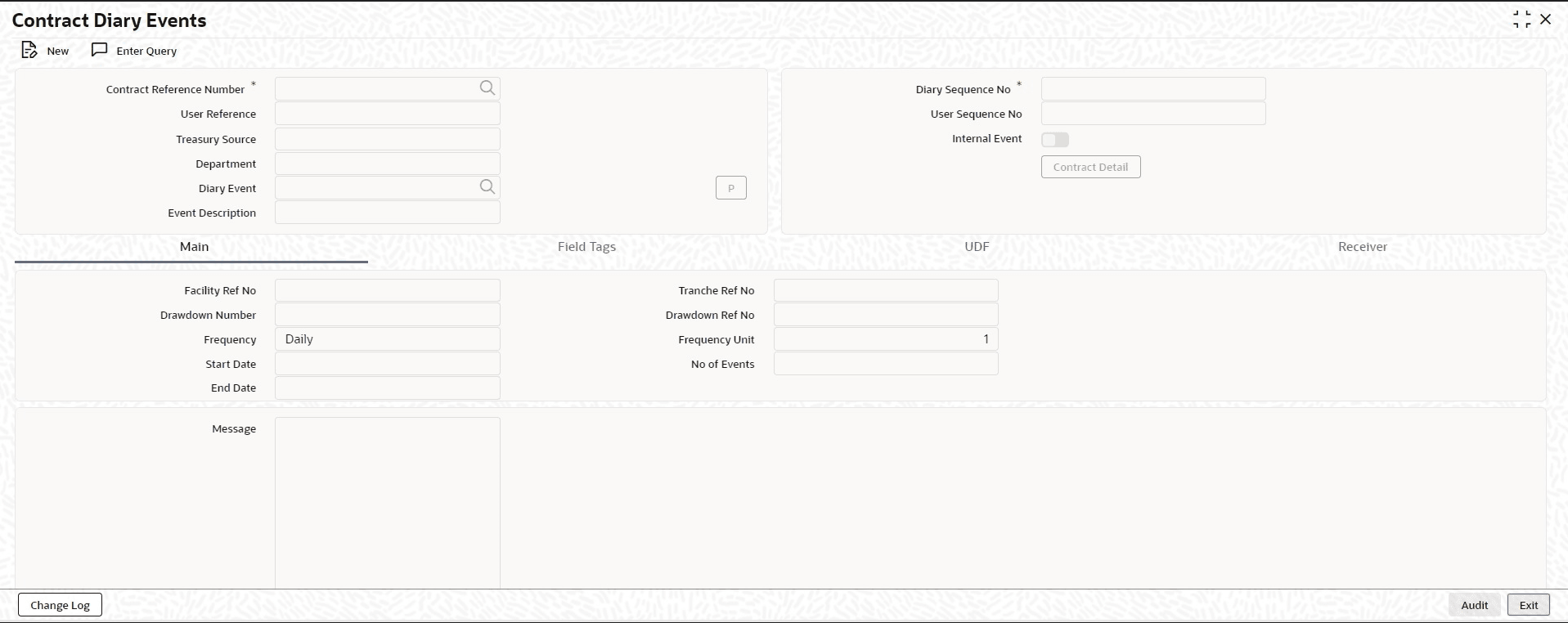
    Figure 2-5 Contract Diary Event


  2. In this screen, you must select the reference number of the contract for which you want to define events. The details of the selected contract appear on the screen. You must also indicate the code of the event which you want to be processed for the contract, in the Diary Event field. The option list in this field consists of diary events defined for the product that the selected contract uses. If you select an internal event, the box Internal Event is selected.

    Note:

    • Amendment of field tags, narrative and UDF values are blocked in the Contract Diary Event screen if diary message is generated for one of the effective dates under the diary sequence number.
    • Amendment is allowed in the Contract Diary Event screen for the field tags, narrative and UDFs until diary message is not generated for the diary sequence number. The changes are updated to the Contract Diary Event screen for all the diary sub sequence numbers associated with the contract reference number and diary sequence number.
    This topic contains following sub-topics: