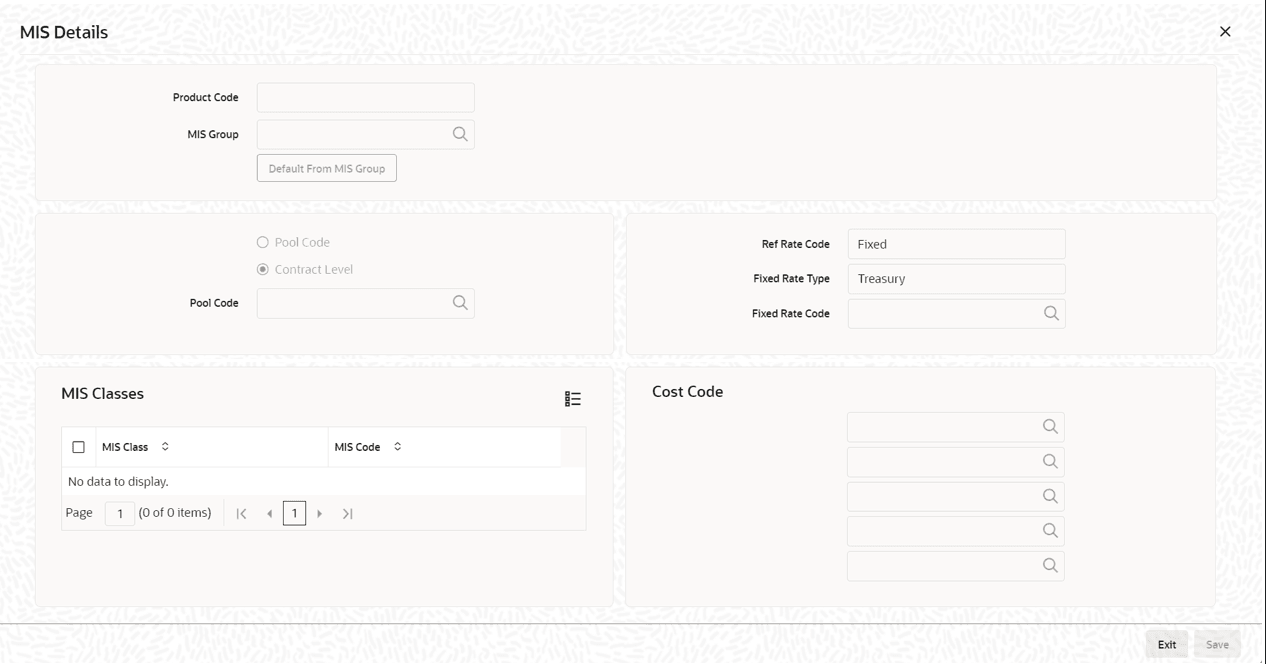
You can link a product to an MIS Group. (If you do not want to link a product
to an MIS Group, you can define the individual entities under which the product
should be reviewed). If you link the product to an MIS Group, the entities
defined for the group is displayed; you can change these entities. For a
product, only the transaction type of MIS Class applies. The specific MIS entity
(in the form of an MIS Code) is picked up, by default, only if you have defined
them for the group. If not, you have to indicate the appropriate MIS code for
each applicable MIS class.
If an MIS Group is linked, you can indicate whether
the linkage with the group should always be maintained. If so, any change
done to the MIS Group is automatically be applied to the product. If not,
the entities defaulted for the product is continued even if they are changed
subsequently for the group.
The details defined for the product is picked
up for the contracts processed under it.
The Pool Code to which the product
belongs should be defined.
Note:
You need to maintain
Ref Rate
Code,
Fixed Rate Type,
Fixed Rate Code in
Bilateral Loans
Product Definition- MIS screen and the same rate codes are
defaulted to Loan and Commitment-Contract Input -MIS screen. Based on these
rates,
Refinance Rate is fetched from the
Treasury Floating Rate Maintenance
screen.
Identifying the Operations MIS Group
While
performing revaluation you have apportion the profits between the treasury and
the respective Operations department in your bank. This internal apportioning of
profits requires an Operations MIS Group to be specified at the product
level.
For more information, refer to the MIS and Core Services User
Manuals.