8.1 Creating Questionnaire Process Linkage

This topic provides systematic instructions about the procedure to create a questionnaire process linkage record.

The Create Questionnaire Process Linkage screen allows you to link the questionnaire created in Create Questionnaire Details screen with a business process.
  1. From Home screen, select Credit Facilities. Under Credit Facilities, select Maintenance.
  2. Under Maintenance, select Questionnaire Process Linkage. Under Questionnaire Process Linkage, select Create Questionnaire Process Linkage.
    The Create Questionnaire Process Linkage screen is displayed.

    Figure 8-1 Create Questionnaire Process Linkage
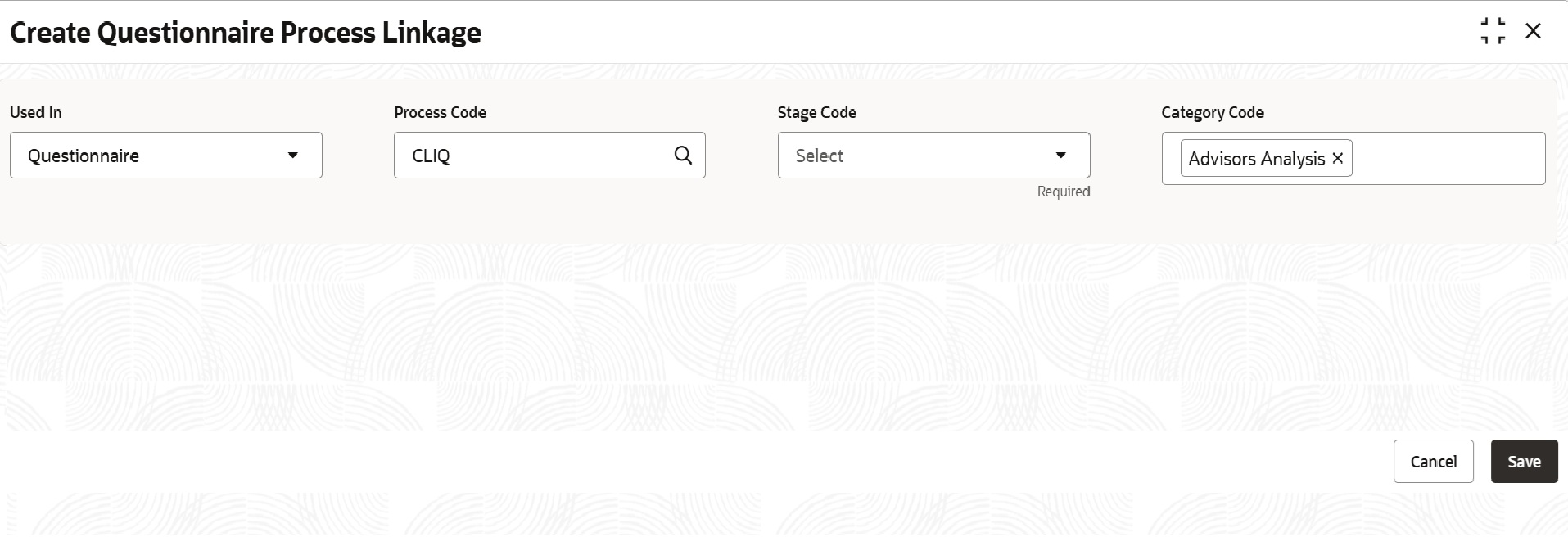


  3. Specify the questionnaire process linkage details based on description in the following table.

    Table 8-1 Create Questionnaire Process Linkage - Field Description

    Field Description
    Process Code Select the Process Code for linking the questionnaire with a particular process.
    Stage Code Select the Stage Code for linking the questionnaire with a particular stage. Stage codes are listed in drop down based on the selected process code.
    Category Code Search and select the required Category Code.
  4. Click Save.
    Questionnaire will be linked to the specified process and stage upon authorization.