5.2.1 Borrowing Base Computation
This topic provides systematic instructions about borrowing base computation.
- Click Next in the previous data segment to proceed with
the next data segment, after successfully capturing the data.The Borrowing Base Computation screen displays.
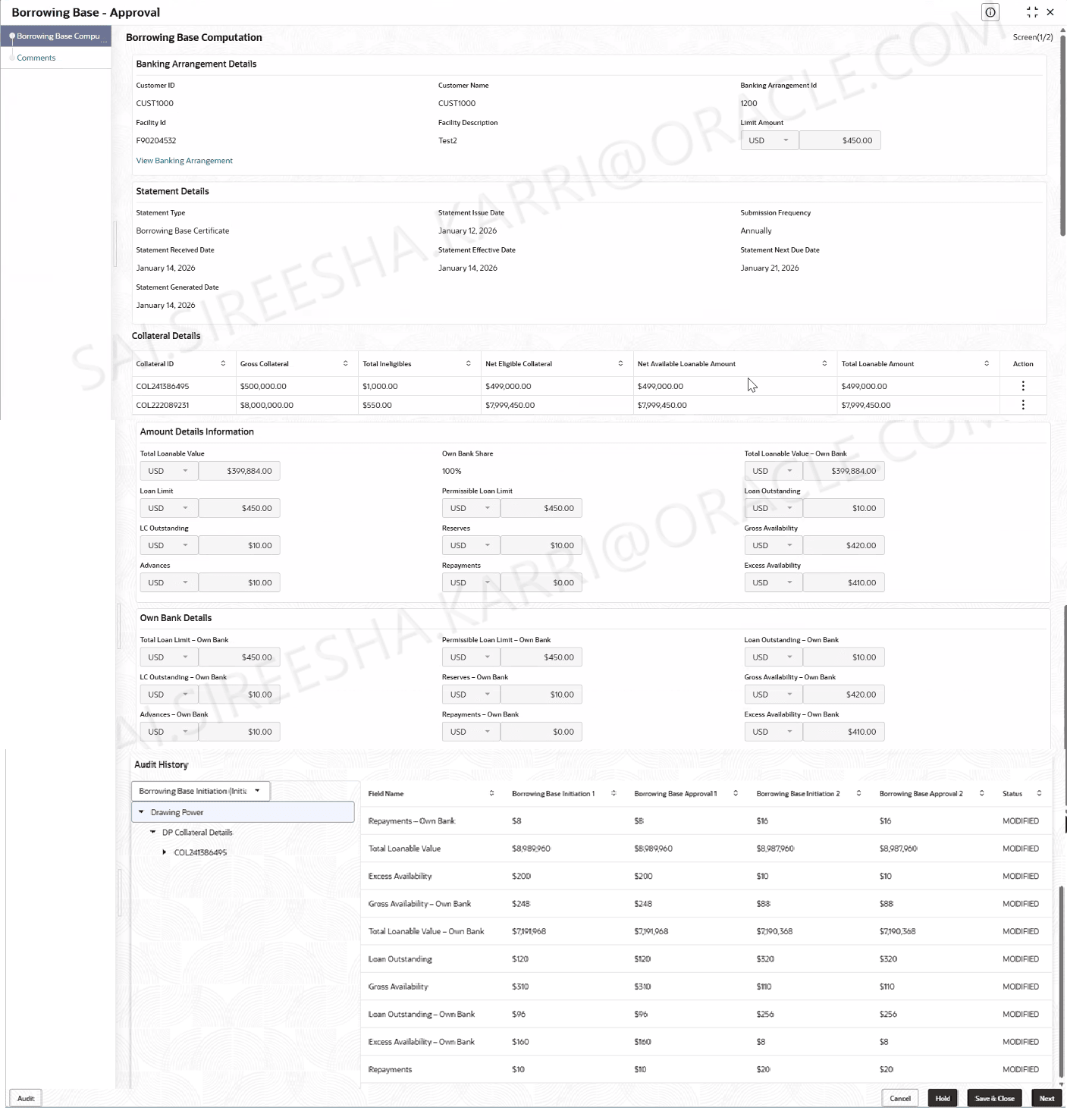
Figure 5-7 Borrowing Base Computation - Approval
For more information on fields, refer to the field description table below:Table 5-4 Borrowing Base Computation
Field Description Banking Arrangements Details This section displays the banking arrangement details. Customer ID Displays the customer ID. Customer Name Displays the customer name. Banking Arrangement ID Displays the banking arrangement ID. Facility ID Displays the facility ID. Facility Description Displays the facility description. Limit Amount Displays the limit amount. Statement Details This section displays the statement details. Statement Type Displays the statement type. Statement Issue Date Select the statement issue date. Submission Frequency Displays the submission frequency. Statement Received Date Select the statement received date. Note: The statement received date can be the past date.
Statement Effective Date Displays the statement effective date. Statement Next Due Date Displays the statement next due date. It ca be calculated as Statement Issue Date + Frequency. Statement Generated Date Displays the statement generated date. Collateral Details This section displays the collateral details. Collateral ID Displays the collateral ID. Gross Collateral Collateral Valuation Amount to be displayed from perfection module when collateral is populated here for the first time. User editable after that. Total Ineligibles Displays the total ineligible amount. Net Eligible Collateral Displays the net eligible collateral. Calculated as 'Total Collateral Amount' - 'Total Ineligible Amount'. Net Available Lonable Amount Displays the net available lonable amount. Total Lonable Amount Displays the total lonable amount. Amount Details Information This section displays the amount details information. Total Lonable Value Displays the total lonable value. Own Bank Share Displays the own bank share percentage. Total Lonable Value - Own Bank Displays the total lonable value. It can be calculated as Total Loanable Amount * Own Bank share Loan Limit Displays the loan limit amount. Permissible Loan Limit Displays the permissible loan limit amount. Loan Outstanding Displays the loan outstanding amount. LC Outstanding Displays the LC Outstanding amount. Reserves Displays the amount to be input by the user for the selected collateral. Gross Availability Displays the gross availability. Advances Displays the amount for the selected collateral. Repayments Displays the repayments. Excess Availability Displays the excess availability. It can be calculated as Gross Availability - Advances + Repayments Own Bank Details This section displays the own bank details. Total Loan Limit - Own Bank Displays the total loan limit. It can be calculated as calculated as Loan Limit * Own Bank share. Permissible Loan Limit - Own Bank Displays the permissible loan limit. It can be calculated as the lower of 'Total Loanable Amount- Own Bank share' and 'Loan Limit- Own Bank share'. Loan Outstanding - Own Bank Displays the loan outstanding amount. It can be calculated as Loan Outstanding * Own Bank share. LC Outstanding - Own Bank Displays the LC Outstanding amount. It can be calculated as LC Outstanding * Own Bank share. Reserves - Own Bank Displays the amount to be input by the user for the selected collateral. Gross Availability - Own Bank Displays the gross availability. It can be calculated as Gross Availability * Own Bank Share. Advances - Own Bank Displays the advances of the bank. Repayments - Own Bank Displays the repayments of the bank. Excess Availability - Own Bank Displays the excess availability of the bank. Audit History This section tracks povides complete log of all changes in borrowing base computations during initiation and approval stages.
Parent topic: Borrowing Base Approval