3 Create Banking Arrangements
This topic provides systematic instructions about Create banking arrangements by updating various details.
- On Home screen, select
Borrowing Base. Under
Borrowing Base, select Create BBC Banking
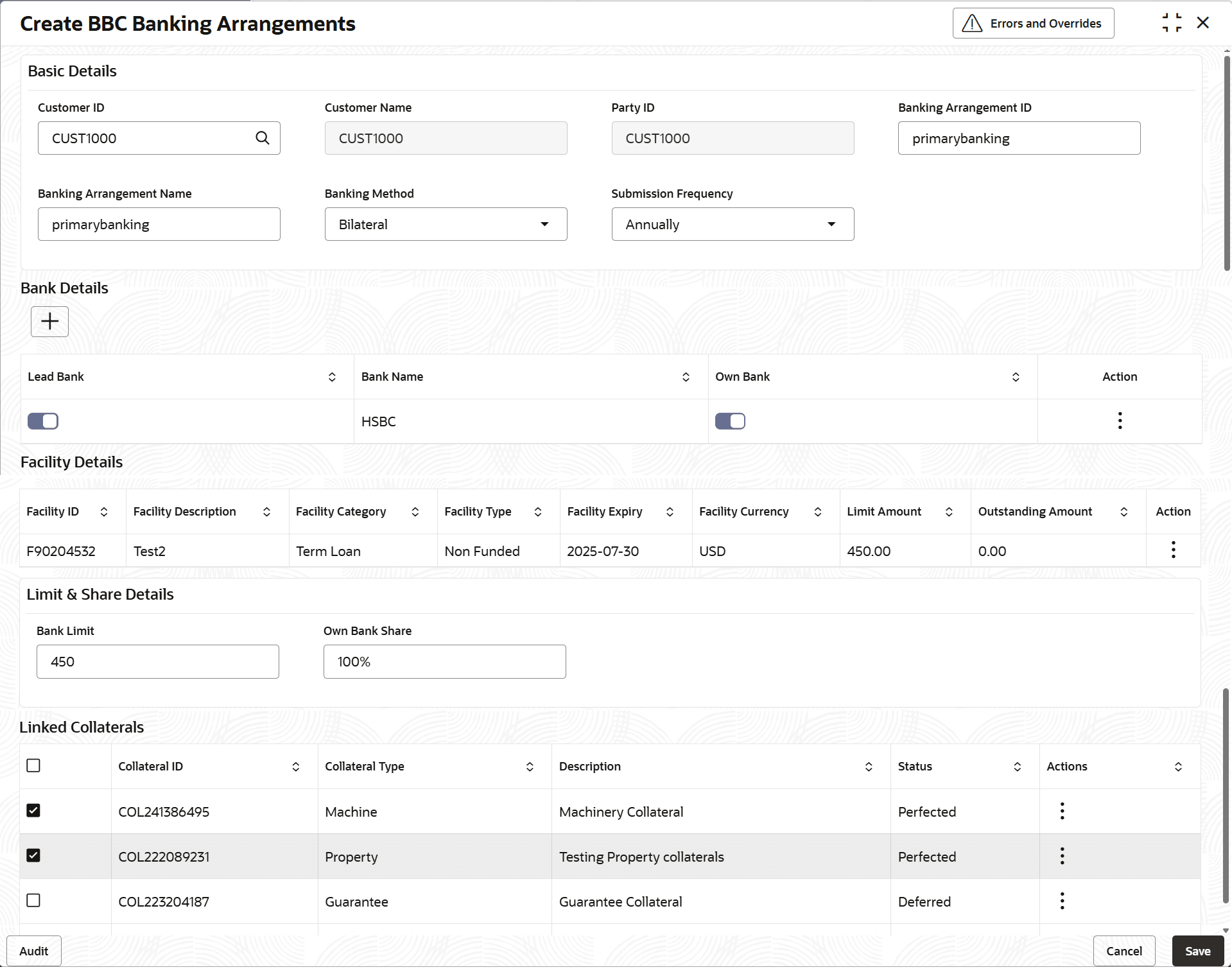
Arrangements. The Create BBC Banking Arrangements screen displays.
Figure 3-1 Create BBC Banking Arrangements
For more information on fields, refer to the field description table below.Table 3-1 Create BBC Banking Arrangements
Field Description Customer ID Specify the customer ID. Customer Name Specify the customer name. Party ID Specify the party ID. Banking Arrangements ID Specify the banking arrangements ID. Banking Arrangements Name Specify the banking arrangements name. Banking Method Select the banking method from the drop-down list. The available options are: - Bilateral
- Syndicated
Submission Frequency Select the submission frequency from the drop-down list. The available options are: - Monthly
- Quarterly
- Semi-Anually
- Anually
Bank Details This section displays the bank details. Lead Bank Enable the toggle if the selected bank is the lead bank for the arrangement. Bank Name Specify the bank name.: Own Bank Enable the toggle if the selected bank is the own bank. Action Enable this toggle to indicate that modification to the ‘Bank Haircut Value’ is allowed. - View: Click to view the bank details.
- Edit: Click to edit the bank details.
Facility Details This section displays the facility details. Facility ID Specify the facility ID. Facility Description Specify the facility description. Facility Category Specify the facility category. Facility Type Select the facility type. Facility Expiry Specify the facility expiry. Facility Currency Specify the facility currency. Limit Amount Specify the limit amount. Outstanding Amount Specify the outstanding amount. Bank Limit Specify the bank limit. Own Bank Share Specify the own bank share. Linked Collaterals This section displays the linked collaterals. Collateral ID Specify the collateral ID. Collateral Type Specify the collateral type. Description Specify the collateral description. Status Specify the status of the collateral. - On Action field, click Setup
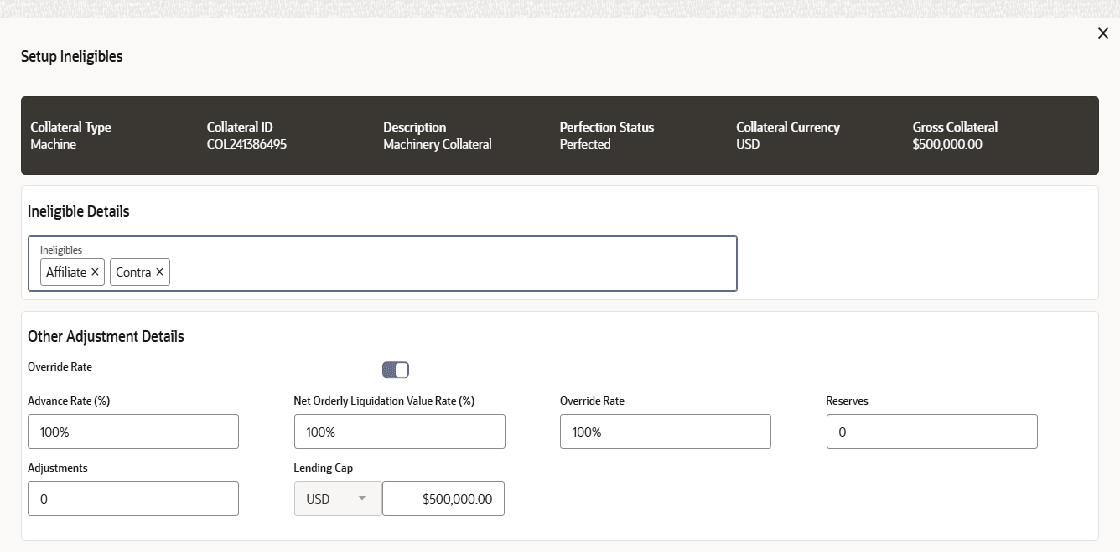
Ineligibles.The Setup Ineligibles screen displays.For more information on fields, refer to the field description table below.
Table 3-2 Setup Ineligibles
Field Description Collateral Details Displays the collateral details. Collateral Type Displays the collateral type. Collateral ID Displays the collateral ID. Description Displays the description of collateral. Perfection Status Displays the perfection status. Collateral Currency Displasy the collateral currency. Gross Collateral Value Displays the gross collateral value. Ineligible Details Select the ineligible details Ineligible Type Displays the ineligible type from the list. The available list of types: . - Affiliate
- Contra
- Foreign
- Other
- Past due
- Percent past due rule
Ineligible Amount Displays the ineligible amount. Other Adjustment Details This section displays the other adjustment details. Override Rate Enable the toggle to override the calculated rate. Override Rule(%) Specify the percentage to override the calculated area. Advance Rate(%) Specify the advance rate (%). Net Orderly Liquidation Value Rate(%) Specify the liquidation value rate(%). Override Rate Specify the override rate. Note: This field displays if override rate toggle is enabled.
Reserves Specify the amount set to reserve against the collateral. Adjustments Specify the additional adjustments of the collateral. Lending Cap Displays the maximum loan amount allowed against the collateral.