1.7 Device Registration and Push Registration Functionality
This topic provides information on Device Registration and Push Registration Functionality.
- Device registration is used for alternate login registrations. Apple does not allow any unique identifier or device UUID to be used. Device is identified by a unique ID generated on application life cycle when the application is installed. New device Id will be generated after is re-installed or alternate logic is de-registered.
- Push registration is used for registering Push tokens for delivering push. These tokens are generated by Apple and registered in OBDX server. These tokens are specific to development and production environment. The configurations are mentioned in the system configuration section.
- Bank can allow single or multiple devices to be registered for push and alternate login.
- Consider a case when a single device is allowed to be registered for alternate login, then only one device registration will be active. If user tries to register another device with same username for alternate login, then the previous registration of other older devices will be removed.
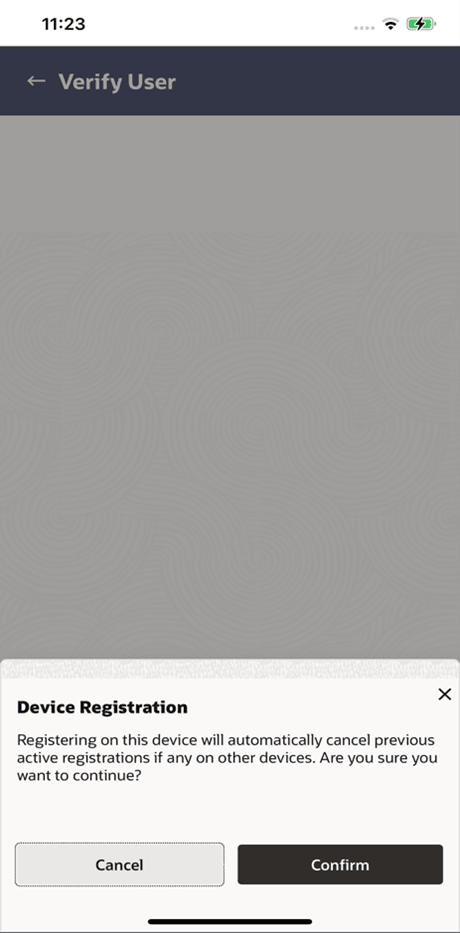
- While user registers his second device or same device again (by re-installing the application), a popup will appear to notify the same.
- If user confirms, then the current device will be registered, and all previous
registrations will be removed.
If user cancel, the process is exited.
- User will get an error message if he/she tries to login using PIN/PATTERN/FACE on the de-registered or old devices.
- Device registration count is controlled by ALLOWED_DEVICE_COUNT to
any value between than 1 and 100.
- 1 will allow on one device registration.
- 100 will allow more than one device registration.
- Refer section: System Configuration on server for more details.
- Push registration count is controlled by ALLOWED_PUSH_DEVICE_COUNT
any value between 1 and -1.
- 1 will only one device to be registered for push.
- -1 will only multiple devices to be registered for push.
- Refer section: System Configuration on server for more details.
Parent topic: OBDX Servicing Application on Saas