Auto Loan Requirements
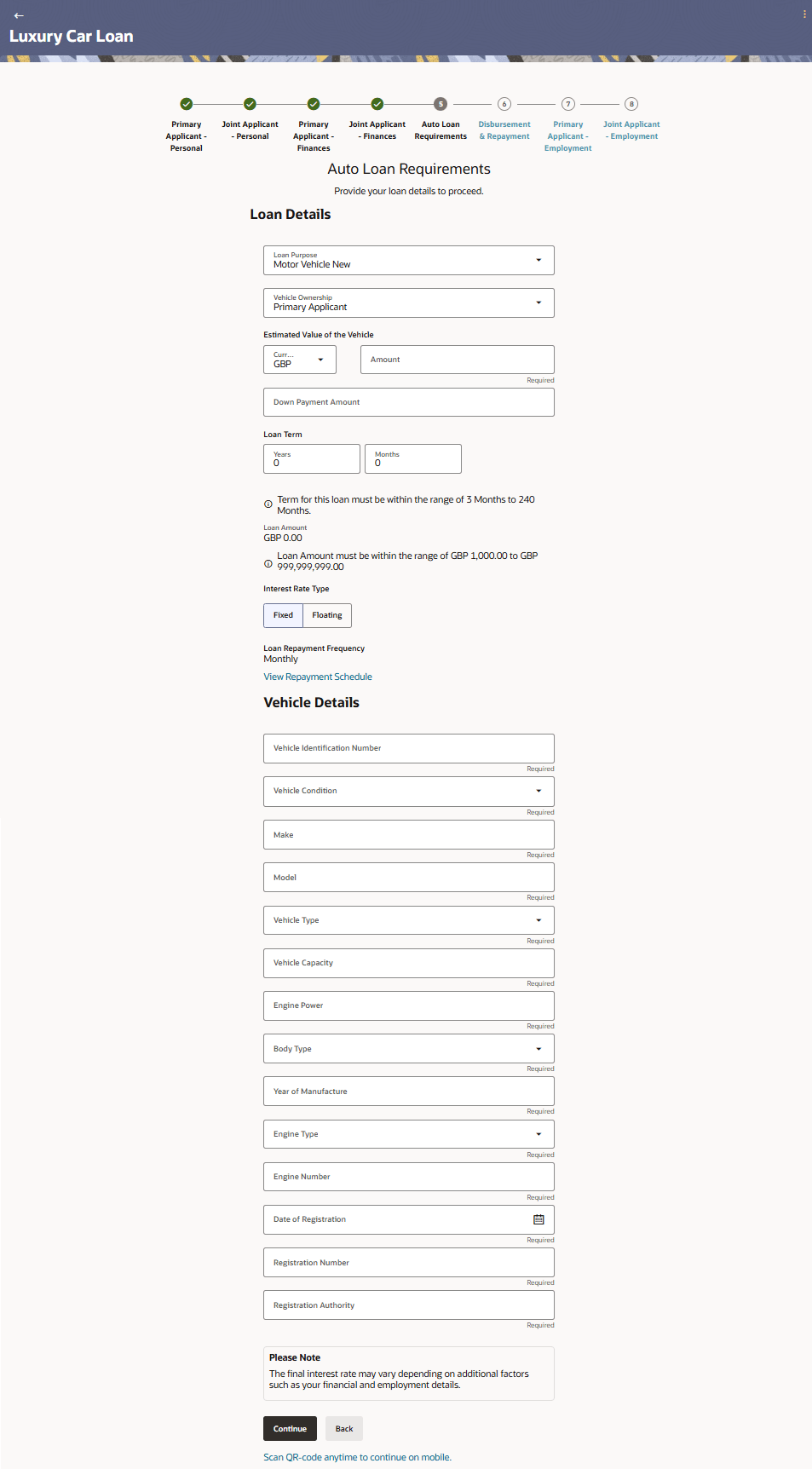
This topic describes the section of the application form where applicants provide information about the vehicle being purchased and the loan itself.
In terms of loan information, in addition to the loan term, you will also be required to define the estimated value of the vehicle, and whether you wish to make any down payment or not which will enable the system to identify the expected loan amount.
- From Financial Profile, click
Continue.The Auto Loan Requirements screen is displayed.
Note:
The fields which are marked as Required are mandatory.For more information on fields, refer to the field description table.
Table 1-14 Loan Requirements - Field Description
Field Name Description Loan Purpose The purpose for which the loan is being availed. Note: Depending on the maintenance in OBO, this field can be a drop-down or an input field.
Vehicle Ownership The owner of the vehicle for which the loan is being made. The options are:
- Primary Applicant
- Joint Applicant
- Both Applicants
Estimated Value of the Vehicle The estimated market value of the vehicle. Down payment Amount The amount, if at all, you wish to make in payment towards the purchase of the vehicle. Loan Term The tenure of the loan in terms of years, months, and days. Note:- The loan term must be within the minimum and maximum allowed range defined at the product level.
- The loan term's duration depends on the product's maintenance in OBO.
Loan Amount Displays the loan amount based on the estimated value and down payment values provided by you. Note: The loan amount, as derived on the basis of the estimated value and down payment value entered, must be within the minimum and maximum allowed range defined at the product level.
Interest Rate Type The type of interest rate to be applied on the loan i.e. fixed or floating. The options are:- Fixed – The rate of interest will be fixed if this option is selected.
- Floating – If this option is selected the interest rate applicable on the loan will vary over time.
Note: In the event that a single type of interest rate is defined for the loan product, this field will be designated as read-only, and the corresponding applicable interest rate type will be presented alongside it.
Loan Repayment Frequency Select the loan repayment frequency from the drop-down list. If only one repayment frequency is supported, this field will be read only and the value will be displayed on screen. Vehicle Identification Number (VIN) A unique code assigned to the vehicle by the manufacturer for identification and tracking purposes. Vehicle Condition Indicates the current condition of the vehicle i.e. whether it is a used vehicle or a new vehicle. Make The brand or manufacturer of the vehicle (e.g., Toyota, Honda, Tata). Model The specific model name or number of the vehicle as designated by the manufacturer. Vehicle Type Specify the category of the vehicle (e.g., Sedan, SUV, Truck, Motorcycle, Bus). Vehicle Capacity The seating or load-carrying capacity of the vehicle (e.g., number of passengers or maximum weight capacity). Engine Power The power output of the vehicle’s engine, typically measured in horsepower (HP) or kilowatts (kW). This field is applicable only if the vehicle is a passenger vehicle.
Body Type The physical structure or design of the vehicle (e.g., Hatchback, Coupe, Convertible, Pickup). Year of Manufacture The year in which the vehicle was manufactured. Distance Travelled – Unit Select the unit in which you wish to specify the distance that the vehicle has covered in it’s lifetime. This field is applicable only if the vehicle condition is used.
Distance Travelled – Distance Specify the distance covered by the vehicle in it’s lifetime. This field is applicable only if the vehicle condition is used.
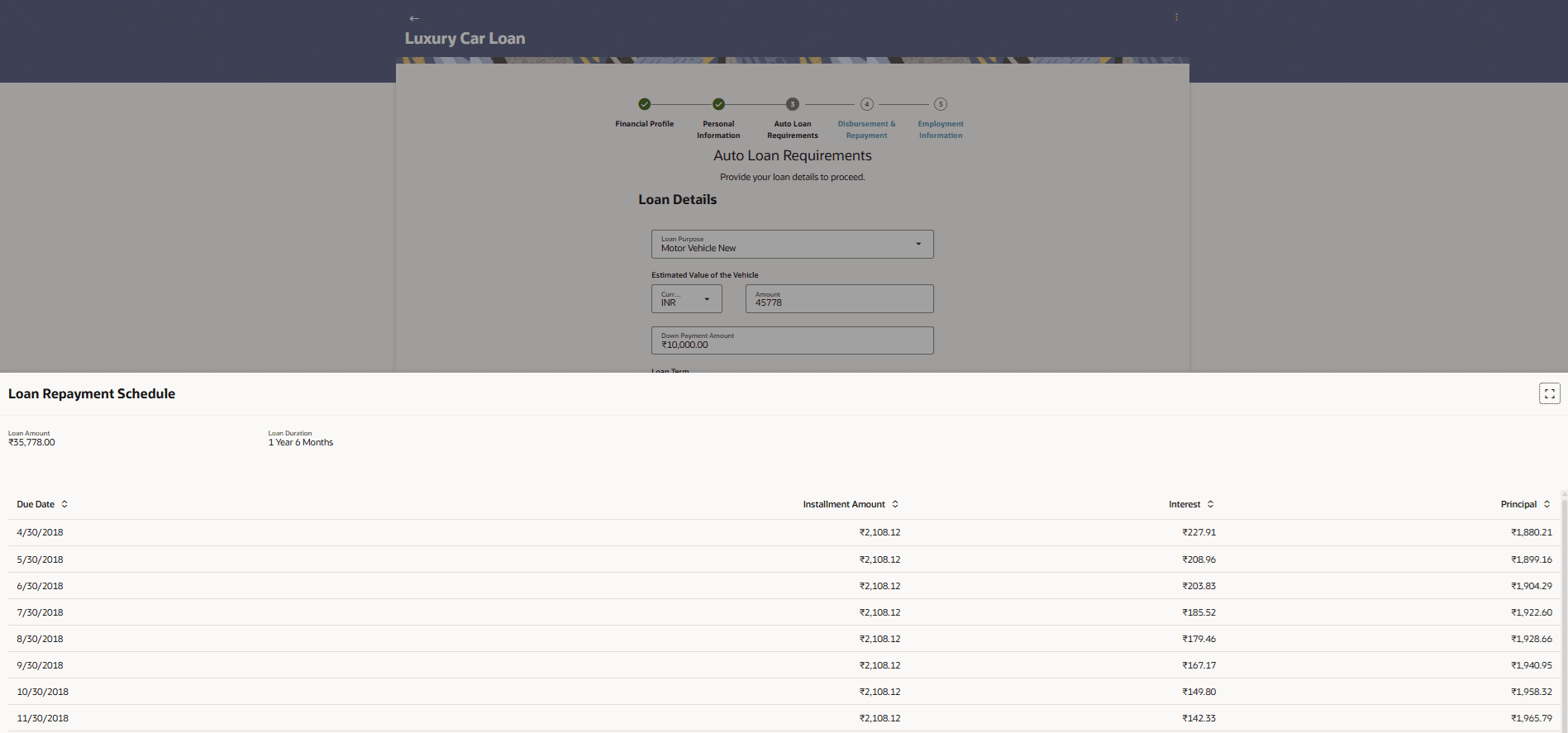
Engine Type Specify the type of engine used (e.g., Petrol, Diesel, Electric, Hybrid, CNG). Engine Number A unique identification number assigned to the vehicle’s engine by the manufacturer. Date of Registration The official date on which the vehicle was registered with the relevant transport authority. Registration Number The unique number assigned to the vehicle by the registering authority (license plate number). Registration Authority The government authority or Regional Transport Office (RTO) where the vehicle is registered. - Select the View Repayment Schedule to view the loan repayment
schedule in a detailed tabular form.
Parent topic: Auto Loan Application