1.12 General Questions
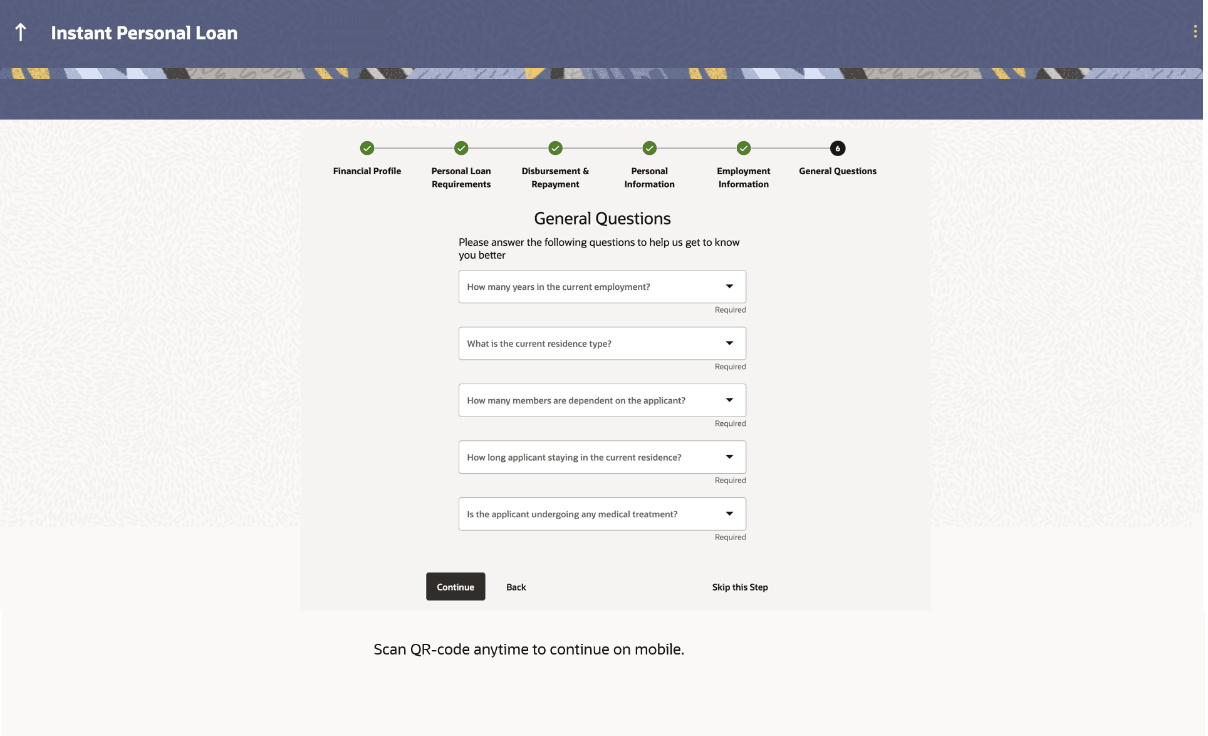
This topic describes the section of the loan application form that includes questions used by the bank for loan application assessment.
In case the applicant selects the Personal Loan product as Instant Personal Loan, then an additional section called General Questions is displayed during the application flow.
In the case of Instant Personal Loan, Straight Through Processing of the application is done.
If the applicant chooses to skip the General Questions step, the application is treated as a regular Personal Loan.
If the application is being made jointly, this section will have two sub sections in which questions specific to the primary applicant will be displayed under one section and questions specific to the joint applicant will be displayed under the other.
Note:
The fields which are marked as Required are mandatory.For more information on fields, refer to the field description table.
Table 1-19 General Questions - Field Description
| Field Name | Description |
|---|---|
| Primary Applicant | This section will be displayed only if the application is being made jointly. |
| Question | The questions configured by the bank for the instant personal loan will be listed one below the other. |
| Answer | Specify the answer to each question. |
| Joint Applicant | This section will be displayed only if the application is being made jointly. |
| Question | The questions configured by the bank for the instant personal loan will be listed one below the other. |
| Answer | Specify the answer to each question. |
- From the Question list, select the question configured by the bank for the instant personal loan.
- In the Answer field, enter an answer for the corresponding question.
- Perform one of the following actions:
- Click Continue to proceed to the next step in the application.
- Click Back to navigate back to the previous step in the application.
- Click on the Skip this Step link. This option will only be
provided, if this step is optional for the product for which the application is being
made.
The next step in the application will be displayed.
- Click on the Scan QR-code anytime to continue on mobile link to continue the application on mobile or tablet device.
- Under the kebab menu, perform any of the following actions:
- Click Save and Continue Later option to save the application.
- Click Continue on Mobile option to continue the application on a mobile device.
Parent topic: Unsecured Personal Loan Application