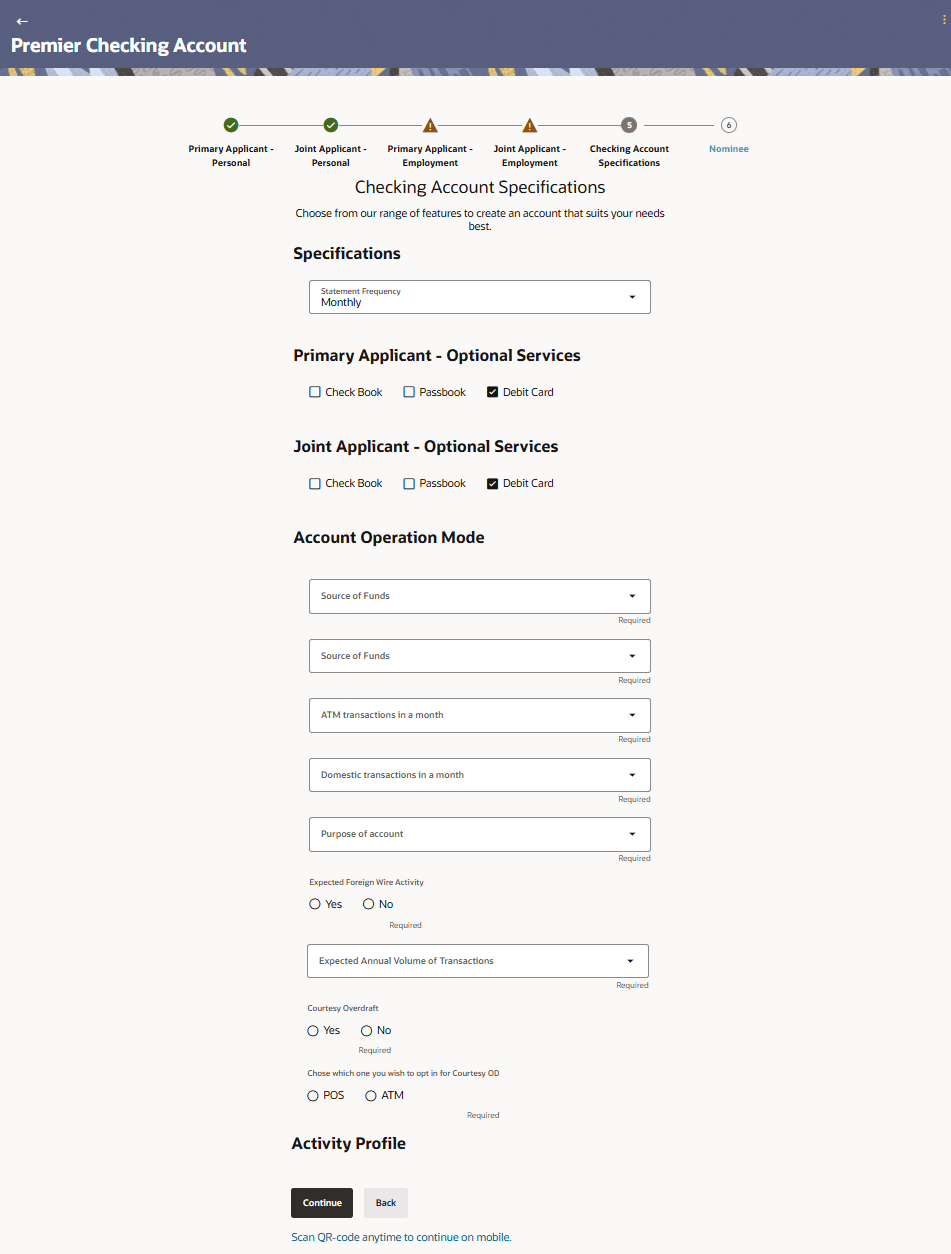
1.11 Checking Account Specifications
This topic describes the section where you can specify your service preferences.
This enables you to enhance the features of the account you are applying for. You can provide your preferences related to services you would like on your account which could include Debit Card, Passbook, Cheque Book, access to Direct Banking and Phone Banking, etc. You can also define account statement preferences such as the delivery mode and frequency. In the case of joint application forms, you can specify the optional services as preferred by each applicant separately. Additionally, if applying for a joint account, you will also be required to specify information regarding how the account is to be operated.
Figure 1-18 Checking Account Specifications
Note:
The fields which are marked as Required are mandatory.For more information on fields, refer to the field description table.
Table 1-17 Checking Account Specifications - Field Description
| Field Name | Description |
|---|---|
| Apply for Overdraft | Specify whether you want to apply for overdraft facility or not.
The options are:
This field will be displayed only if the product supports overdraft. In the case of joint application forms, this field will be disabled. The value that was selected on the kickoff page will be displayed as read only. |
| Whose financial information would you like to capture | The value selected on the kickoff page will be displayed as read
only text.
The options are:
This field will only be displayed in the case of joint application forms and if the option Yes was selected under the Apply for Overdraft? field on the kickoff page. |
| Overdraft Limit Amount | Enter the amount of overdraft limit to be requested.
This field is enabled only if the Yes option is selected in the Apply for Overdraft field. |
| Statement Frequency |
The frequency at which you would like to receive account statements. The options are:
|
| Optional Services | In case of joint application forms, there will be two sub sections to capture each applicant’s preference with regards to the optional services offered against the account. In this case the sub sections will be titled as Primary Applicant – Optional Services and Joint Applicant – Optional Services respectively. |
| Service | Each service that has been configured for the product you are applying for will be listed here. Select the check box against the service that the applicant wishes to enable on the account. |
| Activity Profile | The fields (including type of field and values, in case of dropdowns) displayed under this sub section can change based on mid-office maintenances for the product. The fields described below serve as examples of fields that can appear under this sub section. |
| Account Operation Mode | This sub section will be displayed only in the case of joint applicant application forms. |
| Mode of Operation | The available modes of operation by way of which the account will
be operated.
The options are :
|
Parent topic: Checking Account Application