1.8 Personal Information
This topic describes the section of the application form where you can provide your personal information. In case of applying jointly and the joint applicant is a new to bank customer, a similar section will be part of the form in which you can enter personal information of the joint applicant.
You can opt to upload your ID proof so as to have your information pre-populated on the basis of the ID document.
In the case of joint applications, the personal information of both applicants i.e., the primary applicant as well as the joint applicant will need to be captured.
There will be two separate sections to capture this information of each applicant, which will have headers as Primary Applicant – Personal, Joint Applicant – Personal, respectively.
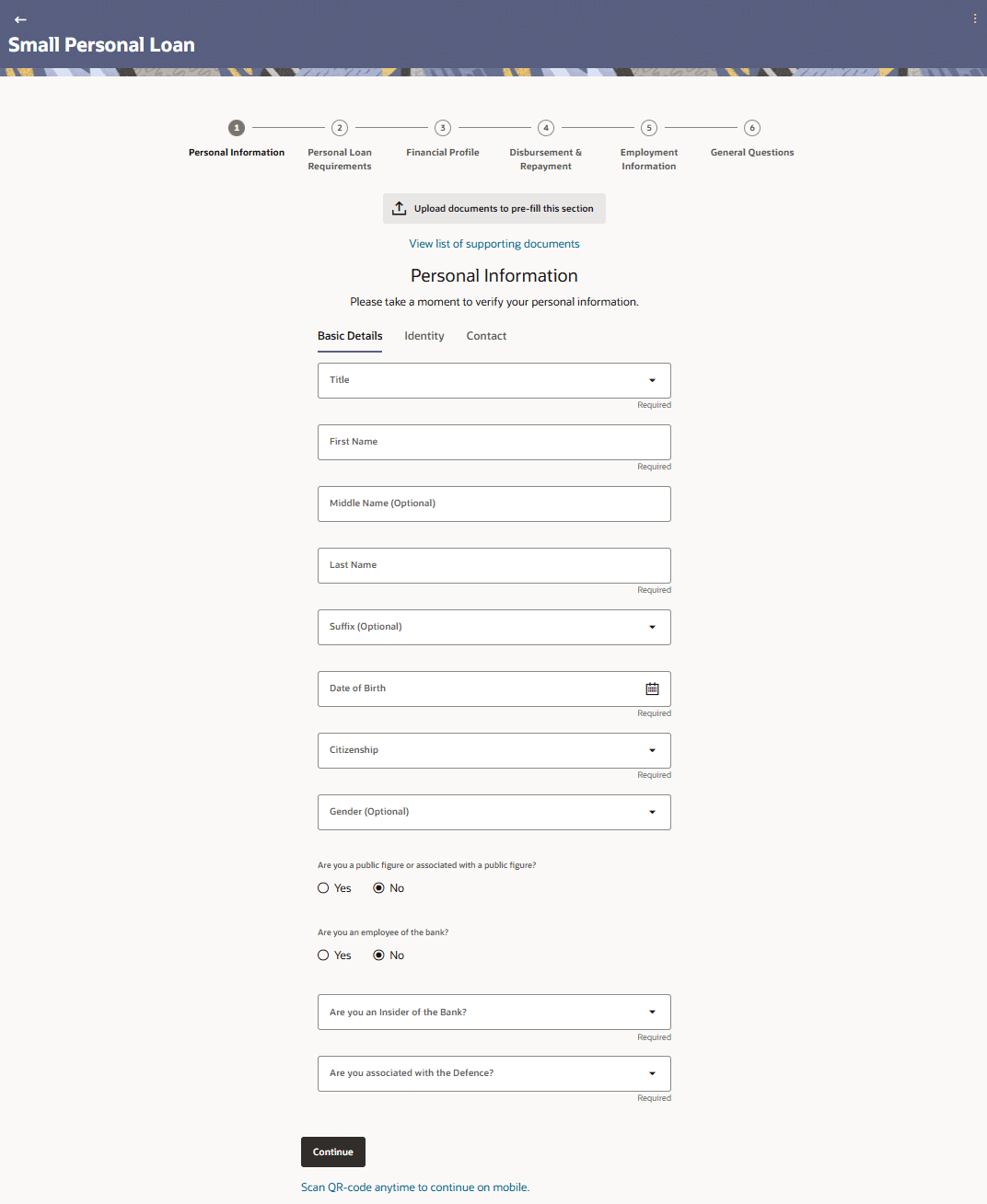
Figure 1-12 Personal Information - Basic Details
Note:
The fields which are marked as Required are mandatory.For more information on fields, refer to the field description table.
Table 1-9 Personal Information - Basic Details - Field Description
| Field Name | Description |
|---|---|
| Upload documents to prefill this section | Click this link to upload an ID proof document so as to auto fill this section with the information available in your ID proof. These documents will also serve to support your application. |
| View list of supporting documents | Click on the link to view the documents supported for this section to be prefilled with data. |
| Title | The salutation/title applicable to the applicant. Examples of salutation are Mr., Mrs., Dr. etc. |
| First Name | Specify the first name of the applicant. |
| Middle Name | Specify the middle name of the applicant, if applicable. |
| Last name | Specify the last name of the applicant. |
| Suffix | Specify the suffix of the applicant, if applicable. Examples are Jr, Sr, I, II, etc. |
| Date of Birth | Specify the date of birth of the applicant.
The system validates your date of birth against your state of residence (as identified on the basis of zip code entered in the zip code modal window) so as to identify whether you have attained age of majority as per your state specifications. The format of the date should be MM/DD/YYYY. |
| Citizenship | Specify the country of your citizenship. |
| Citizenship Status | In case you are not a citizen of the United States of America,
you are required to identify whether you are a resident alien or non-resident
alien.
The options are:
This field is displayed only if any country other than United States is selected in the “Citizenship” field. In case Non-Resident Alien is selected, an error message will be displayed stating that you will not be allowed to proceed with the application online. Only U.S. citizens or resident aliens will be able to submit online applications. |
| Gender | Select the gender of the applicant from the drop-down list.
The options are:
|
| Are you a public figure or associated with a public figure? | Specify whether you are a public figure (aka politically exposed
person) or related to a public figure.
The options are:
|
| Are you an employee of the bank? | This field captures the applicant's relationship with the bank
in terms of employment i.e. whether the applicant is an employee of the bank or
not. This information is captured to handle possible conflicts of interest and to
provide special employee benefits, if applicable.
The options
are:
|
| Are you an insider of the bank? | Specify whether you are an insider of the bank or related to an
insider of the bank i.e. whether you or a relative hold a position of importance
in the bank such as director, senior management, major shareholder, etc.
The options are:
|
| Applicant’s Relationship to Insider | Specify your relationship with the insider i.e. select the value
that describes how you are related to the insider. E.g. If the insider of the bank
is your father, select the value ‘Daughter’ or ‘Son’ as required.
This field will be displayed only if you have selected the option, I am related to an insider from the Are you an insider of the bank? List. |
| Insider’s Relationship to Applicant | Specify how the insider is related to you. E.g. If the insider of
the bank is your father, select the value ‘Father’.
This field will be displayed only if you have selected the option, I am related to an insider from the Are you an insider of the bank? List. |
| Insider’s Banking Customer ID | Specify the customer ID/party ID of the Bank employee.
This field will be displayed if the option I am related to an Insider selected in the Are you an insider of the bank? list. |
| Role | Specify the role at which you or your relation is employed with
the bank.
This field will be displayed if the options Yes or I am related to an Insider is selected from the Are you an insider of the Bank? list. |
| Are you associated with the Defense? | Specify whether you are a serving defense officer or a dependent
of a serving defense officer.
The options are:
|
| Applicant's Relationship to Defense Officer | Specify your relationship to the serving defense officer. E.g.
If the defense officer is your father, select the value ‘Daughter’ or ‘Son’ as
required.
This field will be displayed if the option I am a defense officer dependent is selected in the Are you associated with the Defense? list. |
| Defense Officer’s Relationship to Applicant | Specify how the defense officer is related to you. E.g. If the
defense officer is your father, select the value ‘Father’.
This field will be displayed if the option I am a defense officer dependent is selected in the Are you associated with the Defense? list. |
| Customer ID of Defense Officer | Specify the customer ID (as registered with the bank) of the
related serving defense officer.
This field will be displayed if the option I am a defense officer dependent is selected in the Are you associated with the Defense? list. |
| Service Branch | Select your branch of service (in case you are a defense officer)
or the branch of service of the Defense officer of whom you are a dependent.
This field will be displayed if you have selected the option I am a defense officer in the Are you associated with the Defense? list. |
| Rank | Rank of the defense officer.
This field will be displayed if you have selected the option I am a defense officer in the Are you associated with the Defense? list. |
| Eligible for Military Lending Act? | Specify whether you are serving active military duty
currently.
The options are:
This field will be displayed if you have selected the option I am a defense officer in the Are you associated with the Defense? list. |
| Unit Name | Specify the name of the unit or department in which you are
serving as a defense officer.
This field will be displayed if you have selected the option I am a defense officer in the Are you associated with the Defense? list. |
| Active Duty Start Date | The date on which you start active duty.
This field will be displayed if you have selected the option I am a defense officer in the Are you associated with the Defense? list. |
| Active Duty End Date | The date on which your active duty ends.
This is an optional field. This field will be displayed if you have selected the option I am a defense officer in the Are you associated with the Defense? list. |
| Notification Date | The date on which you have been notified of being eligible for
the military lending act.
This field will be displayed if you have selected the option I am a defense officer in the Are you associated with the Defense? list. |
Note:
The bank might design certain loan products specifically for women. For such products, if the applicant selects a value under the field Gender that is other than Female, the system will display an error message and the applicant will not be able to proceed with the application form.- Click Continue to move to next sub-section.The Identity sub-section appears.
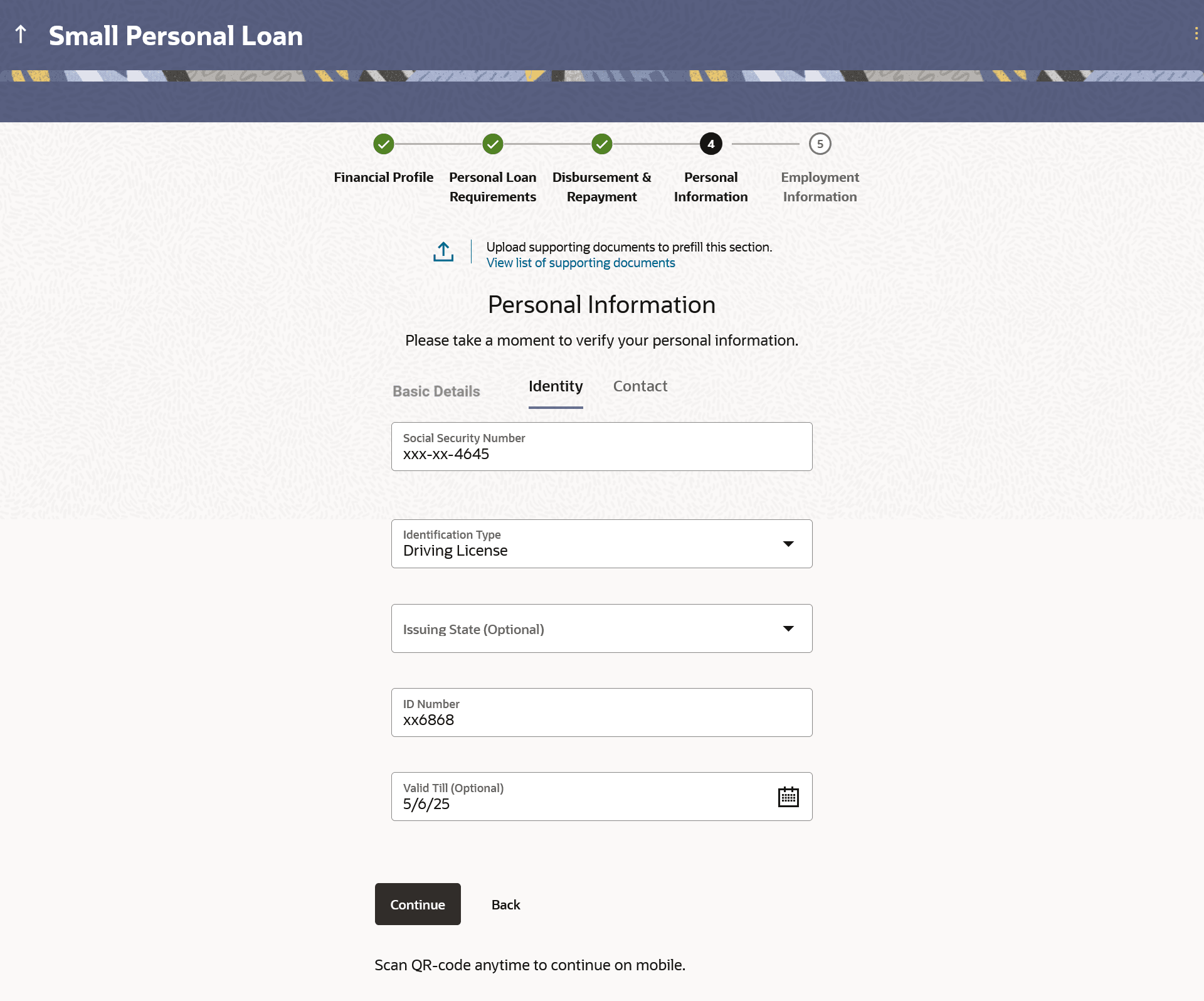
Figure 1-13 Personal Information - Identity
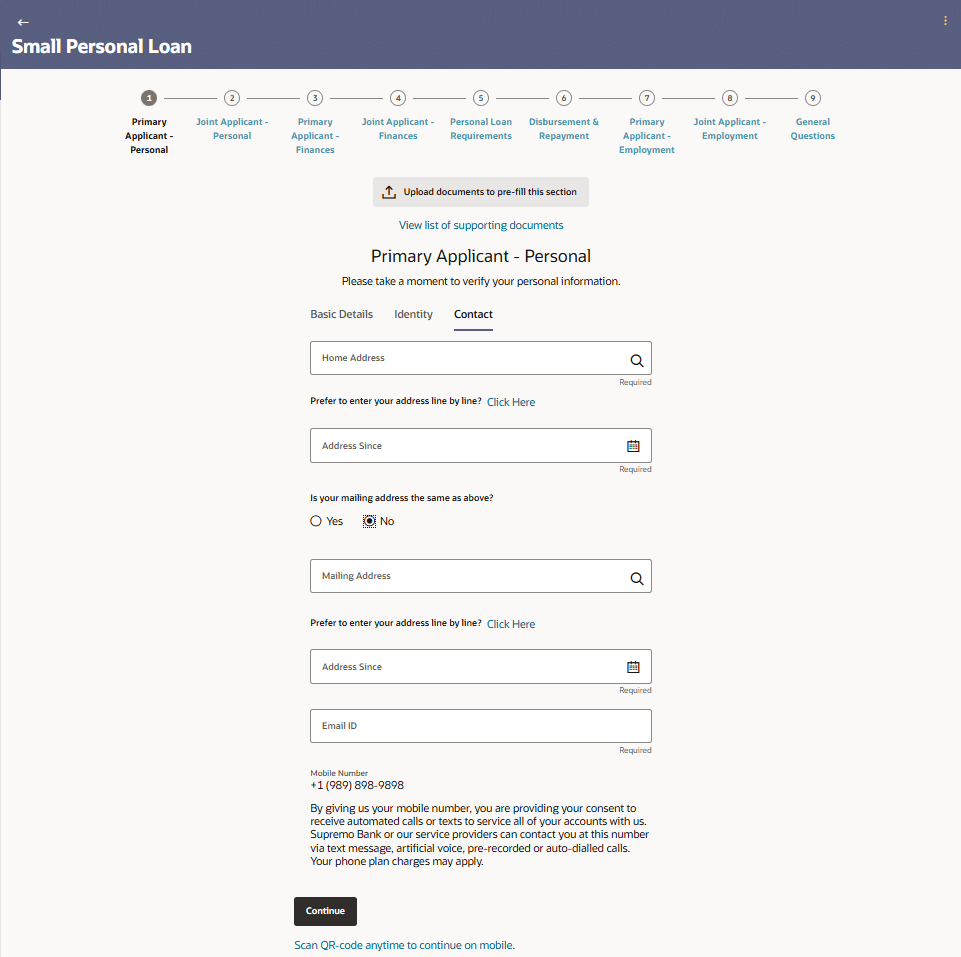
- Click Continue to move to next sub-section.The Contact sub-section appears.
Figure 1-14 Personal Information - Contact
Parent topic: Unsecured Personal Loan Application