8.5.2.2.1 Cash Flow Search (overlay window)
This overlay window appears when you click the  icon to search for specific cash flow records.
Figure 8-77 Cash Flow Search (overlay window)
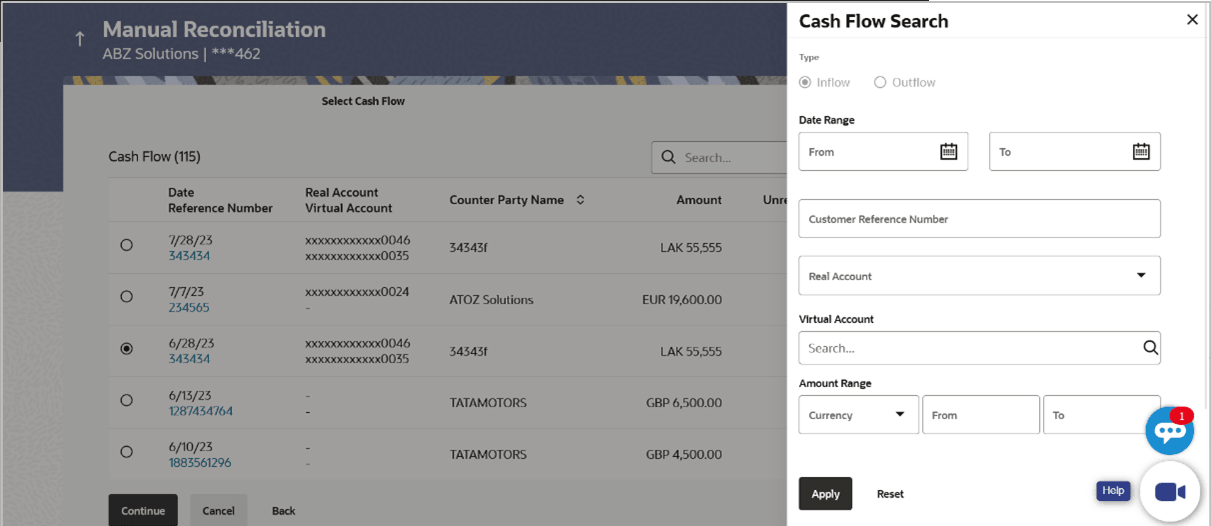
Table 8-40 Cash Flow Search - Field Description
| Field Name | Description |
|---|---|
| Type | Displays the type of cash flow, whether Inflow or Outflow. This field is not editable. |
| Date Range From/To | Specify the date range for filtering the required cash flow records. |
| Customer Reference Number | Specify the customer’s own reference number of the cash flow record to be filtered. |
| Real Account | Specify the real account number associated with the cash flow records to be filtered. |
| Virtual Account | Specify the virtual account number associated with the cash flow records to be filtered. |
| Amount Range Currency From/To | Select the currency and enter the cash flow amount range, to filter the required cash flow records. |
- On selecting/entering the required details, click Apply to apply the filter criteria, or, click Reset to reset the entered data.
Parent topic: Single Payment Multiple Cash Flows