3.2.1 View Program
View Program displays all the programs that the logged-in corporate is linked to. The status of the program and the corporate’s role in the program are also displayed.
- Perform any of the following actions:
- From the Dashboard, click the Toggle Menu, then click Supply Chain Finance. From Supply Chain Finance, click Program Management, and then click View/Edit Program.
- From the Dashboard, click the Toggle Menu, then click Supply Chain Finance. From Supply Chain Finance click Overview, and Quick Links, and then View Program.
The Select Role pop-up appears.For more information on fields, refer to field description table.
Table 3-6 Field Description
Field Name Description Select Role Select the party's role as a Buyer or a Supplier to view data in terms of Payables or Receivables.
The options are:
- Buyer
- Supplier
- Once you select the required role, click Proceed to view
the existing programs. Or, click Cancel to cancel the
transaction.The View Program screen appears.
For more information on fields, refer to field description table.
Table 3-7 View Program - Field Description
Field Name Description Party Name and ID Select the party name and ID from the drop-down list to view the applicable list of programs. By default, the primary party of the logged-in user is selected. Note: Only accessible parties are displayed to the user. Based on the party selection, the list of programs is displayed.
Switch View Select the party's role as a Buyer or a Supplier to view data in terms of Payables or Receivables. The options are:- Buyer
- Supplier
Create New Program Click the Create New Program link to create a new program, if required. Note: This feature is only available on web browsers on desktop computers, and not on a mobile device.
Search Enter the partial or complete name or ID of the specific program to be viewed. 
Click this icon to filter the programs based on name, ID, associated party, and program type. A Search overlay window appears. Enter the required search criteria and click Apply. The program list is updated accordingly. Download Click this link to download the list of finances in CSV format. 
Click this icon to view the programs in a card or tile format. Click a program tile to view its details. 
Click this icon to view the programs in a list format. Click the program name link of a specific program to view its details.
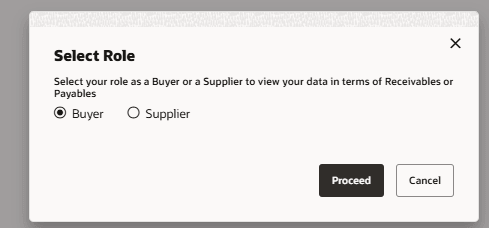
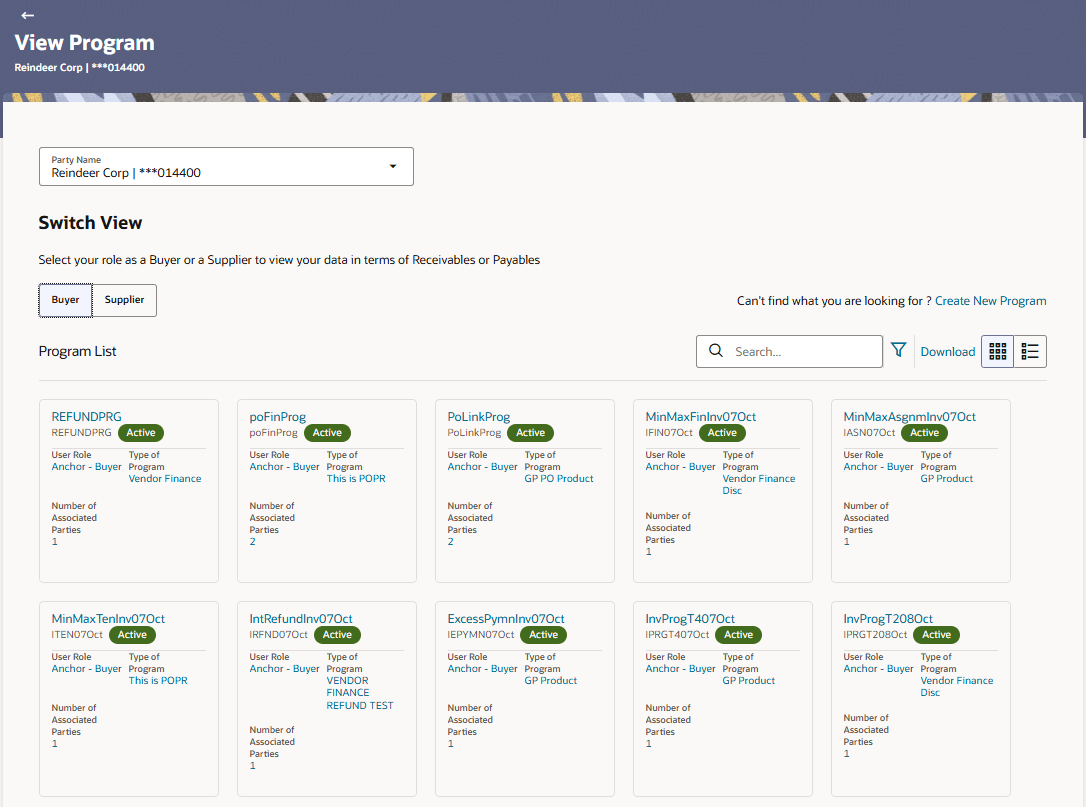
Figure 3-8 Search Overlay Window
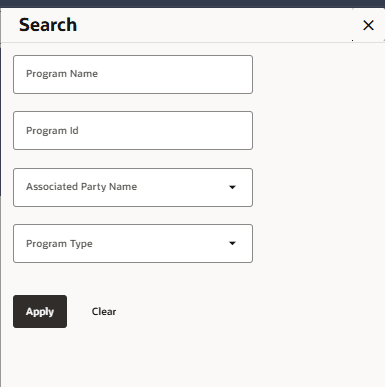
For more information on fields, refer to field description table.
Table 3-8 Search Overlay Window - Field Description
| Field Name | Description |
|---|---|
| Program Name | Indicates an option to search for programs based on the name. |
| Program Id | Indicates an option to search for programs based on the ID. |
| Associated Party Name | Indicates an option to search for programs associated with a specific counter party. A list of onboarded counterparties is available to select from. |
| Program Type | Indicates an option to search for programs based on the program type. |
| Program List |
Displays a list of programs linked to the logged-in corporate. If you have selected the card or tile view, then you can click on a particular program tile to view its details. If you have selected the list view, then you can click on the Program Name link to view its details. Note: If the logged-in party is a ‘Spoke’ who is not the borrower with respect to the program, then such a party can only view the program tile, but not the program details. The tile is non-clickable for this party. The following message appears in the program tile: The program details cannot be displayed as you are not a borrower in the linked program. |
| Program Name | Displays the program name as fetched from the host. This is a hyperlink, which when clicked displays a screen with the program details. |
| Program ID | Displays the program ID as fetched from the Host. |
| Status |
Displays the status of the program. It could be:
|
| User Role | Displays the logged-in Corporate’s role in the program. |
| Type of Program | Displays the program type as fetched from the host. |
| Number of Associated Parties | Displays the number of counter parties linked to the program. |
- This screen appears when you click on a particular card/program name in the
View Program screen. Below screen will be displayed
when the logged corporate is an Anchor in the
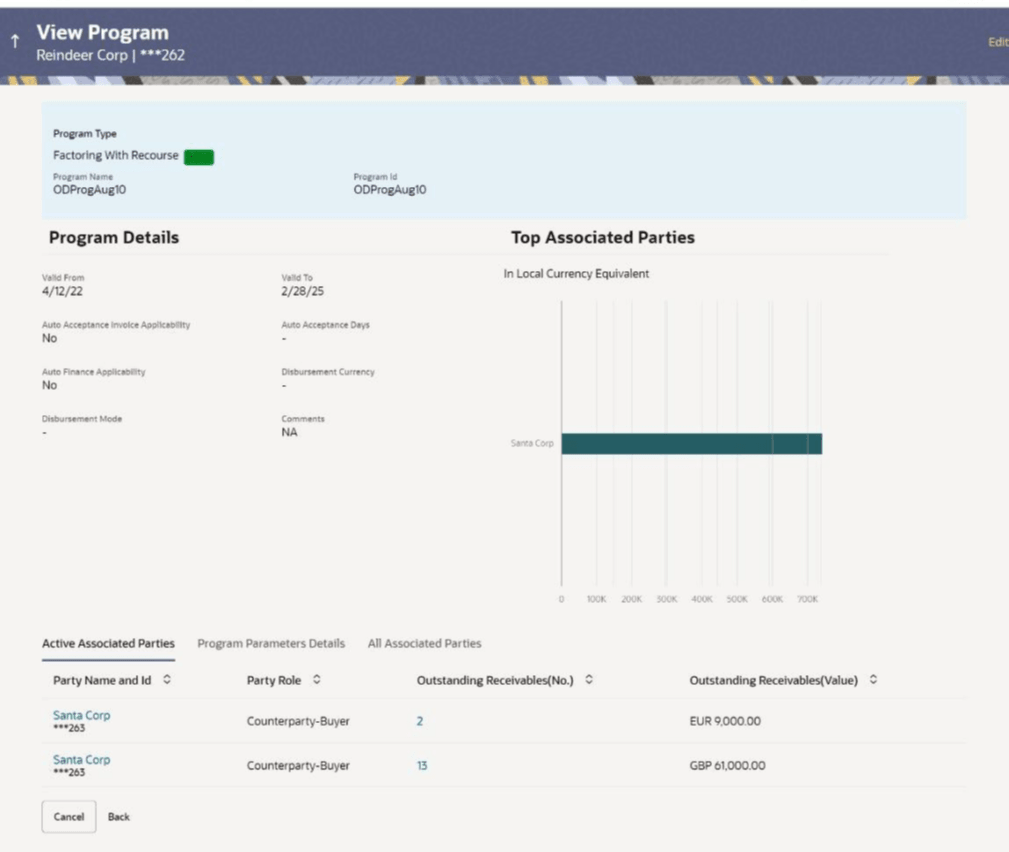
program.The View Program (details) screen appears.
For more information on fields, refer to field description table.
Table 3-9 View Program (details) - Field Description
Field Name Description Party Name and ID Displays the name and ID of the logged-in corporate party. Program Type Status Displays the type of the SCF program. This is the financing product against which the program has been created. Also displays the status of the program. This can be one of the following:- Initiated
- Active
- Inactive
- Modified
- Closed
Program Name Displays the program name as fetched from the Host. Program Id Displays the program ID of the SCF program. Program Details This section displays the program details. Valid From Displays the date from when the SCF program has been active. Valid To Displays the date until when the SCF program will be active. Auto Acceptance Invoice Applicability Displays the value of auto acceptance of invoices/purchase orders as fetched from the host. Informs whether auto acceptance of invoices/purchase orders is applicable or not. Auto Acceptance Days Displays the number of days in which the invoices/purchase orders will be deemed as accepted, if not explicitly accepted by the buyer/supplier. Auto Finance Applicability Displays whether the invoices/purchase orders raised under the program will be auto financed or not. If Yes, all invoices/purchase orders uploaded under the program will be auto financed post acceptance. Disbursement Currency Displays the disbursement currency for the program. Disbursement Mode Displays the disbursement mode for the program. Comments Displays the comments added for the program as fetched from the host. Top Associated Parties This section displays the top 10 counter parties in the program in a bar graph. It provides a comparative view amongst the counter parties on the basis of the receivable or payables in local currency. If the counter parties are less than 10, then all of the counter parties are displayed, and the label represents the actual number of counter parties. If there is only one counterparty linked to the program, then the label displayed is ‘Top Associated Parties’. Only those counter parties with invoices raised against them, are represented on the graph.
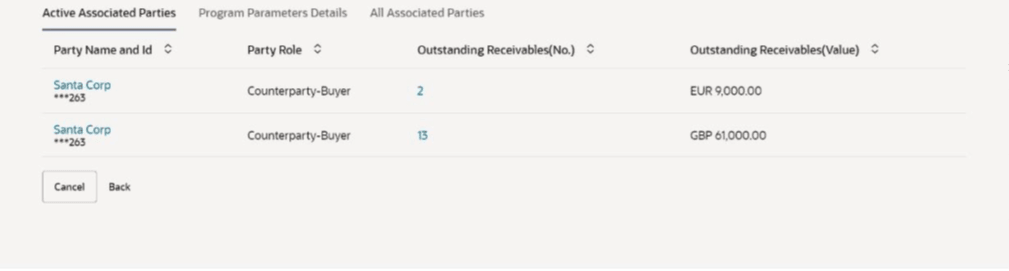
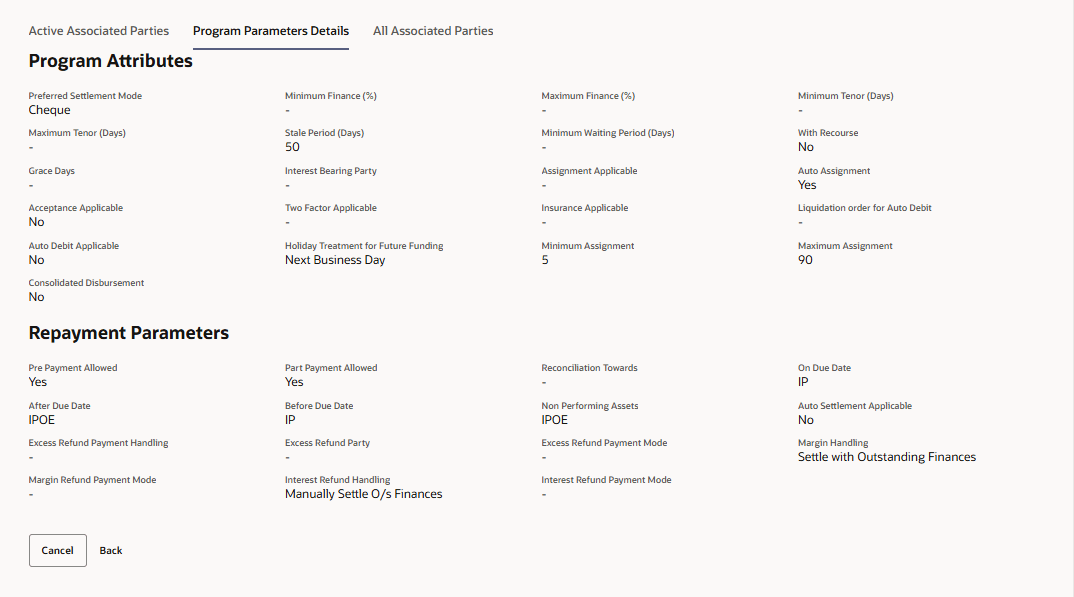
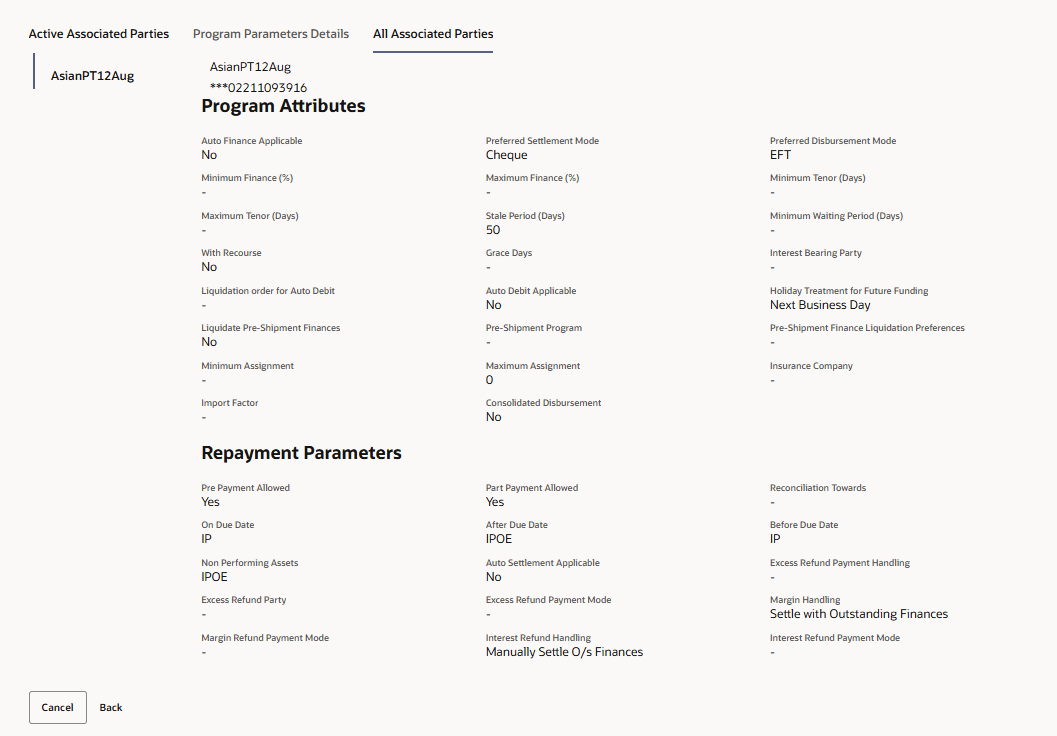
The following three tabs are present:- Active Associated Parties tab
- Program Parameter Details tab
- All Associated Parties tab
For more information on fields, refer to field description table.
Table 3-10 Active Associated Parties - Field Description
Field Name Description Active Associated Parties This section displays the active associated parties. Party Name and ID Displays the name and ID of the linked party. Click on the link to view the associated party (counter party) details. Party Role Displays the role associated with the party.
It could be:
- Counter Party – Buyer
- Counter Party – Supplier
- Anchor – Buyer
- Anchor – Supplier
Outstanding Payables/Receivables (No.) Displays the number of invoices outstanding for the linked party under this program.
Click on the invoice number link to view the list of all outstanding invoices linked to the selected party and currency.
Outstanding Payables/Receivables (Value) Displays the value of payables/ receivables outstanding for the linked party under this program. For more information on fields, refer to field description table.
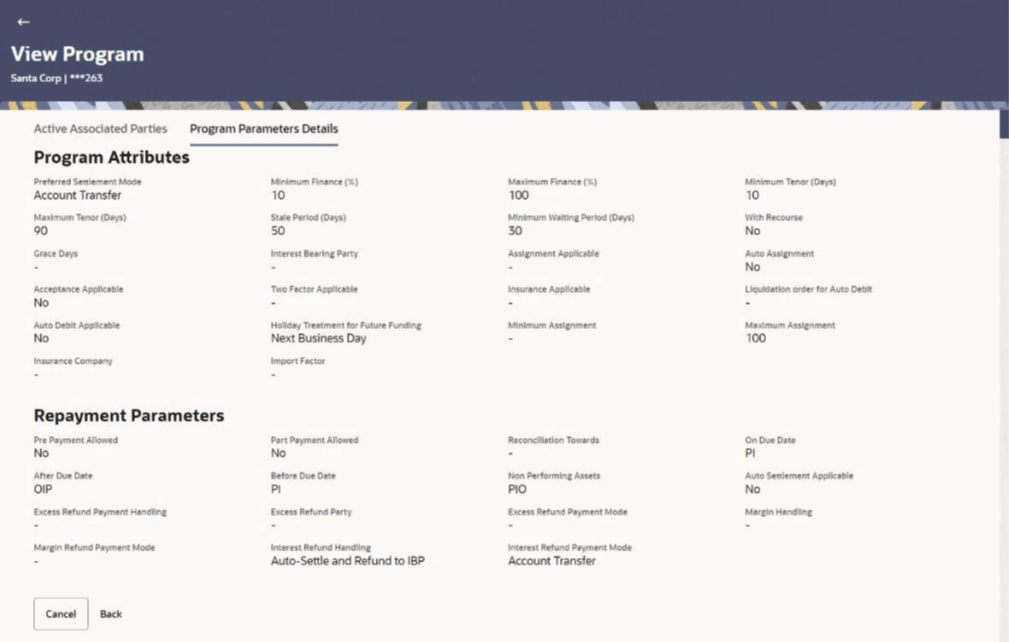
Table 3-11 Program Parameters Details - Field Description
Field Name Description Program Attributes This section displays the program attributes. Preferred Settlement Mode Displays the preferred mode of transferring the settlement amount. Minimum Finance % Displays the minimum percentage (of invoice amount or purchase order amount) allowed for availing finance under the program. Maximum Finance % Displays the maximum percentage (of invoice amount or purchase order amount) allowed for availing finance under the program. Minimum Tenor (Days) Displays the minimum length of time for a finance availed under this program. Maximum Tenor (Days) Displays the maximum length of time for a finance availed under this program. Stale Period (Days) Displays the period in days after which the receivable/payable becomes stale. Minimum Waiting Period (Days) Displays the minimum length of time for a finance availed under this program. With Recourse Displays the value of With Recourse as fetched from the host. Grace Days Displays the number of days allowed as grace period. It is the period over and above the due date during which the payment may be done by the borrower without penalty or interest. Interest Bearing Party Displays whether Anchor or spoke is the interest bearing party. Assignment Applicable Displays whether the assignment on invoice is applicable for financing. Auto Assignment Displays whether the assignment is performed automatically post invoice upload. Acceptance Applicable Displays whether the receivables/payables raised under the program is applicable for financing. Two Factor Applicable Displays whether the two-factor feature is applicable for the program in case the anchor is trading with foreign buyers/suppliers. Insurance Applicable Displays whether the insurance is applicable for the program. Liquidation order for Auto Debit Displays the auto-debit liquidation order in case partial funds are debited from the payment party on auto-debit. Auto Debit Applicable Displays whether auto debit is applicable for finance repayment. Holiday Treatment for Future Funding Displays how the finance disbursement date is handled if it falls on a bank holiday. Minimum Assignment Displays the minimum percentage of assignment allowed for financing a transaction of this program. Maximum Assignment Displays the maximum percentage of assignment allowed for financing a transaction of this program. Repayment Parameters This section displays the repayment parameters. Pre Payment Allowed Displays whether the finance can be repaid prior to the finance maturity date. Part Payment Allowed Displays whether the finance can be repaid in parts. Reconciliation Towards Displays values either Invoice or Finance. On Due Date Displays the order in which the repayment amount will be appropriated towards principal, interest, penalty on principal and penalty on interest when repayment is done on on the finance maturity date. After Due Date Displays the order in which the repayment amount will be appropriated towards principal, interest, penalty on principal and penalty on interest when repayment is done post the finance maturity date. Before Due Date Displays the order in which the repayment amount will be appropriated towards principal, interest, penalty on principal and penalty on interest when repayment is done prior to the finance maturity date. Auto Settlement Applicable Displays whether the finance availed against receivables/payables under the product will be settled automatically. Excess Refund Payment Handling Displays how the excess payment made towards settling of outstanding invoice/finance, is handled. Excess Refund Party Displays the party to whom the excess refund amount is credited. Excess Refund Payment Mode Displays the mode of payment for the excess refunds. Margin Handling Displays how the margin refund is handled. Margin Refund Payment Mode Displays the mode of payment for the margin refunds. Interest Refund Handling Displays how the interest refund is handled. Interest Refund Payment Mode Displays the mode of payment for the interest refunds. For more information on fields, refer to field description table.
Table 3-12 All Associated Parties - Field Description
Field Name Description All Associated Parties A section is displayed for each party linked to the program with invoices associated with them. If the Anchor of the program is logged in, then the linked counter parties are listed. If a counter party of the program is logged in, then the Anchor party is listed. Party Name & ID Displays the name and ID of the associated party. Program Attributes This section displays the program attributes. Auto Finance Applicable Displays whether the receivables/payables raised under the product will be automatically financed, or not. Preferred Settlement Mode Displays the preferred mode of transferring the settlement amount. Preferred Disbursement Mode Displays the preferred mode of transferring the finance amount. Minimum Finance % Displays the minimum percentage (of invoice amount or purchase order amount) allowed for availing finance under the program. Maximum Finance % Displays the maximum percentage (of invoice amount or purchase order amount) allowed for availing finance under the program. Minimum Tenor (Days) Displays the minimum length of time for a finance availed under this program. Maximum Tenor (Days) Displays the maximum length of time for a finance availed under this program. Stale Period (Days) Displays the period in days after which the receivable/payable becomes stale and cannot be financed any more. Minimum Waiting Period (Days) Displays the minimum length of time for a finance availed under this program. With Recourse Displays the value of With Recourse as fetched from the host. Grace Days Displays the number of days allowed as grace period. It is the period over and above the due date during which the payment may be done by the borrower without penalty or interest. Interest Bearing Party Displays the name of the interest bearing party. Liquidation order for Auto Debit Displays the auto-debit liquidation order in case partial funds are debited from the payment party on auto-debit. Auto Debit Applicable Displays whether auto debit is applicable for finance repayment. Holiday Treatment for Future Funding Displays how the finance disbursement date is handled if it falls on a bank holiday. Liquidate Pre- Shipment Finances Displays whether linking of Pre-Shipment Programs is enabled. This field is displayed only if the program is Purchase Order based program.
Pre-Shipment Program Displays the list of pre-shipment programs for select supplier-buyer combination. This field is displayed only if the program is Purchase Order based program.
Pre-Shipment Finance Liquidation Preferences Displays the liquidation preference selected for the pre-shipment finances. This field is displayed only if the program is Purchase Order based program.
Minimum Assignment Displays the minimum percentage of assignment allowed for financing a transaction of this program. Maximum Assignment Displays the maximum percentage of assignment allowed for financing a transaction of this program. Insurance Company Displays the name of the insurance company linked to the program. Import Factor Displays the import factor linked to the program. Repayment Parameters This section displays the repayment parameters. Pre Payment Allowed Displays whether the finance can be repaid prior to the finance maturity date. Part Payment Allowed Displays whether the finance can be repaid in parts. Reconciliation Towards Displays what the reconciliation is matched against. On Due Date Displays the order in which the principal, and the interest is paid on the finance maturity date. After Due Date Displays the order in which the principal, interest, and overdue interest is paid post the finance maturity date. Before Due Date Displays the order in which the principal, and the interest is paid prior to the finance maturity date. Non Performing Assets Displays the order in which the principal, interest, and overdue interest is paid if the finance repayment gets defaulted/missed. Auto Settlement Applicable Displays whether the finance availed against receivables/payables under the product will be settled automatically. Excess Refund Payment Handling Displays how the excess payment made towards settling of outstanding invoice/finance, is handled. Excess Refund Party Displays the party to whom the excess refund amount is credited. Excess Refund Payment Mode Displays the mode of payment for the excess refunds. Margin Handling Displays how the margin refund is handled. Margin Refund Payment Mode Displays the mode of payment for the margin refunds. Interest Refund Handling Displays how the interest refund is handled. Interest Refund Payment Mode Displays the mode of payment for the interest refunds. - Click Edit to make any required changes to the program. Or, do one of the following:
- Click Cancel to cancel the transaction.
- Click Back to navigate back to the previous screen.
Spoke Party who is also the BorrowerThe View Program details screen can only be viewed in the following cases:- If the logged-in party is the Anchor party.
- If the logged-in party is the Spoke and the borrower in the program. Spokes who are not borrowers in a program cannot view the program details.
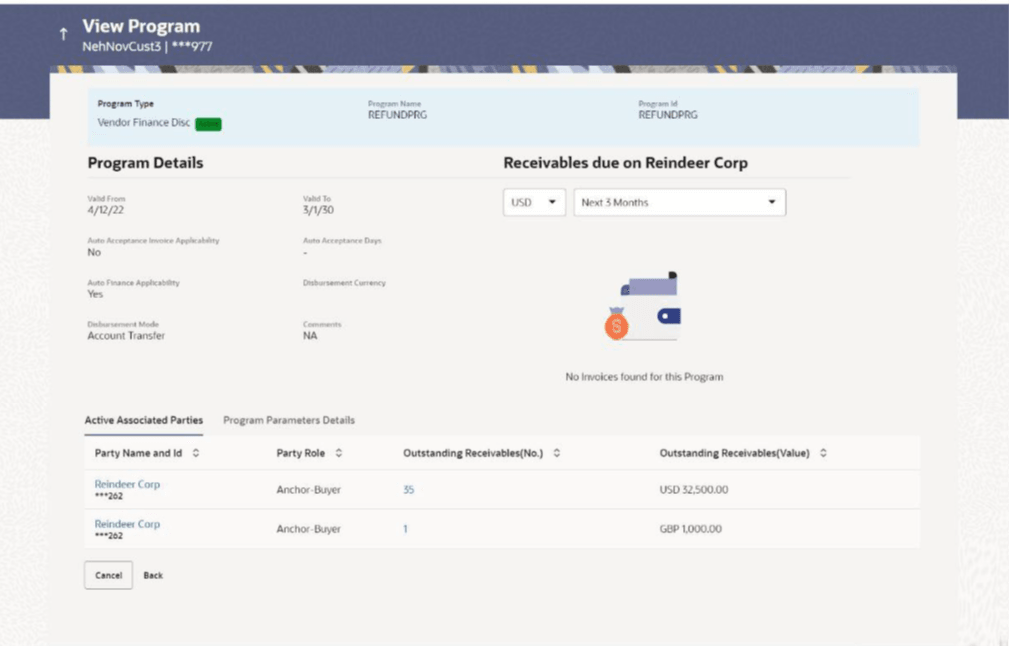
If the logged-in party is a Spoke and the borrower in the program, then the Program Details screen appears as shown below:
For more information on fields, refer to field description table.
Table 3-13 Spoke Login - Field Description
Field Name Description Party Name and ID Displays the name and ID of the logged-in corporate party. Program Type Status Displays the type of the SCF program. This is the financing product against which the program has been created. Also displays the status of the program. This can be one of the following: Initiated, Active, Inactive, Modified, or Closed.
Program Name Displays the program name as fetched from the Host. Program Id Displays the program ID of the SCF program. Program Details This section displays the program details. Valid From Displays the date from when the SCF program has been active. Valid To Displays the date until when the SCF program will be active. Auto Acceptance Invoice Applicability Displays the value of auto acceptance of invoices/purchase orders as fetched from the Host. Informs whether auto acceptance of invoices/purchase orders is applicable or not. Auto Acceptance Days Displays the number of days in which the invoices/purchase orders will be deemed as accepted, if not explicitly accepted by the buyer/supplier. Auto Finance Applicability Displays whether the invoices/purchase orders raised under the program will be auto financed or not. If Yes, all invoices/purchase orders uploaded under the program will be auto financed post acceptance. Disbursement Currency Displays the disbursement currency for the program. Disbursement Mode Displays the disbursement mode for the program. Comments Displays the comments added for the program as fetched from the host. Receivables/Payables Due Widget This widget displays the receivables/payables amounts in local currencies that are due each day for the current month. You can select the required option from the drop-down menu on the top of the widget, to view these details for the next month, the next 3 months, the next 6 months, and so on. This drop-down menu also provides an option to view overdue receivables/payables amounts. You can view the receivables/payables amounts of other currencies, using the ‘Select currency’ dropdown on the top of the widget. Note: Receivables due widget is displayed if the spoke is a supplier. Payables due widget is displayed if the spoke is a buyer.
Active Associated Parties This section displays the active associated parties. Party Name and ID Displays the name and ID of the linked party. Click on the link to view the associated party (counter party) details. Party Role Displays the role associated with the party. It could be:
- Counter Party – Buyer
- Counter Party – Supplier
- Anchor – Buyer
- Anchor - Supplier
Outstanding Receivables/Payables (No.) Displays the number of receivables/payables outstanding for the linked party under this program. Click on the to view the list of all outstanding receivables/payables linked to the selected party and currency.
Outstanding Receivables/Payables (Value) Displays the value of receivables/payables outstanding for the linked party under this program. For more information on fields, refer to field description table.
Table 3-14 Field Description
Field Name Description Program Attributes This section displays the program attributes. Preferred Settlement Mode Displays the preferred mode of transferring the settlement amount. Minimum Finance % Displays the minimum percentage (of invoice amount or purchase order amount) allowed for availing finance under the program. Maximum Finance % Displays the maximum percentage (of invoice amount or purchase order amount) allowed for availing finance under the program. Minimum Tenor (Days) Displays the minimum length of time for a finance availed under this program. Maximum Tenor (Days) Displays the maximum length of time for a finance availed under this program. Stale Period (Days) Displays the period in days after which the receivable/payable becomes stale and cannot be financed any more. Minimum Waiting Period (Days) Displays the minimum length of time for a finance availed under this program. With Recourse Displays the value of With Recourse as fetched from the host. Grace Days Displays the number of days allowed as grace period. It is the period over and above the due date during which the payment may be done by the borrower without penalty or interest. Interest Bearing Party Displays the name of the interest bearing party. Assignment Applicable Displays whether the assignment on invoice is applicable for financing. Auto Assignment Displays whether the assignment is performed automatically post invoice upload. Acceptance Applicable Displays whether the receivables/payables raised under the program is applicable for financing. Two Factor Applicable Displays whether the two-factor feature is applicable for the program in case the anchor is trading with foreign buyers/suppliers. Insurance Applicable Displays whether the insurance is applicable for the program. Liquidation Order for Auto Debit Displays the auto-debit liquidation order in case partial funds are debited from the payment party on auto-debit. Auto Debit Applicable Displays whether auto debit is applicable for finance repayment. Holiday Treatment for Future Funding Displays how the finance disbursement date is handled, if it falls on a bank holiday. Liquidate Pre- Shipment Finances Displays whether linking of Pre-Shipment Programs is enabled. This field is displayed only, if the program is Purchase Order based program.
Pre-Shipment Program Displays the list of pre-shipment programs for select supplier-buyer combination. This field is displayed only, if the program is Purchase Order based program.
Pre-Shipment Finance Liquidation Preferences Displays the liquidation preference selected for the pre-shipment finances. This field is displayed only, if the program is Purchase Order based program.
Minimum Assignment Displays the minimum percentage of assignment allowed for financing a transaction of this spoke. Maximum Assignment Displays the maximum percentage of assignment allowed for financing a transaction of this spoke. Insurance Company Displays the name of the insurance company linked to the spoke. Import Factor Displays the import factor linked to the spoke. Repayment Parameters This section displays the repayment parameters. Pre Payment Allowed Displays whether the finance can be repaid prior to the finance maturity date. Part Payment Allowed Displays whether the finance can be repaid in parts. Reconciliation Towards Displays what the reconciliation is matched against. On Due Date Displays the order in which the principal, and the interest is paid on the finance maturity date. After Due Date Displays the order in which the principal, interest, and overdue interest is paid post the finance maturity date. Before Due Date Displays the order in which the principal, and the interest is paid prior to the finance maturity date. Non Performing Assets Displays the order in which the principal, interest, and overdue interest is paid if the finance repayment gets defaulted/missed. Auto Settlement Applicable Displays whether the finance availed against receivables/payables under the product will be settled automatically. Excess Refund Payment Handling Displays how the excess payment made towards settling of outstanding invoice/finance, is handled. Excess Refund Party Displays the party to whom the excess refund amount is credited. Excess Refund Payment Mode Displays the mode of payment for the excess refunds. Margin Handling Displays how the margin refund is handled. Margin Refund Payment Mode Displays the mode of payment for the margin refunds. Interest Refund Handling Displays how the interest refund is handled. Interest Refund Payment Mode Displays the mode of payment for the interest refunds.
Parent topic: View / Edit Program