3.1 OBRH Origination Configuration
This topic describes the systematic instruction to OBRH Origination Configuration option.
Follow the steps defined below to configure origination users:
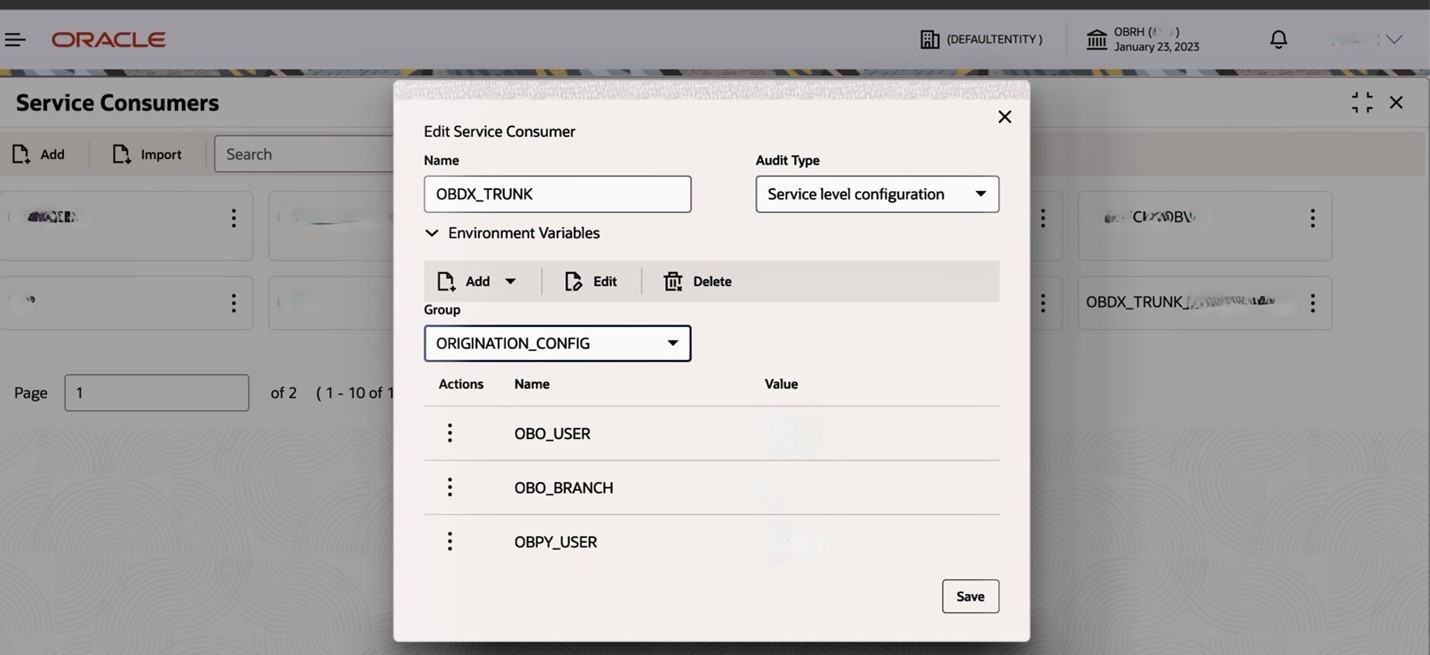
- Go to the service consumer – OBDX_TRUNK or OBDX (check the name mentioned in installer as the same needs to be imported in OBRH).
- Click on View More. By default, the tab will be on Environment Variables. Select Edit Group on ORIGINATION_CONFIG.
- Configure the user and branch code.
- For OBO_USER, OBO_BRANCH, OBPY_USER, OBPY_BRANCH configuration, refer OBO Users creation and configuration-step2.
- For CMC_USER, CMC_BRANCH configuration, refers OBO Users
creation and configuration (Point 2).
- For JUMIO_AUTH : Check with the bank to check if Jumio vendor
integration with the license version is enabled for KYC purposes; if not,
keep these value as blank or configure the Jumio bearer token, followed by
Basic … , refer Jumio Configuration.
- For WHATSAPP_TOKEN : This token is used for API communication between WhatsApp Artifacts and CMC. It is utilized to authenticate and authorize the session for API calls between both systems.
- WHATSAPP_VERSION : Specifies the version of the authenticated WhatsApp API being used
- OBO_VERSION : Specifies the version used by the OBO update API for POST operations.
- REGION : RW/US region parameters used by obo API.

Parent topic: Prerequisites OBRH