13.1 Create Collateral Category
This topic provides systematic instructions about Create Collat Category by updating various details.
- Under Maintenances, select Collateral Category
Maintenance. Under Collateral Category
Maintenance, select Create Collateral
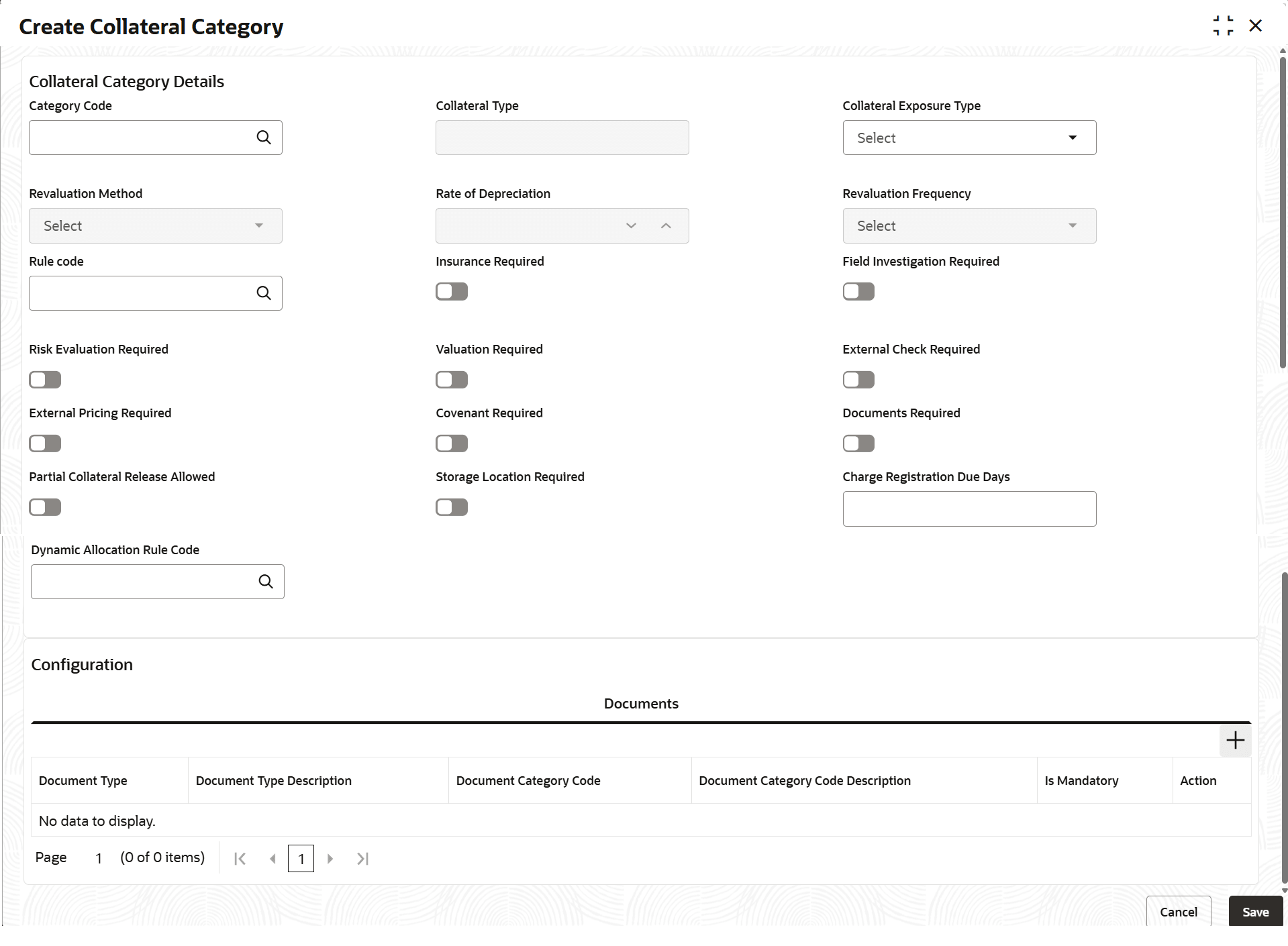
Category.The Create Collateral Category screen displays.For more information on fields, refer to the field description table below.
Table 13-1 Create Collateral Category
Field Description Category Code Specify the collateral code. Category Type Displays the collateral Type. Collateral Exposure Type Select the collateral exposure type from the drop-down list. Revaluation Method Select the collateral exposure type from the drop-down list. The available options are: - Custom
- External
- Straight Line
- Sum of Years Digit
- Written Down Value
Rate of Depreciation Specify the percentage. Rate of depreciation is applicable only when the revaluation method is straight line method or written down value method Revaluation Frequency Select the collateral exposure type from the drop-down list. The available options are: - Daily
- Half-Yearly
- Monthly
- Quarterly
- Weekly
- Yearly
This field is applicable only when Revaluation Type is Automatic.
Rule Code Select the rule code. Insurance Required Enable the insurance toggle, if required. Field Investigation Required Enable the field investigation toggle, if required. Risk Evaluation Required Enable the risk evaluation toggle, if required. Valuation Required Enable the valuation toggle, if required. Exteranl Check Required Enable the external check toggle, if required. External Pricing Required Enable the external pricing toggle, if required. Covenant Required Enable the covenant toggle, if required. Documents Required Enable the documents toggle, if required. Partial Collateral Release Allowed Enable the partial collateral release toggle, if required. Storage Location Required Enable the storage alocation required toggle, if required. Charge Registration Due Days Specify the charge registartion due days. Dynamic Allocation Rule Code Select the dynamic allocation rule code. Documents Type Select the document type. Document Type Description Specify the description of document type. Document Category Code Select the document category code. Document Category Code Description Specify the description of document category code. Is Mandatory Enable the toggle, if required. Action Click Edit, to edit the document details. Click Delete, to delete the document details.
Parent topic: Collateral Category Maintenance