3.11.1 Collateral Warehouse Maintenance
This topic provides systematic instructions about the procedure of collateral warehouse maintenance.
- Under Collateral Warehouse, select Collateral Warehouse
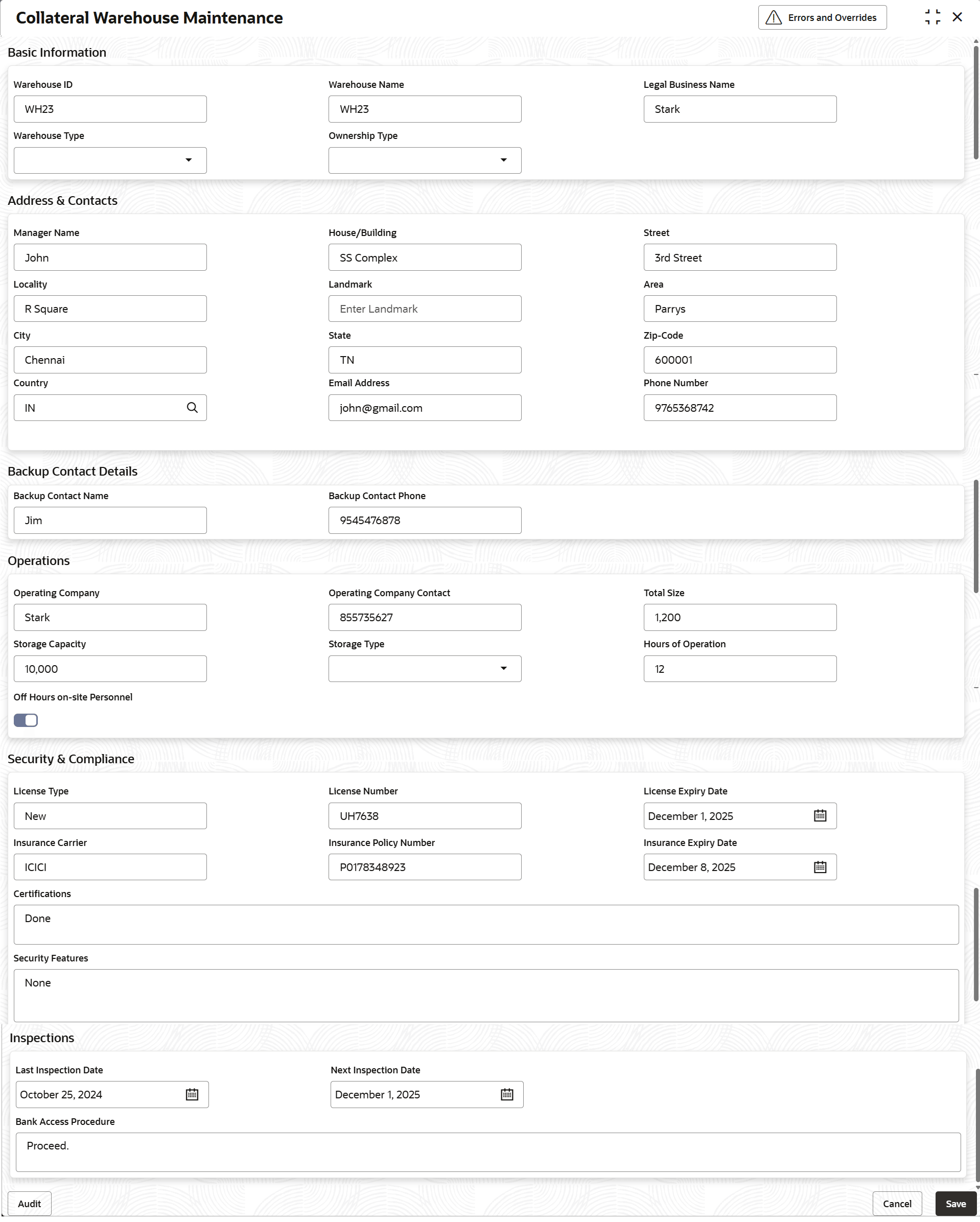
Maintenance.The Collateral Warehouse Maintenance screen is displayed.
Figure 3-31 Collateral Warehouse Maintenance
For more information on fields, refer to the filed description table below.Table 3-27 Collateral Warehouse Maintenance - Field Description
Field Description Warehouse ID Specify a unique warehouse ID to the warehouse record. Warehouse Name Specify the warehouse name. Legal Business Name Specify the legal businesss name of the warehouse. Warehouse Type Select the warehouse type from the drop-down list. The available optiosn are: - Private
- Bonded
- Public
Ownership Type Select the ownership type from the drop-down list. The available optiosn are: - Tenants in Common
- Others
- Single
- Joint
Address and Contacts This section describes about address and contact details of the warehouse. Manager Name Specify the name of the warehouse manager. House/Building Specify the house/ building name of the warehouse. Street Specify the street name of the warehouse. Locality Specify the locality name of the warehouse. Landmark Specify the landmark of the warehouse. Area Specify the area name of the warehouse. City Specify the city name of the warehouse. State Specify the state name of the warehouse. Zip-Code Specify the zip-code of the warehouse. Country Specify the country name of the warehouse. Email Adress Specify the email address of the warehouse. Phone Number Specify the contact number of the warehouse. Backup Contact Details This section decribes the backup contact details of the warehouse. Backup Contact Name Specify the alternate contact name of the warehouse. Backup Contact Phone Specify the alternate contact number of the warehouse. Operations This section describes the opertaions of warehouse. Operating Company Specify the opertaing company of the warehouse. Operating Company Contact Specify the opertaing company contact number of the warehouse. Total Size Specify the total area of the warehouse. Storage Capacity Specify the stotage capacity of the warehouse. Storage Type Select the storage type from the drop-down list. Hours of Operation Specify the operation hours of the warehouse. Off Hours on-site Personnel Enable the toggle whether the authorized personnel are on-site at the collateral warehouse after standard business hours. Security and Compliance This section describes the security and compliance of the warehouse. License Type Specify the license type of warehouse. License Number Specify the license number of warehouse. License Expiry Date Specify the license expiry date of warehouse. Insurance Carrier Specify the insurance carrier of the warehouse. Insurance Policy Number Specify the insurance policy reference number. Insurance Expiry Date Specify the insurance expiry date. Certifications Specify the certifications obtained for the warehouse. Security Features Specify the security features at the warehouse. Inspections This section describes about the inspections. Last Inspection Date Specify the last inspection date of the warehouse. Next Inspection Date Specify the next inspection date of the warehouse. Bank Access Procedure Specify the process for banks to access the warehouse for inspections.
Parent topic: Collateral Warehouse Maintenance