2.1 PII Masking Maintenance
This topic describes about the detailed information on PII masking maintenance screen.
If the data comes under the following categories for an individual user, then it is
considered as PII data.
- Customer Name
- Customer Contact Information
- Demographic Information
- Financial Information
- Unique Identifiers
Privacy and security features are applied to PII information. Personal identifiable
information captured and processed in OBELCM application for the following
screens.
- Collaterals
- General Collateral
- Guarantees
- Life Insurance
- Property
- Property Address
- Property Construction
- Property Lease
- General Collateral
- Limits
- Facility
- Customer Liability Linkage
- Under Maintenances, select PII Masking. Under PII
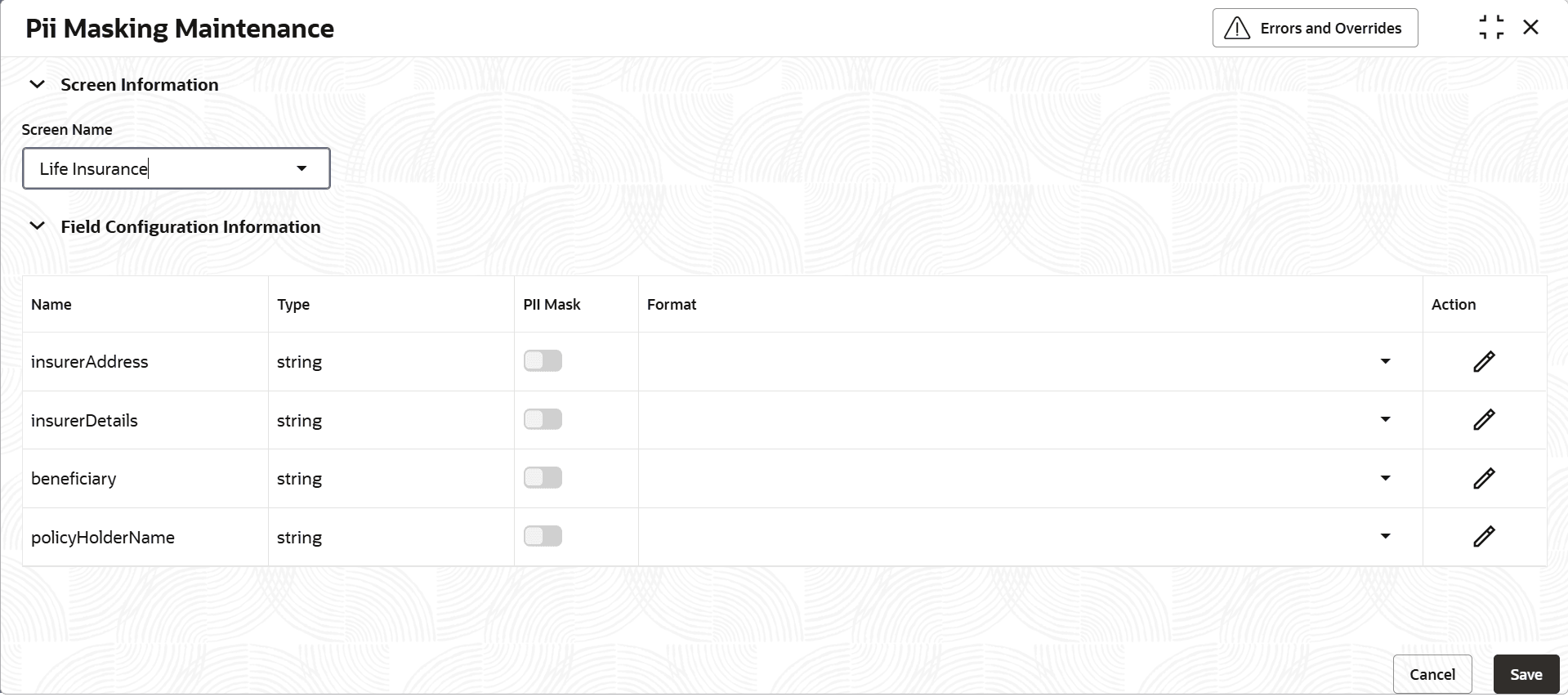
Masking, select PII Masking Maintenance.The PII Masking Maintenance screen displays.For more information on fields, refer to the field description table below.
Table 2-1 PII Masking Maintenance
Field Description Screen Name Select the screen name from the drop-down list. The available options are: - General Collateral
- Guarantee
- Life Insurance
- Property
- Property Address
- Property Construction
- Property Lease
The related PII attributes captured as part of the screen will be listed under the Field Configuration Information section.
PII Mask Enable the PII Mask as required against the respective attributes that user want to mask. Format Select the format from the drop-down list. - FULL_MASK – Will mask the entire PII attribute
- FIRST4LETTERS_MASK – Will mask the first four characters of PII attribute
- EXCEPTLAST4LETTERS_MASK - Will mask the entire PII attribute except the last four characters.
- EMAIL_MASK – Applicable only to the email type of PII attributes.
Parent topic: PII(Personally Identifiable Information) Masking