3.7 Notional Headers

This topic describes the systematic instruction to create Notional Headers.

A Notional Header is the master/parent record used to define and manage a notional pooling arrangement in OBLM. It captures the high-level setup for the notional pool and serves as the Header under which participating accounts are linked and processed for Consolidating balances and interest calculations.
The Notional header is used as:
  • The control point for pool-level rules, eligibility, interest account groups and processing.
  • Pool characteristics (currency, hierarchy where applicable)
  • Linkage to participants accounts via child/participant records maintained under the header
  • Acts as the anchor for notional pool maintenance (add/remove participants, activate/inactivate pool).
  • Drives consolidated liquidity position reporting at the pool level while preserving individual account balances.
  1. On Home screen, click Liquidity Management. Under Liquidity Management, click Third Party Maintenance.
  2. Under Third Party Maintenance, click Account Parameters. Under Account Parameters, click Create Third Party Account Parameters.
    The Create Third Party Account Parameters screen displays.

    Figure 3-4 Create Third Party Account Parameter - Notional Headers
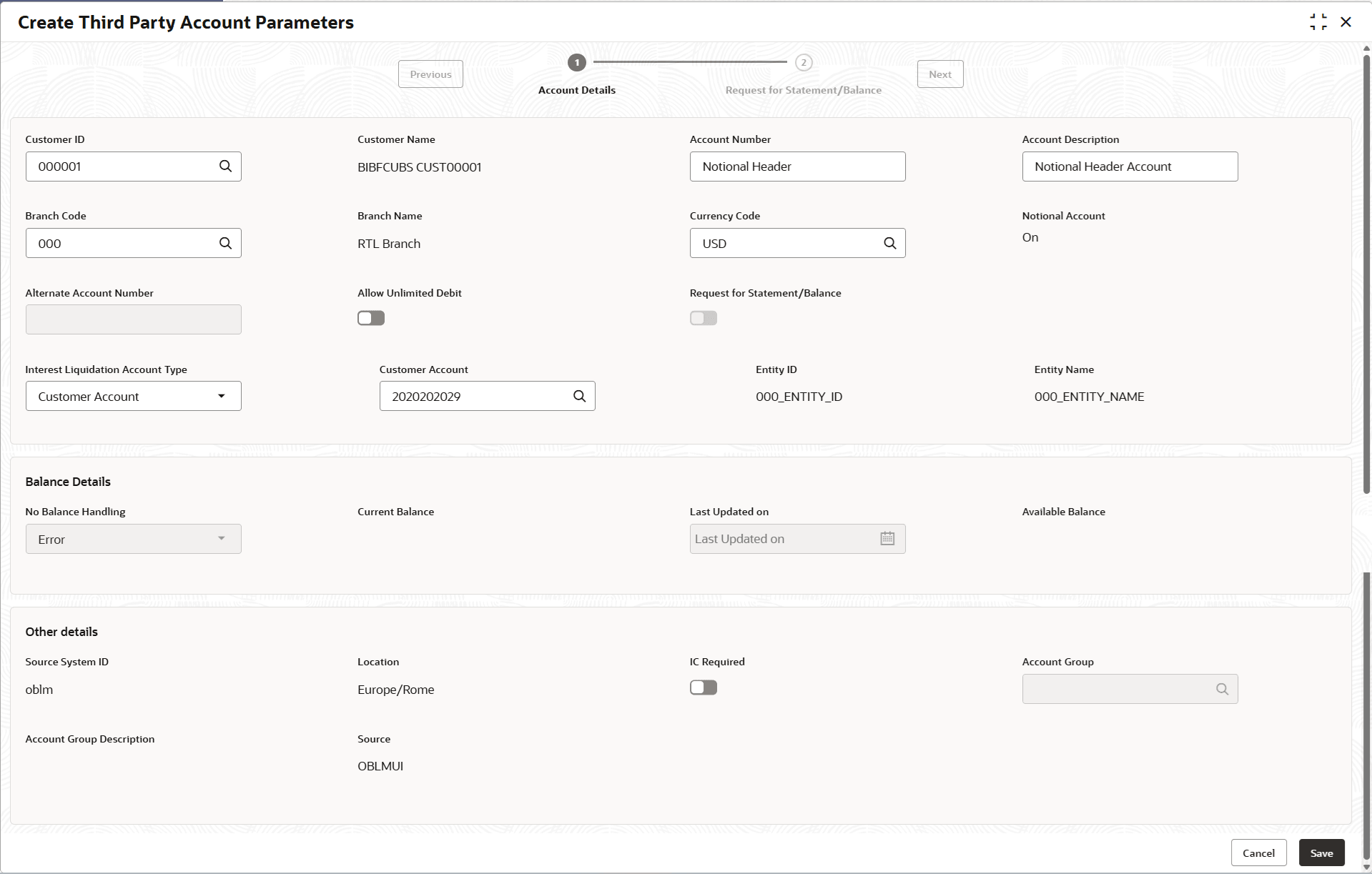
    Description of notional-header-create-third-party-account-parameter.png follows
    Description of the illustration notional-header-create-third-party-account-parameter.png

  3. Select the Pool option from the Structure Type drop-down list.
  4. Specify the fields on Create Third Party Account Parameters - Notional Headers screen.

    Note:

    The fields marked as Required are mandatory.

    For more information on fields, refer to the field description table.

  5. Specify the fields on Create Third Party Account Parameters screen.

    Note:

    The fields marked as Required are mandatory.

    For more information on fields, refer to the field description table.

    Table 3-3 Create Third Party Account Parameters - Field Description

    Field Description
    Customer ID Click Search icon and select the customer ID.
    Account Number Specify the account number.
    Account Description Specify the account description.
    Branch Code Click Search icon and select the Internal Branch code.
    Currency Code Click Search icon and select the currency code of the Notional Header.

    This is the currency in which the interest is calculated.

    Notional Account Displays whether the account is Notional or not.

    By default Notional Account is Off.

    Notional Account is On when the user selects Internal Branch Code.

    Allow Unlimited Debit Switch the toggle On to allow unlimited debit for the account while processing the transactions.
    Interest Liquidation Account Type Select the account type in which interest should be liquidated.
    The options are:
    • General Ledger
    • Customer Account
    General Ledger Interest Liquidation Account for pool Click Search icon and select the general ledger account for interest liquidation.

    This field displays if the user selects General Ledger in the Interest Liquidation Account Type field.

    IC Required Switch on the toggle to enable the interest calculation.

    This option should be enabled to create a Notional Header.

    Account Group Click Search to view and select the account group for interest calculation.
  6. Click Save to save the details.
    The added Account must be authorized by the different user which has the authorization role assigned.
  7. Click Cancel to discard the updated details and close the screen. In such case, the Notional Header data will not get saved.