2.5.1 Archive Transaction Log
This topic explains the systematic instructions to view archived transaction log screen.
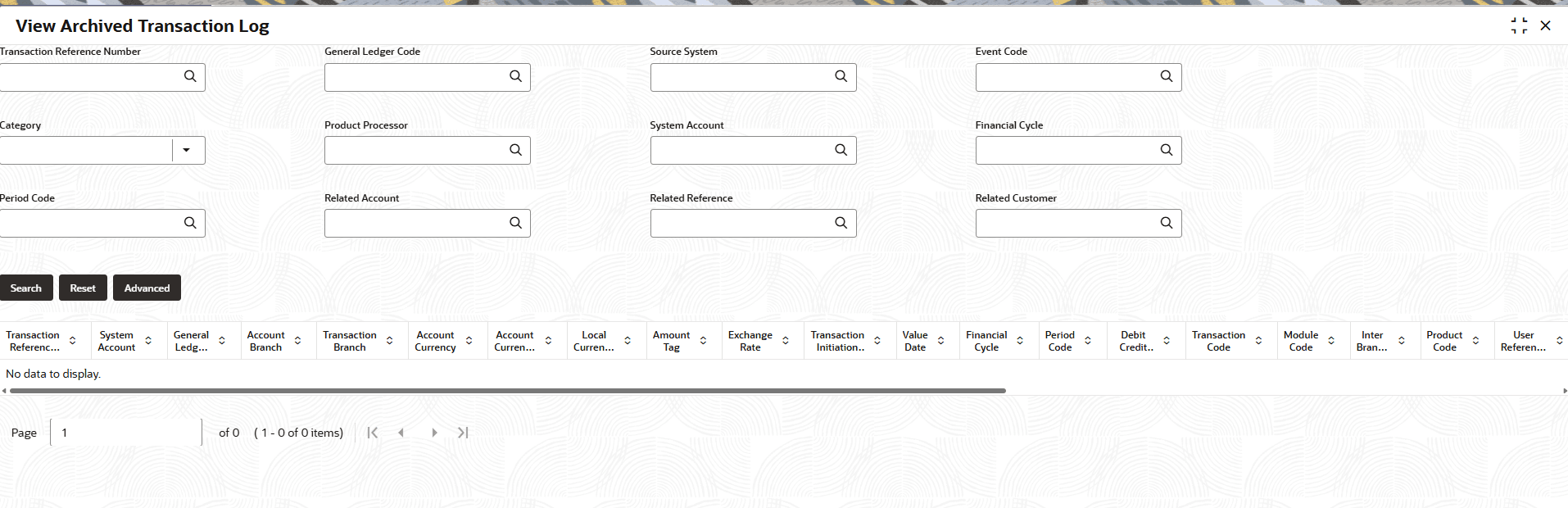
- On the homepage, click Menu and click Operational Ledger, and then click Enquiry. Under Enquiry, click View Archived Transaction Log.The View Archived Transaction Log screen displays.
- Specify the following details, for more information on fields, refer to the field description table below.
Table 2-7 View Archived Transaction Log - Field Description
Field Description Transaction Reference Number Select the transaction reference number from the option list to view the archived transaction details. General Ledger Code Select the general ledger code from the option list to view the archived transaction details. Source System Select the source system from the option list to view the archived transaction details. Event Code Select the event code from the option list to view the archived transaction details. Category Select the type of category from the drop-down list. The options are:- Asset
- Liability
- Income
- Expense
- Contingent Asset
- Contingent Liability
Product Processor Select the product processor for the transaction from the option list to view the archived transaction details. System Account Select the system account from the option list to view the archived transaction details. Financial Cycle Select the financial cycle from the option list to view the archived transaction details. Period Code Select the period code from the option list to view the archived transaction details. Related Account Select the related account from the option list to view the archived transaction details. Related Reference Select the related reference from the option list to view the archived transaction details. Related Customer Select the related customer from the option list to view the archived transaction details. - After specifying the above details, perform one of the following actions:
- Click the Search button to view all archived transactions details.
- Click the Reset button to clear the search criteria.
- Click the Advanced button for advanced details.
Parent topic: Archival of Transaction Entries and Balance