1.14.2 View SLA

This topic describes the systematic instructions to view the list of configured SLA maintenance.

The user can view the summary of SLA's maintained in the form of tiles. The user can view the maintained SLA, if the SLA is already created in the system. The user can also create a new SLA using View SLA screen, by clicking Add.

  1. On Homescreen, click Menu, and click Core Maintenance.
  2. Under Core Maintenance, click SLA Maintenance.
  3. Under SLA Maintenance, click View SLA.

    The View SLA screen displays.
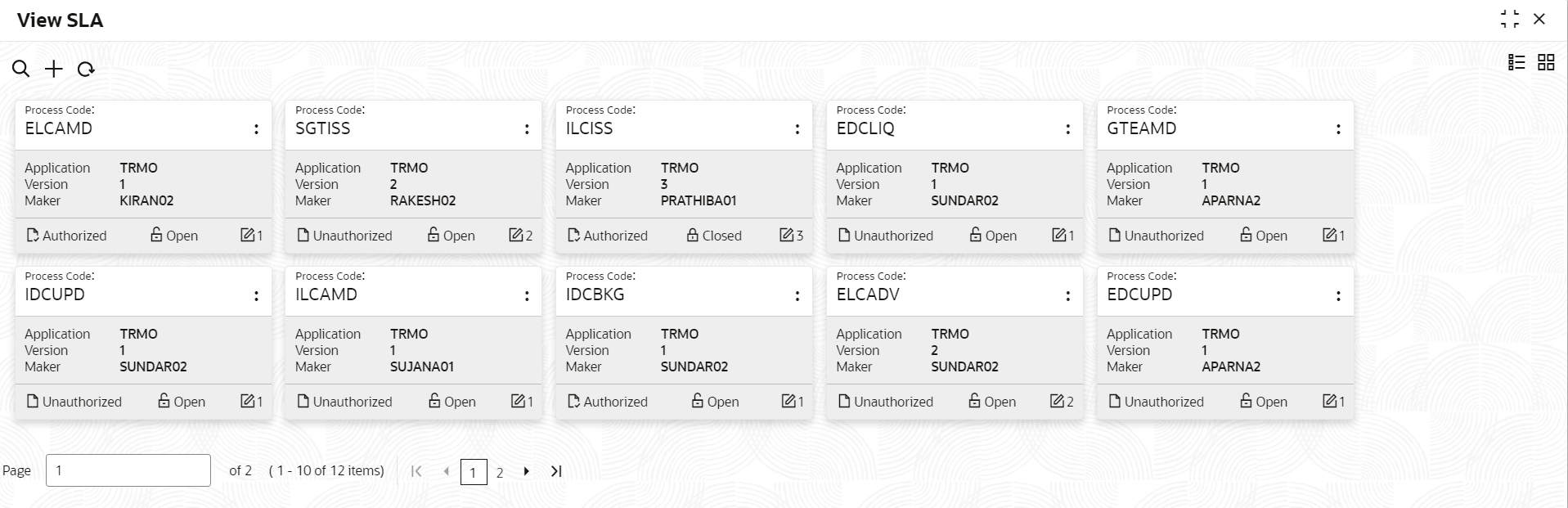
    Figure 1-110 View SLA Maintenance


  4. For more information on fields, refer to the field description table below:

    Table 1-115 View SLA – Field Description

    Field Description
    Process Code Displays the process code of the SLA Maintenance configured.
    Application Displays the name of the application.
    Authorization Status Displays the authorization status of the record.
    The available options are:
    • Authorized
    • Rejected
    • Unauthorized
    Record Status Displays the status of the record.
    The available options are:
    • Open
    • Closed
    Modification Number Displays the number of modification performed on the record.