3.5.4 Stress and Affordability Test
This topic provides the systematic instructions to perform the stress and affordability test.
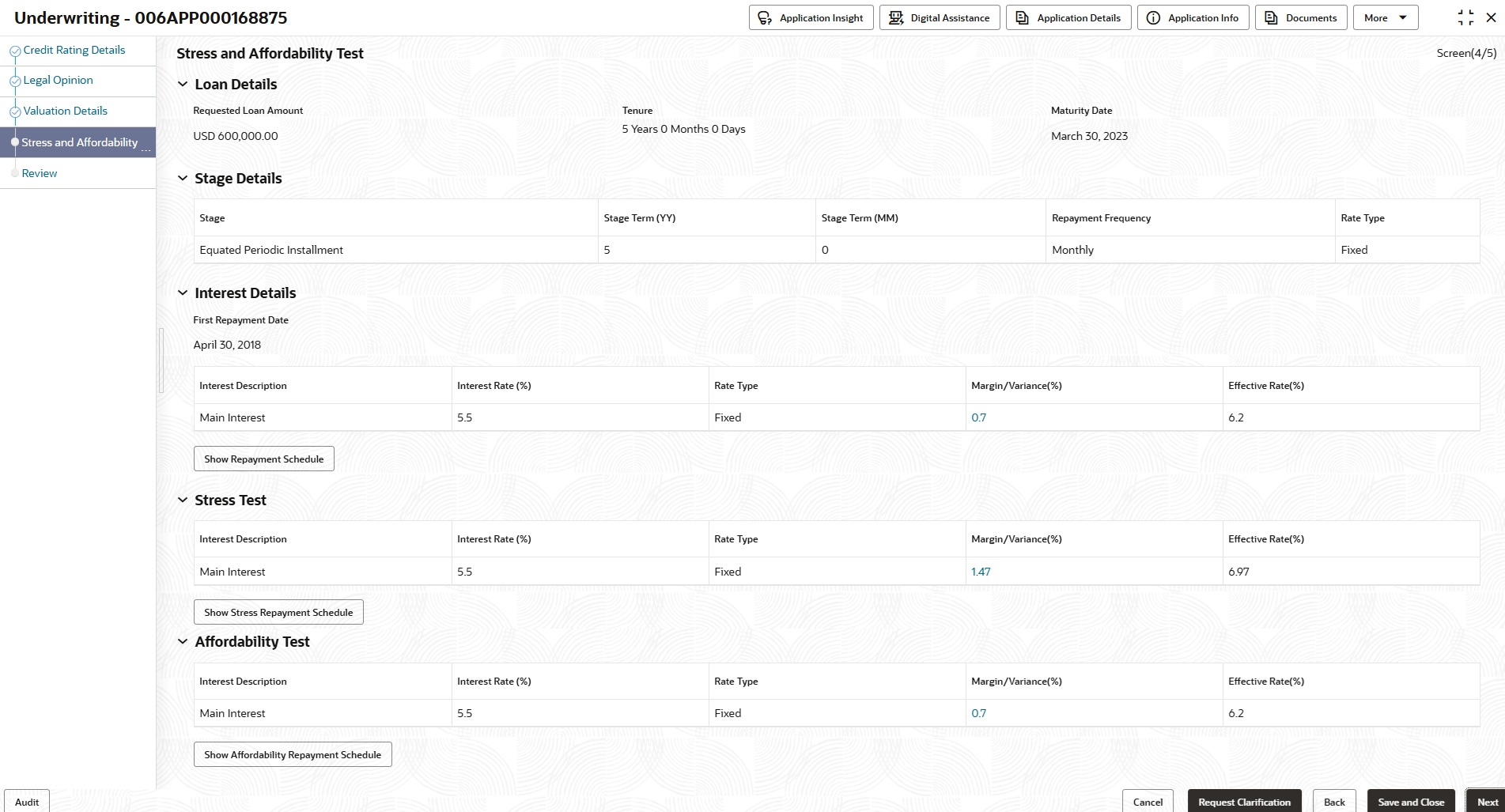
This data segment allows users to perform statutory stress testing and affordability before assessment. It supports generation of three repayment schedules, such as Account, Stress, and Affordability. The Stress Test applies a configured Stress Margin to simulate higher interest rates, while the Affordability Test uses a user-defined margin to assess repayment capacity at a higher effective rate. Each test generates its own schedule with exclusive margin display and standard interest validations. The Stress and Affordability are for simulation purposes only, and the account will be opened using the actual interest rate.
To capture the Stress and Affordability Margin details:
- Click Next in the previous data segment to proceed with the next data segment, after successfully capturing the data.The Stress and Affordability Test screen displays.
- Specify the details in the relevant data fields. For more information on fields, refer to the field description table below.
Note:
The fields which are marked as Required are mandatory.Table 3-40 Stress and Affordability Test – Field Description
Field Description Loan Details This section provides the following loan details that are captured from the Loan Details data segment. Requested Loan Amount Displays the requested loan amount. Tenure Displays the loan tenure. Maturity Date Displays the maturity date. Stage Details This section provides the following stage details that are captured from the Loan Details data segment. Stage Displays the selected stage. Stage Term <Unit Term> Displays the stage term. Repayment Frequency Displays the repayment frequency. Rate Type Displays the select rate type. Interest Details This section provides the following interest details that are captured from the Interest and Charges data segment. First Repayment Date Displays the first repayment due date as per account interest. Interest Description Displays the name of interest. Interest Rate (%) Displays the base interest rate for the interest type. Rate Type Displays the selected rate type for the interest type. That are: - Floating
- Fixed
Margin/Variance(%) Displays the sum of margin for the above interest rate with a hyperlink. Click the hyperlink to displays the bifurcation of margin rate, such as Risk based Margin and Discretionary Margin on the side panel. Effective Rate(%) Displays the effective rate of the interest type. Show Repayment Schedule Click this button to show the repayment schedule as per the above effective rate. Stress Test This section provides the following interest details that are captured from the Interest and Charges data segment for the stress test. Interest Description Displays the name of interest. Interest Rate (%) Displays the base interest rate for the interest type. Rate Type Displays the selected rate type for the interest type. That are: - Floating
- Fixed
Margin/Variance(%) Displays the sum of margin for the above interest rate with a hyperlink. Click the hyperlink to displays the bifurcation of margin rate, such as Risk based Margin, Discretionary Margin and Stress Margin on the side panel. The Stress Margin rate is maintained on the Business Product Preferences screen. For more information, refer to the Business Product Preferences - Retail Loans topic in the Configurations User Guide.
Effective Rate(%) Displays the effective rate of the interest type. Show Stress Repayment Schedule Click this button to show the repayment schedule as per the above effective rate. Affordability Test This section provides the following interest details that are captured from the Interest and Charges data segment for the affordability test. Interest Description Displays the name of interest. Interest Rate (%) Displays the base interest rate for the interest type. Rate Type Displays the selected rate type for the interest type. That are: - Floating
- Fixed
Margin/Variance(%) Displays the sum of margin for the above interest rate with a hyperlink. Click the hyperlink to displays the bifurcation of margin rate, such as Risk based Margin, Discretionary Margin and Affordability Margin on the side panel. User can specify the Affordability Margin on the side panel.
Effective Rate(%) Displays the effective rate of the interest type. Show Affordability Repayment Schedule Click this button to show the repayment schedule as per the above effective rate. - Click Next to navigate to the next data segment, after successfully capturing the data. The system validates for all mandatory data segments and data fields. If mandatory details are not provided, the system displays an error message for the user to take an action. The User cannot to proceed to the next data segment, without capturing the mandatory data.
Parent topic: Loan Underwriting