This topic describes systematic instructions to view Loan Offer Status widget.
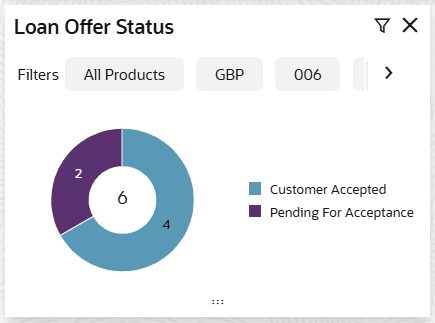
The Loan Offer Status widget allows the logged-in user, who could be a Loan Officer or a Loan Head, to view the status of the loans for which offers
have been made for their branch.
- On Home screen, click Dashboard.The Loan Offer Status widget displays in Dashboard screen.In a pie chart reveals the numbers and the value of the loan offers for the below mentioned status:
- Bank Reject
- Customer Accepted
- Pending for Acceptance
- Customer Rejected
- Click
 icon to filter the data.The available options are:
- Currency
- Branch
- Sub-Products
- Period
- Select Month
By default, the system displays the status for the current month, logged-in branch and the base currency of the branch.
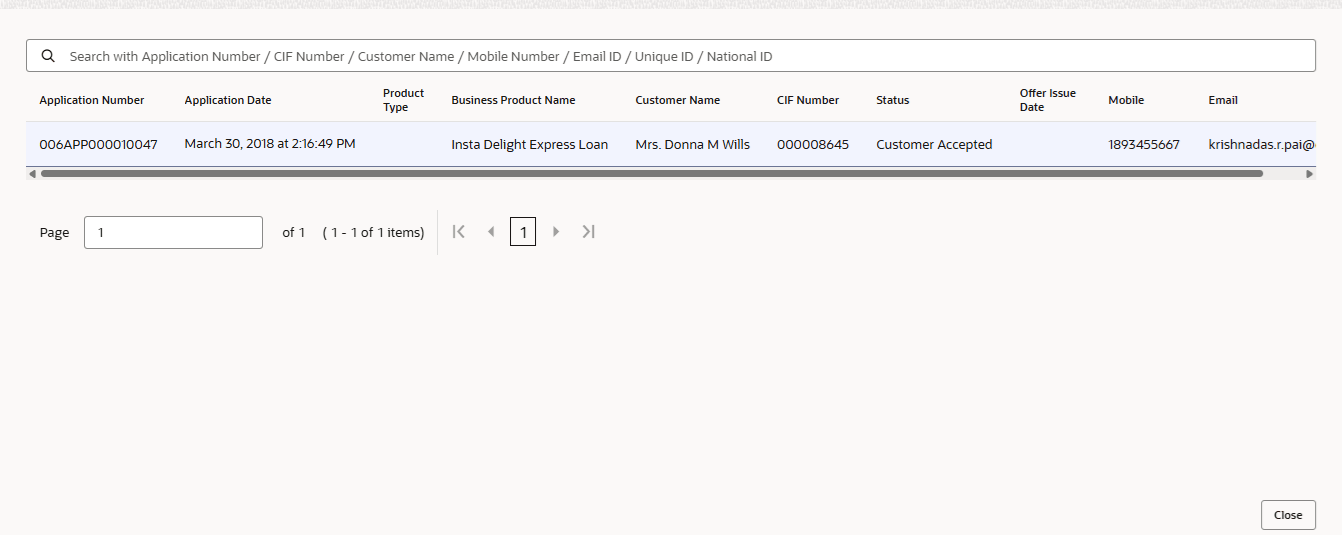
- Click on hyper-linked number to redirect to the All Applications screen.The All Applications screen displays a drill-down view that shows the list of applications.For more information on fields, refer to the field description table.
Figure 1-11 All Applications - Loan Offer Status
Table 1-6 All Applications – Field Description
Field Description Application Number Displays the application reference number. Application Date Displays the application date. Product Type Displays the type of product. Business Product Name Displays the name of the business product. Customer Name Displays the customer name. CIF Displays the CIF number. Status Displays the status of the application. Offer Issue Date Displays the offer issue date. Mobile Displays the mobile number. Email Displays the Email ID. For more information about the All Applications screen, refer to the My Applications topic.