2.5.1 Funding

This topic provides the systematic instruction to view the details captured for the Funding in the Account Funding stage.

In the Application Entry stage, funding details are captured and displayed in the Funding data segment. Upon submission, the Account Funding stage is generated only when the Origination Preferences configuration is set to Manual; it is not generated for Host/Automatic processing. The Transaction Reference Number and Transaction Status in the Account Funding stage are either auto-populated or manually captured based on the configuration. Accordingly, Account Transfer triggers it in manual mode and skips it in host-based processing, and GL Account (host only) does not generate the stage as funding is handled by the host.

Note:

For more details on the Modes and the Manual/Automatic Process configuration, refer to the Configurations Guide.

During the Application Entry stage, the initial funding transaction triggers a teller transaction reference number and its status.

  1. User can acquire the Account Funding task from the FREE task screen.
    The Funding screen displays.
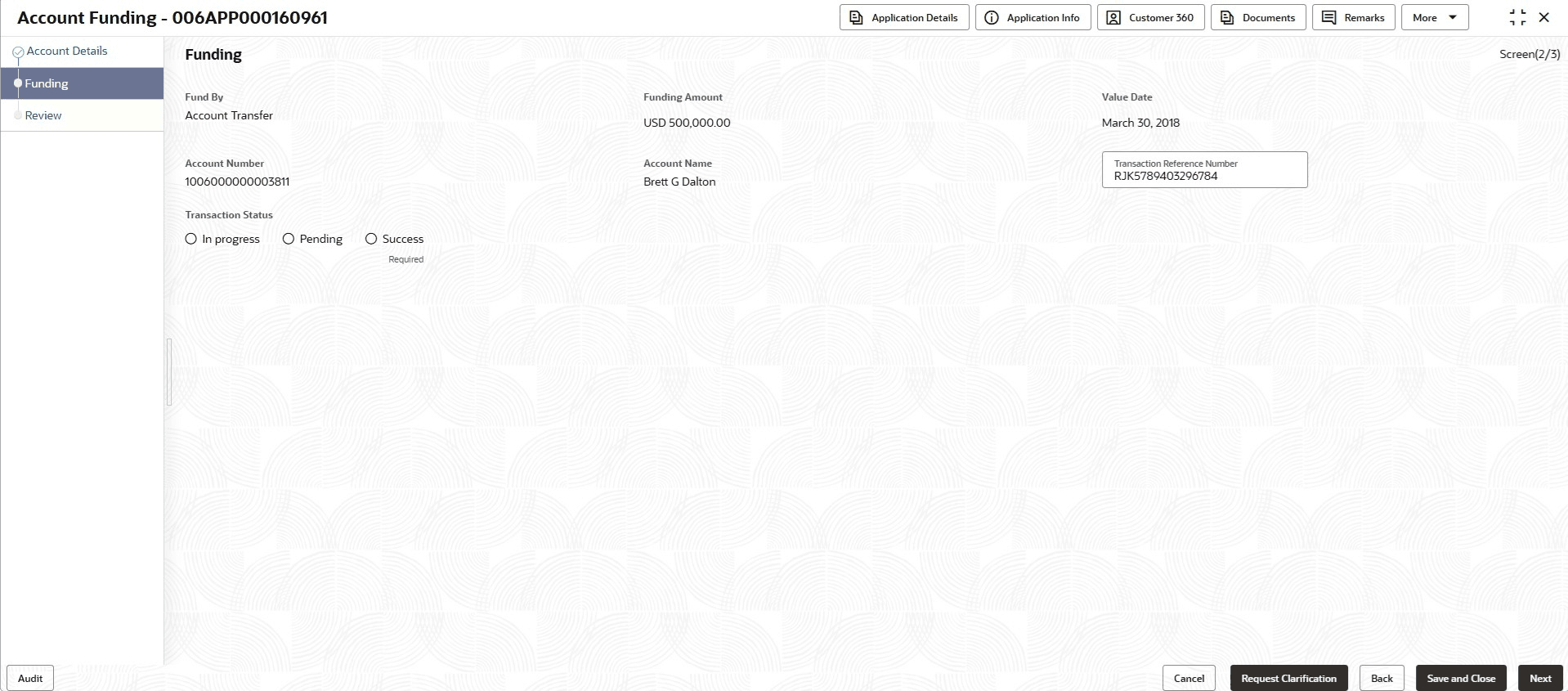
  2. Specify the fields on Funding screen.

    Note:

    The fields marked as Required are mandatory.
    For more information on fields, refer to the field description table.

    Table 2-19 Funding - Field Description

    Field Description
    Fund By Displays the Fund by option selected in the Account Details data segment in Application Entry stage.
    Funding Amount At the Application Entry stage, the Account Details data segment updates the amount of initial funding displayed.
    Value Date At the Application Entry stage, the Account Details data segment displays the value date of the initial funding update.
    Account

    Displays the account number.

    This field appears if the GL Account or Account Transfer option selected as the funding by mode.

    Account Name Displays the account name.

    This field displays only if Account Transfer is selected as the funding by mode.

    Check Number Displays the check number.

    This field displays if Account Transfer or Other Bank Check is selected as the funding mode.

    During the funding details capture in the Account Details data segment, the cheque number is displayed for Account Transfer.

    Check Date Displays the cheque date.

    This field displays if Account Transfer or Other Bank Check is selected as the funding by mode. During the funding details capture in the Account Details data segment, the cheque date is displayed for Account Transfer.

  3. Click Next to navigate to the next data segment, after successfully capturing the data. The user is required to provide all mandatory data segments and data fields for the system to validate. If any mandatory details are missing, the system displays an error message for the user to correct the information. Users must capture the mandatory data before they can proceed to the next data segment.