3.1.2.8 NEFT Inbound Payments View Summary

  1. On Homepage, specify PTSIVIEW in the text box, and click next arrow.
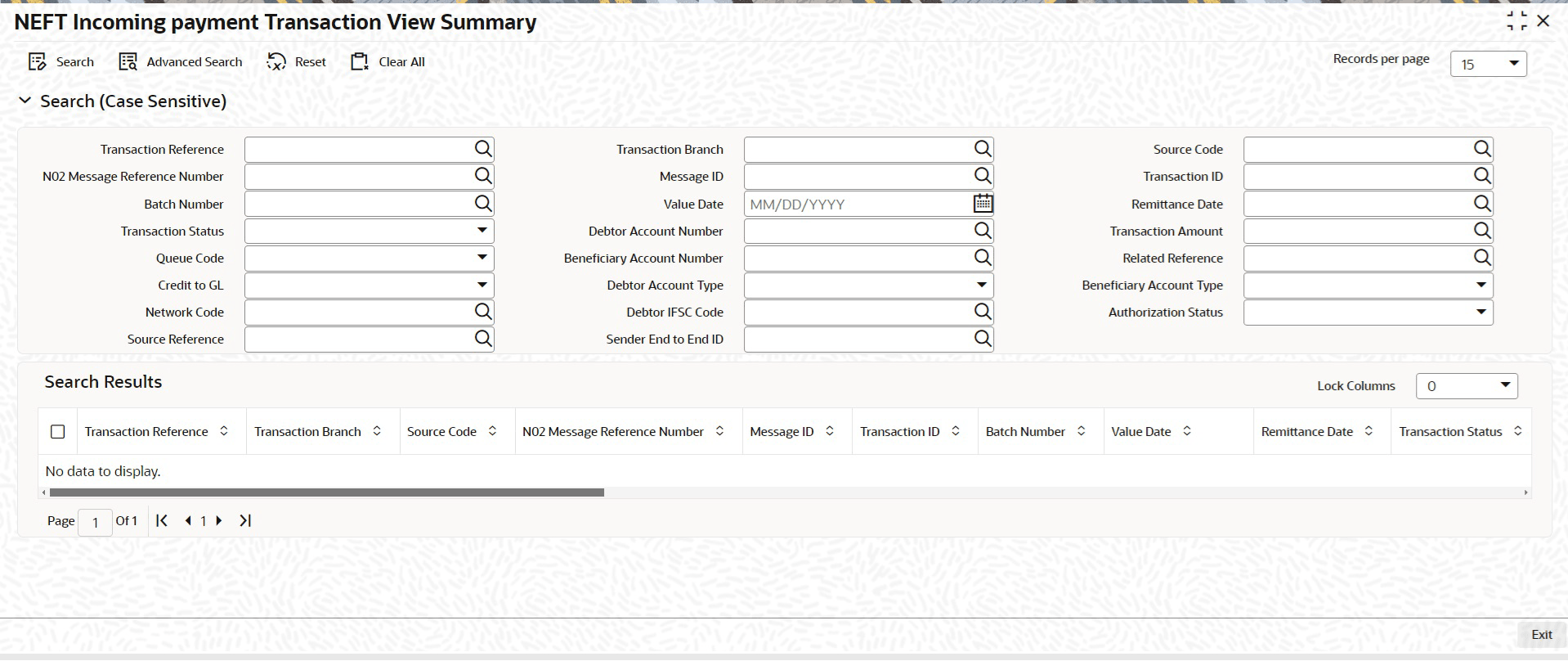
    NEFT Incoming payment Transaction View Summary screen is displayed.

    Figure 3-17 NEFT Incoming payment Transaction View Summary
    Description of Figure 3-17 follows
    Description of "Figure 3-17 NEFT Incoming payment Transaction View Summary"
  2. Search using one or more of the following parameters:
    • Transaction Reference
    • Transaction Branch
    • Source Code
    • N02 Message Reference Number
    • Message ID
    • Transaction ID
    • Batch Number
    • Value Date
    • Remittance Date
    • Transaction Status
    • Debtor Account Number
    • Transaction Amount
    • Queue Code
    • Beneficiary Account Number
    • Related Reference
    • Credit to GL
    • Debtor Account Type
    • Beneficiary Account Type
    • Network Code
    • Debtor IFSC Code
    • Authorization Status
    • Source Reference
    • Sender End to End ID
  3. Once you specified the parameters, click the Search button.
    System displays the records that match the search criteria.