2.2.19 Fedwire Drawdown Manual Match Details
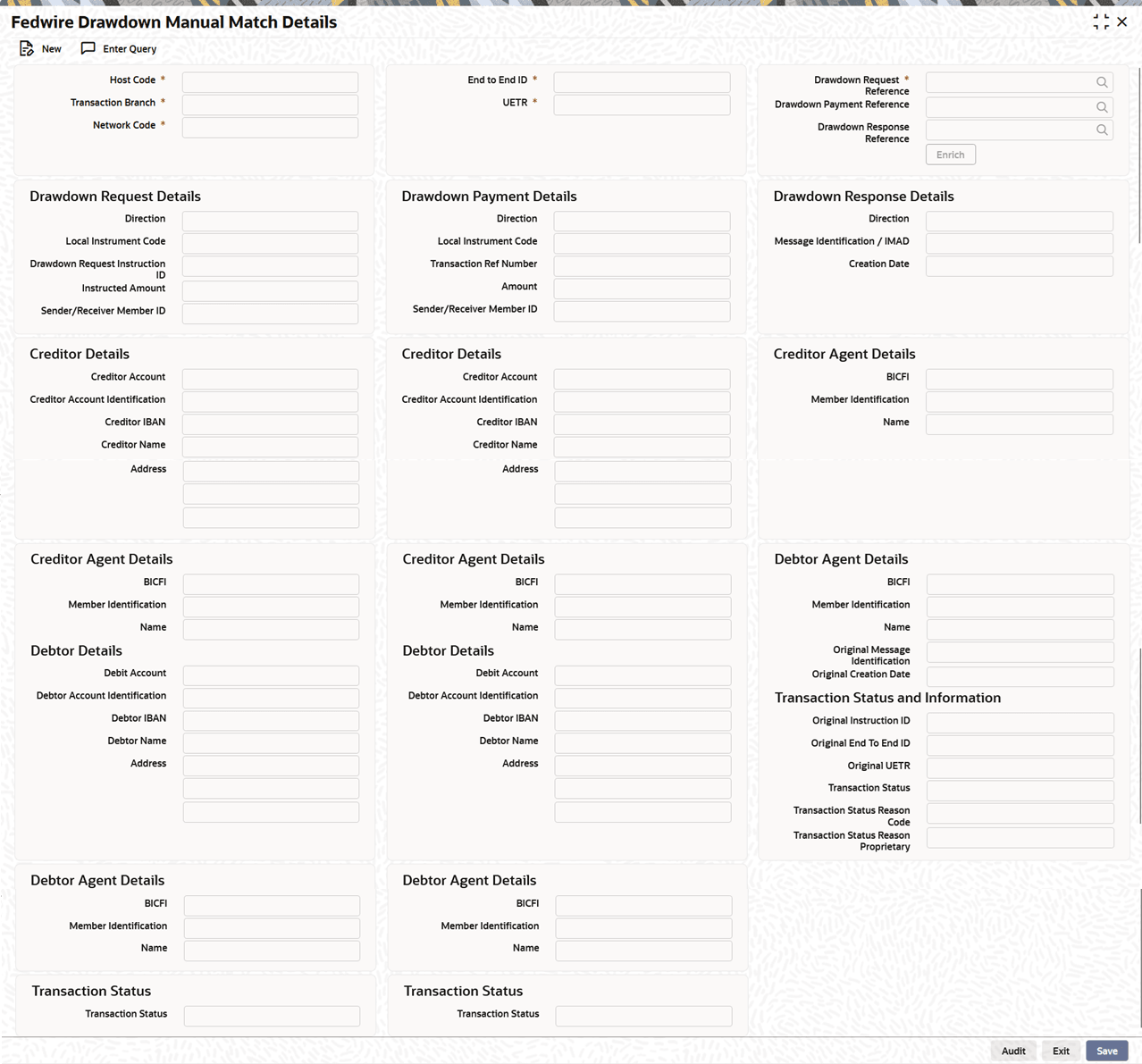
The Fedwire Drawdown Manual Match Details screen allows user to capture the manual match of MX messages-based, drawdown request, drawdown response and drawdown payment transactions.
This screen is specific to MX messages fields.
- On Homepage, specify PSDFWDMM in the text box, and click
next arrow.The Fedwire Drawdown Manual Match Details screen is displayed.
Figure 2-81 Fedwire Drawdown Manual Match Details
- On Fedwire Drawdown Manual Match Details screen, click
New to specify the fields.For more information about the fields, refer to field description table.
Table 2-67 Fedwire ISO Outbound Drawdown Request Detailed - Field Description
Field Description Host Code System defaults the Host Code of the transaction branch when the user clicks the New button. Network Code Select from the list of values for Network Code. The list of values contains all MX networks defined in Network code definition for the host. Transaction Branch System defaults the transaction branch of the user’s logged in branch on clicking New button. End to End Identification System displays the End To End Identification. UETR System displays the UETR. Drawdown Request Reference Specify the Drawdown Request Reference from the list of values. Drawdown Payment Reference Specify the Drawdown Response Reference from the list of values. Drawdown Response Reference Specify the Drawdown Payment Reference from the list of values. Drawdown Request Details When Drawdown Request Reference field is selected, following fields are auto-populated: Direction System auto-populates the Direction. Local Instrument Code System auto-populates the Local Instrument Code. Drawdown Request Instruction ID System auto-populates the Drawdown Request Instruction ID. Instructed Amount System auto-populates the Instructed Amount. Sender/Receiver Member ID System auto-populates the Sender/Receiver Member ID. Creditor Details This section displays the Creditor Details. Creditor Account System auto-populates the Creditor Account. Creditor Account Identification System auto-populates the Creditor Account Identification. Creditor IBAN System auto-populates the Creditor IBAN. Creditor Name System auto-populates the Creditor Name. Address System auto-populates the Address. Creditor Agent Details This section displays the Creditor Agent Details. BICFI System auto-populates the BICFI. Member Identification System auto-populates the Member Identification. Name System auto-populates the Name. Debtor Details This section displays the Debtor Details. Debit Account System auto-populates the Debit Account. Debtor Account Identification System auto-populates the Debtor Account Identification. Debtor IBAN System auto-populates the Debtor IBAN. Debtor Name System auto-populates the Debtor Name. Address System auto-populates the Address. Debtor Agent Details This section displays the Debtor Agent Details. BICFI System auto-populates the BICFI. Member Identification System auto-populates the Member Identification. Name System auto-populates the Name. Transaction Status This section displays the Transaction Status. Transaction Status System auto-populates the Transaction Status. Drawdown Payment Details When Drawdown Payment Reference field is selected, following fields are auto-populated. Direction System auto-populates the Direction. Local Instrument Code System auto-populates the Local Instrument Code. Drawdown Request Instruction ID System auto-populates the Drawdown Request Instruction ID. Instructed Amount System auto-populates the Instructed Amount. Sender/Receiver Member ID System auto-populates the Sender/Receiver Member ID. Creditor Details This section displays the Creditor Details. Creditor Account System auto-populates the Creditor Account. Creditor Account Identification System auto-populates the Creditor Account Identification. Creditor IBAN System auto-populates the Creditor IBAN. Creditor Name System auto-populates the Creditor Name. Address System auto-populates the Address. Creditor Agent Details This section displays the Creditor Agent Details. BICFI System auto-populates the BICFI. Member Identification System auto-populates the Member Identification. Name System auto-populates the Name. Debtor Details This section displays the Debtor Details. Debit Account System auto-populates the Debit Account. Debtor Account Identification System auto-populates the Debtor Account Identification. Debtor IBAN System auto-populates the Debtor IBAN. Debtor Name System auto-populates the Debtor Name. Address System auto-populates the Address. Debtor Agent Details This section displays the Debtor Agent Details. BICFI System auto-populates the BICFI. Member Identification System auto-populates the Member Identification. Name System auto-populates the Name. Transaction Status This section displays the Transaction Status. Transaction Status System auto-populates the Transaction Status. Drawdown Response Details When Drawdown Response Reference field is selected, following fields are auto-populated. Direction System auto-populates the Direction. Message Identification / IMAD System auto-populates the Message Identification / IMAD. Creation Date System auto-populates the Creation Date. Creditor Agent Details This section displays the Creditor Agent Details. BICFI System auto-populates the BICFI. Member Identification System auto-populates the Member Identification. Name System auto-populates the Name. Debtor Agent Details This section displays the Debtor Agent Details. BICFI System auto-populates the BICFI. Member Identification System auto-populates the Member Identification. Name System auto-populates the Name. Original Message Identification System auto-populates the Name. Original Creation Date System auto-populates the Name. Transaction Status and Information This section displays the Transaction Status and Information. Original Instruction ID System auto-populates the Original Instruction Identification. Original End To End ID System auto-populates the Original End To End Identification. Original UETR System auto-populates the Original UETR. Transaction Status System auto-populates the Transaction Status. Transaction Status Reason Code System auto-populates the Transaction Status Reason Code. Transaction Status Reason Proprietary System auto-populates the Transaction Status Reason Proprietary.
- Fedwire Drawdown Manual Match Details Summary
This topic provides the instructions to view the details of the selected records.
Parent topic: Generic Wires ISO Maintenance