25.1.1.1 Main Tab

This topic explains the Main tab of the Generic Wires ISO Outbound Investigation Response Input Detailed screen.

  1. From the main screen, select the Main Tab.
    The Main details are displayed.

    Figure 25-2 Generic Wires ISO Outbound Investigation Response Input Detailed_Main Tab
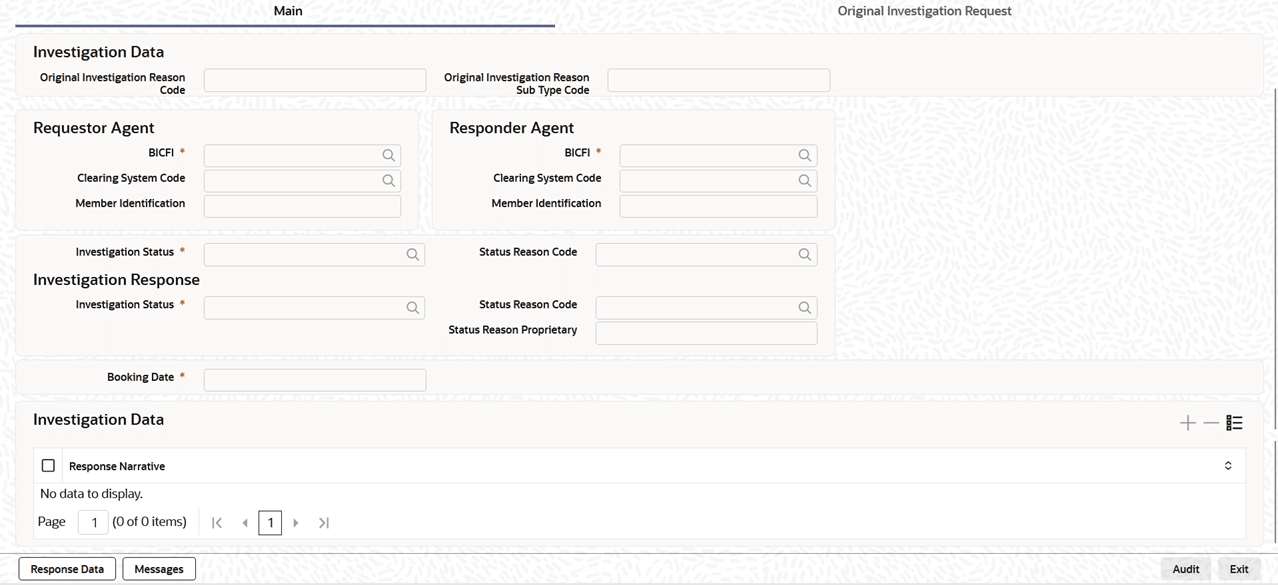


  2. On Main Tab, specify the fields.
    For more information about the fields, refer to field description table.

    Table 25-2 Generic Wires ISO Outbound Investigation Request Input Detailed_Main Tab - Field Description

    Field Description
    Investigation Data This section displays the Investigation Data.
    Original Investigation Reason Code Specify the additional information about the response in narrative form.
    Original Investigation Reason Sub Type Code Specify the Original Investigation Reason Sub Type Code.
    Requestor Agent This section displays the Requestor Agent.
    BICFI Specify the BICFI from the list of values.
    BICFI Specify the BICFI from the list of values.
    Clearing System Code

    Select from the list of values for clearing system code.

    Responder Identification Specify the clearing ID code.
    Requestor Agent This section displays the Requestor Agent details.
    BICFI Specify the BICFI from the list of values.
    Clearing System Code

    Select from the list of values for clearing system code.

    Member Identification Specify the clearing ID code.
    Investigation Response This section displays the Investigation Response details.
    Investigation Status Specify the Investigation Status from the list of values.
    Status Reason Code Specify the Status Reason Code from the list of values.
    Booking Date System defaults the booking date to current branch date on clicking New button.
    Status Reason Proprietary Specify the Status Reason Proprietary.
From this tab, navigate to Main or Original Investigation Request tab.