25.1.1.7 Process Remittance Information Tab
This topic explains the Remittance Information tab of the Generic Wires ISO Outbound Investigation Response Input Detailed screen.
- From the main screen, select the Remittance Information
tab.The Remittance Information details are displayed.
Figure 25-10 Fedwire ISO Outbound Drawdown Request Detailed - Remittance Information Tab
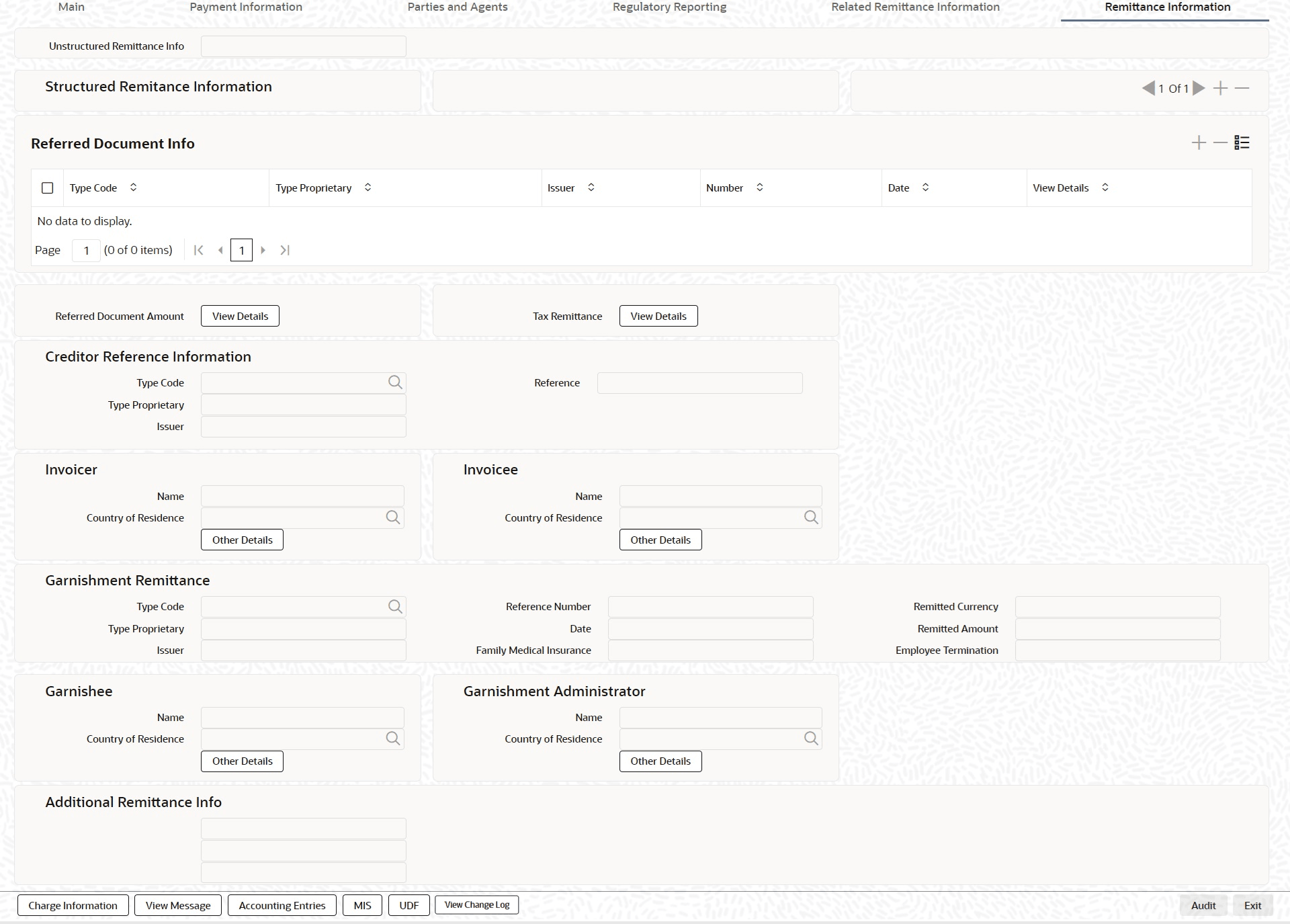
Description of "Figure 25-10 Fedwire ISO Outbound Drawdown Request Detailed - Remittance Information Tab" - On Remittance Information Tab, specify the fields.For more information about the fields, refer to field description table.
Table 25-10 Generic Wires ISO Outbound Investigation Response Input Detailed_Remittance Information Tab - Field Description
Field Description Unstructured Remittance Info Specify the unstructured remittance information. Referred Document Info This section displays the Referred Document Info details. Type Code Select from the list of values for Type Code of the Remittance. Type Proprietary Specify the Type Proprietary of the Remittance.
Note: If you input information for Type, either input Type Code or Type Proprietary.
Issuer Specify the Issuer of the Remittance. Number Specify the Number of the Remittance. Date Specify the Date of the Remittance. View Details button Click the View Details button for Referred Document Info to invoke Referred Document Information Details screen.
Creditor Reference Information This section displays the Creditor Reference Information details. Type Code Select the Type Code from the list of values. Type Proprietary Specify the Type Proprietary. Issuer Specify the issuer. Reference Specify the reference number. Invoicer This section displays the Invoicer details. Name Specify name of the initiating party. Country of Residence Specify the country of initiating party from the list of values.
Note: Select the Country of Residence (where the party physically lives) only if it differs from Postal Address/Country.
Other Details Button Click the Other Details button on Remittance Information tab under Invoicer header to process the sub-screen. This screen shows the Invoicer Details.
For more details, refer to the topic Remittance Information Tab - Other Details Button.
Invoicee This section displays the Invoicee details. Name Specify the name of the initiating party. Country of Residence Specify the country from the list of values. Note: Select the Country of Residence (where the party physically lives) only if it differs from Postal Address/Country.
Other Details Button Click the Other Details button on Remittance Information tab under Invoicee header to process the sub-screen. This screen shows the Invoicee Details.
For more details, refer to the topic Remittance Information Tab - Other Details Button.
Garnishment Remittance This section displays the Garnishment Remittance details. Type Code Select the Type Code for garnishment remittance from the list of values. Type Proprietary Specify the Type Proprietary for garnishment remittance. Reference Number Specify the Reference Number for garnishment remittance. Date Specify the date for garnishment remittance. Family Medical Insurance Specify the Family Medical Insurance for garnishment remittance. Remitted Currency Specify Remitted Currency for garnishment remittance from the list of values. Remitted Amount Specify the remitted amount for garnishment remittance. Employee Termination Specify the employee termination for garnishment remittance. Garnishee This section displays the Garnishee details. Name Specify the name. Country of Residence Specify country from the list of values. Note: Select Country of Residence (where the party physically lives) only if it differs from Postal Address/Country.
Other Details Button Click the Other Details button on Remittance Information tab under Garnishee header to process the sub-screen. This screen shows the Garnishee Details.
For more details, refer to the topic Remittance Information Tab - Other Details Button.
Garnishment Administrator This section displays the Garnishment Administrator details. Name Specify the name. Country of Residence Select the country from the list of values.
Note: Select Country of Residence (where the party physically lives) only if it differs from Postal Address/Country.
Other Details Button Click the Other Details button on Remittance Information tab under Garnishment Administrator header to open the sub-screen. This screen displays the Garnishment Administrator Details.
For more details, refer to the topic Remittance Information Tab - Other Details Button.
Additional Remittance Info Specify the additional remittance information. Referred Document Info This section displays the Referred Document Information details. Type Code Select the Type Code from the list of values. Type Proprietary Specify the Type Proprietary.
Note: If you enter information for Type, you must provide either Type Code or Type Proprietary.