25.1.2 Generic Wires ISO Outbound Investigation Response View

This topic provides the instructions to view Generic Wires ISO Outbound Investigation Response details.

  1. On Homepage, specify PSDOIRPV in the text box, and click next arrow.
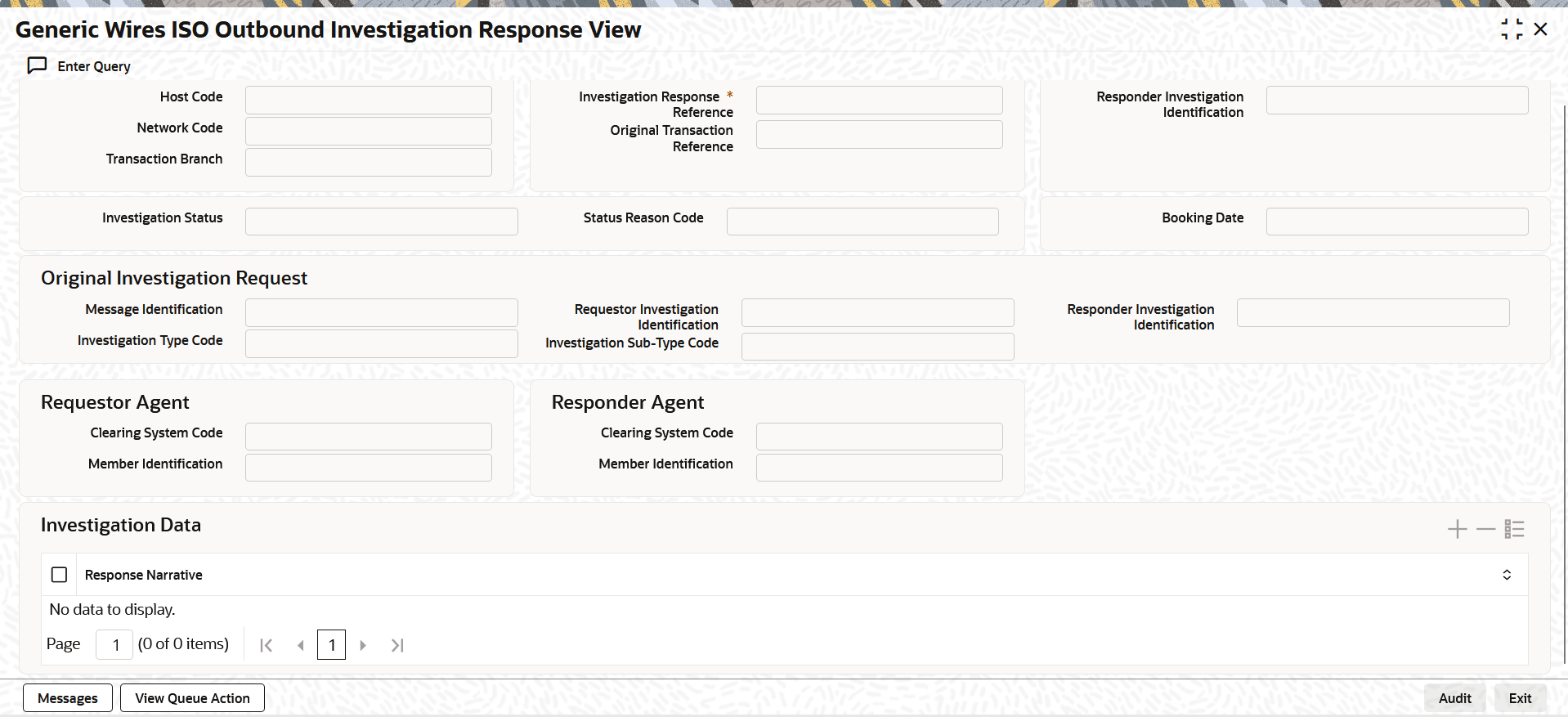
    The Generic Wires ISO Outbound Investigation Response View screen is displayed.

    Figure 25-18 Generic Wires ISO Outbound Investigation Response View


  2. Click the Enter Query button on this screen.
    The Investigation Response Reference field is enabled for the user to enter the Investigation Request Reference.
  3. Click the Execute Query button to populate the details of the transaction in the screen.

    The system displays all the fields in the below mentioned tabs based on the selected Investigation Request Reference.

    • Original Transaction Reference
    • Host Code
    • Transaction Branch
    • Network Code
    • Investigation Status
    • Status Reason Code
    • Booking Date
    • Original Investigation Request Details
    • Message Identification
    • Requestor Investigation Identification
    • Responder Investigation Identification
    • Investigation Type Code
    • Investigation Sub-Type Code
    • Requestor Agent Details
    • Clearing System Code
    • Message Identification
    • Responder Agent Details
    • Clearing System Code
    • Message Identification
    • Investigation Data Details
    • Response Narrative

    Fore more details, refer to Generic Wires ISO Outbound Investigation Response Input Detailed screen details.