3.2.1 RTGS ISO Outbound FI to FI Customer Credit Transfer Input Detailed
This topic provides the systematic instructions to perform manual booking of customer credit transfer transactions.
- On Homepage, specify PSDOT2CT in the text box, and click next
arrow.The RTGS ISO Outbound FI to FI Customer Credit Transfer Input Detailed screen is displayed.
Figure 3-126 RTGS ISO Outbound FI to FI Customer Credit Transfer Input
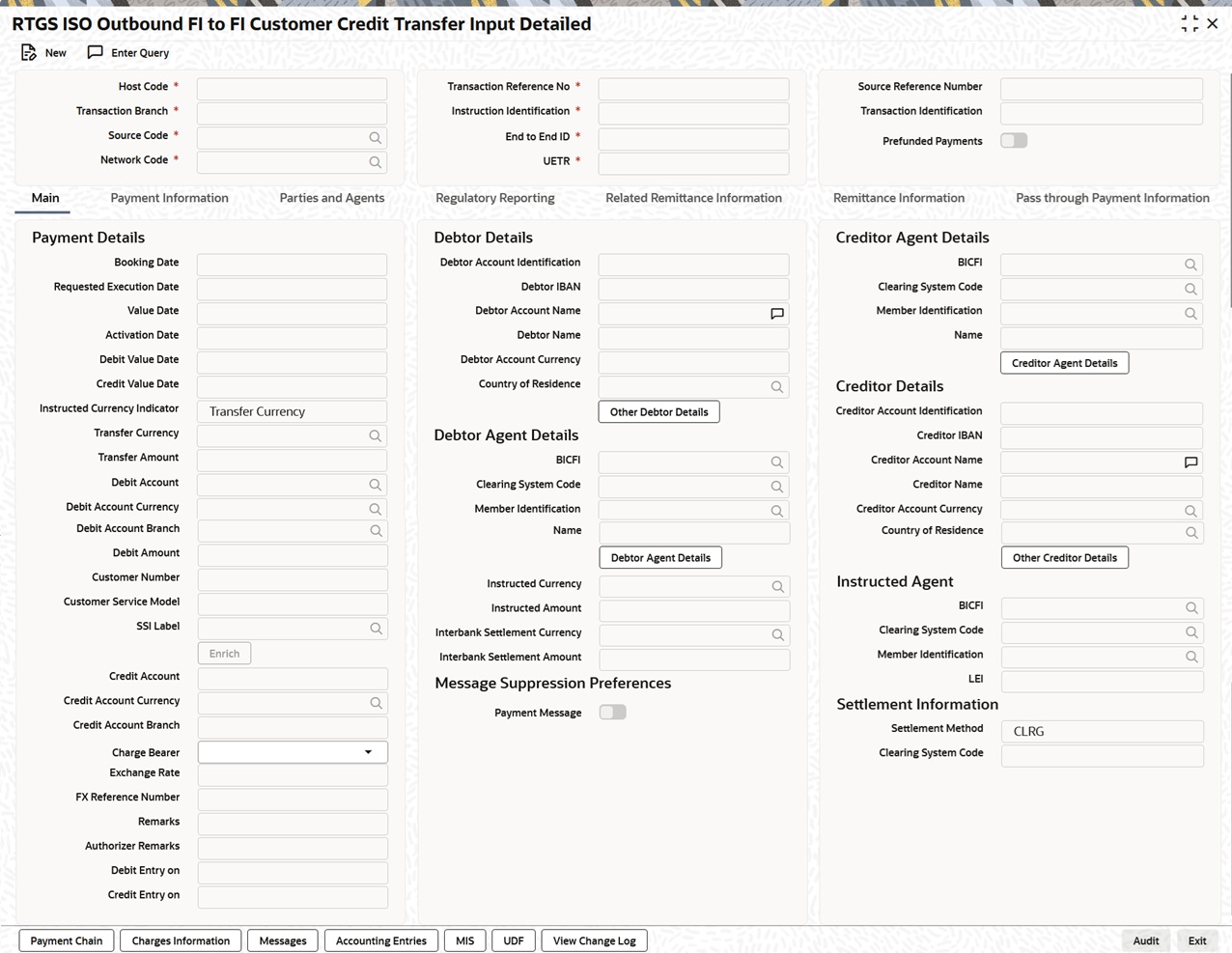
Description of "Figure 3-126 RTGS ISO Outbound FI to FI Customer Credit Transfer Input"
- Process Main Tab
This topic explains the Main tab of the RTGS ISO Outbound FI to FI Customer Credit Transfer Input Detailed screen. - Main Tab - Other Debtor Details Button
This topic explains the Other Debtor Details button in the Main tab of the RTGS ISO Outbound FI to FI Customer Credit Transfer Input Detailed screen. - Main Tab - Other Creditor Details Button
This topic explains the Other Creditor Details button in the Main tab of the RTGS ISO Outbound FI to FI Customer Credit Transfer Input Detailed screen. - Main Tab - Debtor Agent Details Button
This topic explains the Debtor Agent Details button in the Main tab of the RTGS ISO Outbound FI to FI Customer Credit Transfer Input Detailed screen. - Main Tab - Creditor Agent Details Button
This topic explains the Creditor Agent Details button in the Main tab of the RTGS ISO Outbound FI to FI Customer Credit Transfer Input Detailed screen. - Process Payment Information Tab
This topic explains the Payment Information tab of the RTGS ISO Outbound FI to FI Customer Credit Transfer Input Detailed screen. - Process Parties and Agents Tab
This topic explains the Parties and Agents tab of the RTGS ISO Outbound FI to FI Customer Credit Transfer Input Detailed screen. - Parties and Agents Tab - Other Details Button
This topic explains the Other Details buttons pertaining to each party under the Parties and Agents tab in the RTGS ISO Outbound FI to FI Customer Credit Transfer Input Detailed screen. - Parties and Agents - Other Agent Details
This topic explains the Other Details buttons pertaining to each agent under the Parties and Agents tab in the RTGS ISO Outbound FI to FI Customer Credit Transfer Input Detailed screen. - Process Regulatory Reporting Tab
This topic explains the Regulatory Reporting tab of the RTGS ISO Outbound FI to FI Customer Credit Transfer Input Detailed screen. - Process Related Remittance Information Tab
This topic explains the Related Remittance Information tab of the RTGS ISO Outbound FI to FI Customer Credit Transfer Input Detailed screen. - Process Remittance Information Tab
This topic explains the Remittance Information tab of the RTGS ISO Outbound FI to FI Customer Credit Transfer Input Detailed screen. - Remittance Information Tab -Referred Document Info - View Details Button
This topic explains the View Details button under the Referred Document Info header in the Remittance Information tab of the RTGS ISO Outbound FI to FI Customer Credit Transfer Input Detailed screen. - Remittance Information Tab -Referred Document Amount - View Details Button
This topic explains the View Details button under the Referred Document Amount header in the Remittance Information tab of the RTGS ISO Outbound FI to FI Customer Credit Transfer Input Detailed screen. - Remittance Information Tab -Tax Remittance - View Details Button
This topic explains the View Details button under Tax Remittance of Remittance Information tab in the RTGS ISO Outbound FI to FI Customer Credit Transfer Input screen. - Remittance Information Tab - Other Details Button
This topic explains the Other Details buttons under the Remittance Information tab in the RTGS ISO Outbound FI to FI Customer Credit Transfer Input Detailed screen. - Process Pass through Payment Information Tab
This topic explains the Pass through Payment Information tab of the RTGS ISO Outbound FI to FI Customer Credit Transfer Input Detailed screen. - Pass through Payment Information Tab - Other Details Button
This topic explains the Other Details buttons under the Pass through Payment Information tab in the RTGS ISO Outbound FI to FI Customer Credit Transfer Input Detailed screen. - Payment Chain Button
This topic explains the Payment Chain details of the RTGS ISO Outbound FI to FI Customer Credit Transfer Input Detailed screen. - Charges Information Button
This topic explains the Charges Information details of the RTGS ISO Outbound FI to FI Customer Credit Transfer Input Detailed screen. - Messages Button
This topic provides details of the All Messages screen. - Accounting Entries
This topic provides the systematic instructions to process the Accounting Entries screen. - MIS Button
This topic explains the MIS Details screen. - UDF Button
This topic provides details of the Fields screen. - View Change Log Button
This topic provides details of the Field Log screen. - RTGS ISO Outbound FI to FI Customer Credit Transfer Input Detailed Summary
This topic provides the instructions to view the details of the selected records.
Parent topic: RTGS ISO Outbound Transaction