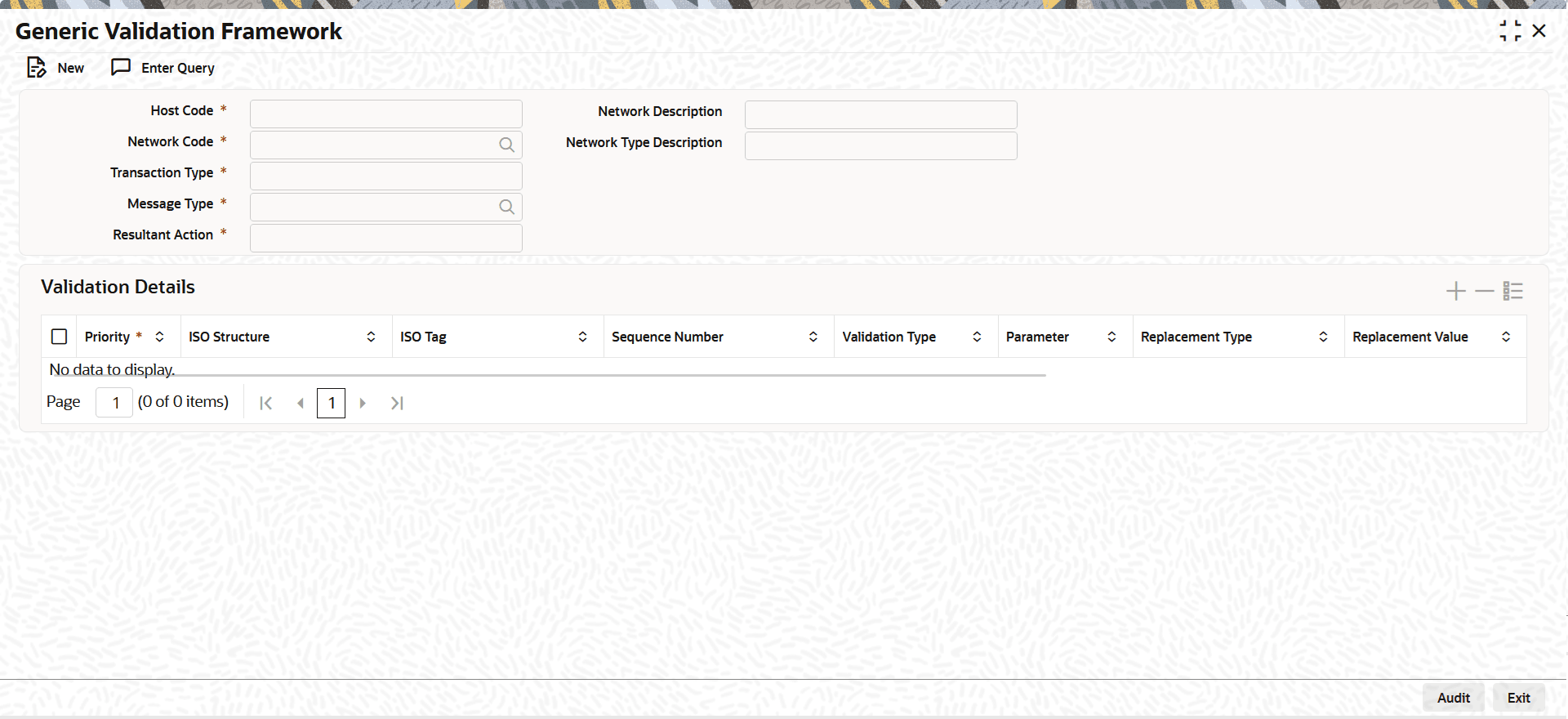
1.8.5 Generic Validation Framework Maintenance
Use this screen to maintain generic validations for ISO tags in ISO messages for the selected Network Code, Transaction Type and Message Type.
This maintenance is applicable for networks defined for Generic ACH and Generic Wires. The validations can be maintained for a combination of Network Code, Transaction Type, Message Type, and Resultant Action. For each Resultant Action, you can configure multiple validations within the same maintenance record using this screen. During transaction processing, validations are executed based on the configured rules and the corresponding resultant actions are applied. These changes apply to RTGS MX transactions.
- On Homepage, specify PMDGVALD in the text box, and click
next arrow.Generic Validation Framework screen is displayed.
- On Generic Validation Framework screen, click
New to specify the fields.For more information on fields, refer to the field description table.
Table 1-64 Generic Validation Framework - Field Description
Field Description Host Code System defaults the Host Code of transaction branch on clicking New. Network Code Specify the Network Code from the list of values. The list of values contains all the valid Networks of payment type ACH CT. This is a mandatory field. Transaction Type Select the transaction type from the drop-down list. This is a mandatory field. The list displays the following values: - Origination
- Receipts
Message Type Select the Message Type from the list of values. The list of values contains all the valid values of message type. This is a mandatory field. Resultant Action Resultant Action lists following options, if the maintained validation fails: - Cancel: This action cancels the transaction.
- Replace: If the validation fails, replacement action gets applied considering the values in the fields Replacement Type & Replacement Value.
- Exception: The transaction moves to Process Exception (PE) queue if any of the validation fails.
- Repair: The transaction moves to Repair (TR) queue on validation failure.
- Override: The transaction moves to Business Override (BO) Queue.
- Report: If the validation fails, the transaction details gets logged into a generic validation related table for reporting and the transaction proceeds with the next stage of processing.
Network Description System defaults the description of the selected clearing Network. Network Type Description System defaults the Network Type Description on the Network selected. Validation Details This section displays the Validation Details. Priority You can assign the priority number in which the maintained validation details are to be executed. ISO Structure and ISO tag Specify the ISO Structure and ISO tag from the list of values. The list of values contains the ISO structure and ISO Message Tag for which validations are to be maintained.
For more information, refer the Example on ISO Structure and ISO Tag.
Note: The ISO tags which are repetitive in nature is not allowed to link in Generic Validation Framework in 14.3.1.
Sequence Number This field is provided to maintain the sequence number if the ISO tag is having multioccurrence like party identifier tags. It is mandatory to provide the sequence number, multioccurrence is allowed for the tag. Validation Type Specify the Network Code from the list of values. The Validation types are: - Min Value
- Max Value
- Min Length
- Max Length
- Length
- Mandatory
- Null Value
- Value Equal To
- Back Value Limit Days
- Future Value Limit Days
- Clearing Code Mask Validation
- Clearing Code Validation
- Bene Name Match
- IBAN Validation
- Data Type
- Must Start With
- Must Contain
- Must not start with
- Must not contain
- Special Character Validation
- Custom
- External
Parameter Specify the Parameter based on which the validation has to be processed. Replacement Type Select the Replacement Type as follows, if the Resultant Action is maintained as Replace. - Replace - This replacement type replaces the original value of the ISO message tag with the Replacement value maintained.
- LPAD - This replacement type is allowed only if the Validation Type is 'Min Length'. The original value is left padded with the Replacement value till the length of the tag becomes equal to minimum length given in Parameter field.
- RPAD- This replacement type is allowed only if the Validation Type is 'Min Length'. The original value is right padded with the Replacement value till the length of the tag becomes equal to minimum length in Parameter field.
- Retain First -This replacement type is allowed only if the Validation Type is 'Max Length'. The original value is trimmed from the end till the length of the tag becomes equal to maximum length allowed in Parameter value.
- Retain Last - This replacement type is allowed only if the Validation Type is 'Max Length'. The original value is trimmed from the beginning till the length of the tag becomes equal to maximum length.
Replacement Value Specify the Replacement Value. Validator Name If the Validation type is Custom this field lists the valid Custom Rules maintained (existing functionality) for the Transaction type. If validation type is External, then the same field lists all the valid External Validators maintained for the Network and Transaction Type.
Note: If validation type is External, only Validator Name field and Error code field are enabled for input. Other fields like Parameter, Replacement type, Replacement value & Special character standard get disabled.
Special Character Standard Select the Special Character Standard, if the Validation Type is Special Character Validation. For more details, please refer ACH Special Character Set Maintenance.
Error Code Custom Error Codes defined in the User Defined Error Code Maintenance (Function ID: PMDERRCD) with Error Type as Generic Validations are listed in this field. It is mandatory to link an error code for every validation. It is possible to link same error code for multiple validations.
For more details, please refer User Defined Error Codes in the ACH Credit Transfer User Guide.