1.3.4 Network Preferences
- Exchange Rate Preferences
- Payment Preferences for Inbound and Outbound transactions
- Faster Payment Preferences
- Value Dating Preferences
- RTGS Outbound Preferences
- Split Accounting Preferences
- On Homepage, specify PMDNWPRF in the text box, and click next arrow.Payment Network Preferences Detailed screen is displayed.
Figure 1-43 Payment Network Preferences Detailed
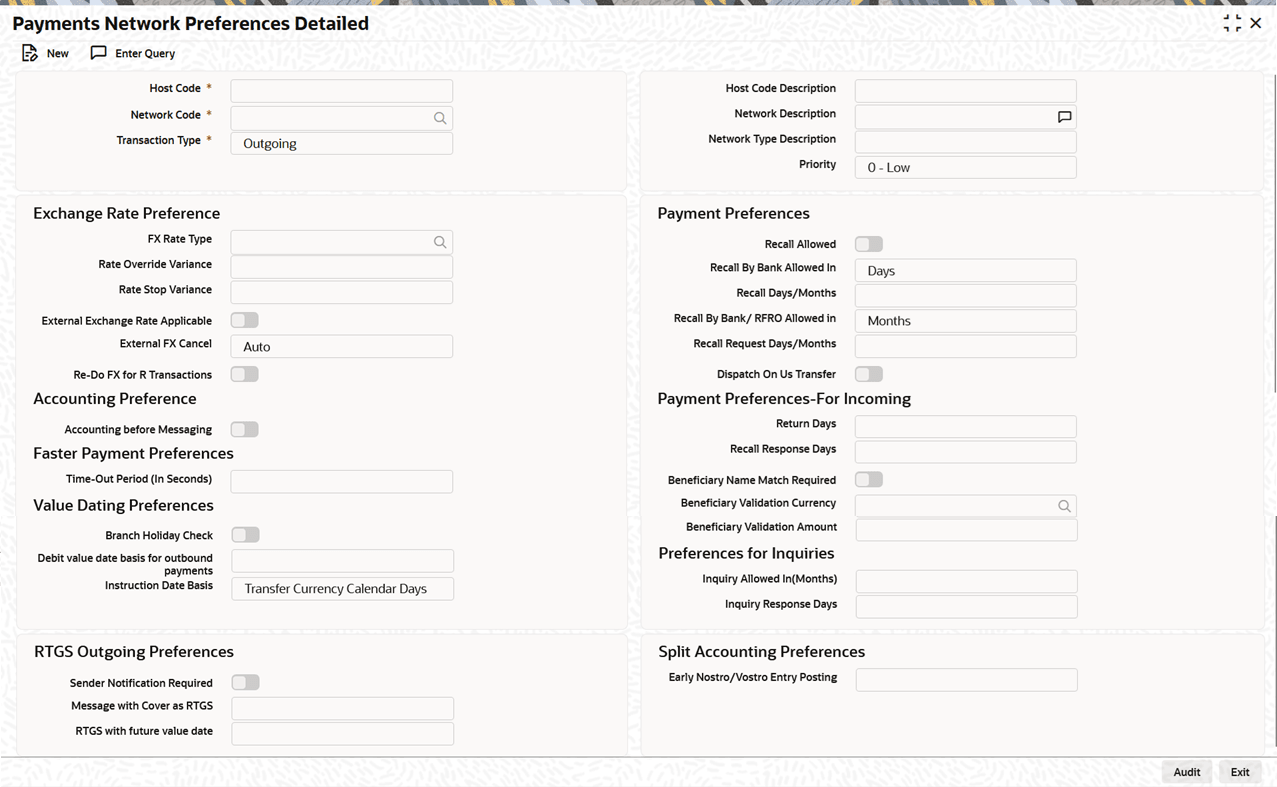
Description of "Figure 1-43 Payment Network Preferences Detailed" - On Payment Network Preferences Detailed screen, click New to
specify the fields.For more information on fields, refer to the field description table.
Table 1-25 Payment Network Preferences Detailed - Field Description
Field Description Network Code Specify the network code. Alternatively, user can select the network code from the option list. The list displays all valid network codes applicable for the logged in Host, maintained in the system. Network Description System displays the network code description for the selected network. Host Code System defaults the host code of transaction branch on clicking New. Host Code Description System defaults the description of the Host code displayed. Transaction Type Select Transaction Type from the following: - Incoming
- Outgoing (Default)
Network Type Description The system displays the Network Type Description based on the network code selected. Priority Select the priority from the drop-down values. 0 indicates Low priority and 9 indicates High priority. Different priorities can be set for the networks and payment types.
Exchange Rate preferences This section displays the Exchange Rate preferences. FX Rate Type Specify the FX rate type. Alternatively, you can select the FX rate type from the option list. The list displays all open and authorized exchange rate types maintained in the system. Rate Override Variance Specify the rate override variance. If the variance between the exchange rate manually provided for a payment with internal rate exceeds the override limit specified, then the system displays a message and the transaction is saved.
Rate Stop Variance Specify the rate stop variance. The system displays an error message if the exchange rate variance exceeds the stop limit. External Exchange Rate Applicable Check this box to receive the exchange rate from the external system. External FX Cancel Specify the External FX cancel option for the selected network. Options are - Auto /Manual. System defaults the value as Auto. Note:
- On cancellation of queue or rollover of a transaction which has completed external FX processing, a reversal request is handed off to FX system automatically, when Auto option is selected.
- On queue cancellation or rollover of a cross-currency transaction with External FX reference, the transaction is moved to a FX Unwind Queue before processing the action, when the External FX Cancel mode is chosen as Manual.
Re-Do FX for R Transactions Check this box if foreign exchange has to be recomputed for the R/return transactions. When this box is not checked, the old FX values computed are picked up. Payment Preferences This section displays the Payment Preferences. Recall Allowed Select this check box to indicate that recall of the payment is permitted. Recall By Bank Allowed In Select the time unit used to specify the recall period of the bank from the drop-down list: - Days (Default)
- Months
Recall Days/Months Specify the recall period (in days or months) during which a payment can be recalled. This value is used to validate recall requests. Days are counted as branch business days, and months are counted as calendar months. Recall By Bank/ RFRO Allowed in Select Recall By Bank/ RFRO Allowed in from the following: - Days
- Months (Default)
Recall Request Days/Months Specify the number of days/months within which the Recall request is allowed. If an originator name is provided on the recall, it is treated as a customer recall request and validated against this allowed period.
Dispatch On Us Transfer Select this check box to indicate that Dispatch On Us Transfer is allowed for payments. Accounting Preference This section displays the Accounting Preference. Accounting before Messaging Check the preference for accounting during the Outbound faster payment transaction processing. If the Accounting before Messaging field is checked in Network Preference (PMDNWPRF) for the Network code with Transaction Type Outgoing combination, then accounting handoff gets triggered first and then faster payment message is generated.
If the Accounting before Messaging field is not checked in Network Preference (PMDNWPRF) for the Network code with Transaction Type Outgoing combination, then faster payment message gets generated and sent to the clearing network. On receiving the response from the clearing network, the accounting entries are posted.
Check the preference for accounting during the Outbound Cross Border/RTGS transaction processing.
If the Accounting before Messaging checkbox is selected in Network Preference (PMDNWPRF) for the Network code with Transaction Type Outgoing combination, then accounting handoff generation and payment message generation happen in parallel. But the generated message handed off only after receiving a positive accounting response.
If the Accounting before Messaging field is unchecked in Network Preference (PMDNWPRF) for the Network code with Transaction Type Outgoing combination, then accounting handoff generation, the payment message generation and handoff all happen in parallel.
Faster Payment Preferences This section displays the Faster Payment Preferences. Time-Out period (In Seconds) Specify time out period in seconds. Time out period is allowed to be maintained for both Outbound and Inbound with different time in seconds. For Outbound payments, investigation message is generated after time out period. For Inbound transaction, the system validates whether the message is received after the time out seconds or the response is sent within the time out seconds. If the validation fails, then reject response is sent.
Payment Preferences-For Incoming This section displays the payment preferences for incoming. Return Days Specify the number of days within which the payment originating bank has to return an Inbound payment. Recall Response Days Specify the number of days within which the beneficiary bank has to respond to an Inbound recall request. Recall days is considered as working days based on Network holidays.
System validates if the Recall days is applicable for payment types SCT Inst payment or ACH with transaction type as Outbound. Recall response days is applicable to SCT Inst payment or ACH payment types with transaction type as Inbound.
Beneficiary Name Match Required Check this box to match the beneficiary name with the customer account name linked to the beneficiary account for Inbound payments. Beneficiary Validation Currency Select the Beneficiary Validation Currency from the list of values. Beneficiary Validation Amount Specify the beneficiary validation amount. Value Dating Preferences This section displays the Value Dating Preferences. Branch Holiday Check Check this flag to indicate that Branch holiday check should be done for activation date as part of processing of the Outbound or Inbound payment. Debit value date basis for outbound payments Select the Debit value date basis for outbound payments from the following: - Activation Date - When the debit value date basis is Activation Date, then debit value date is the same as the derived Activation date.
- Instruction Date - If the basis is instruction date, the debit value date is derived as Instruction date – Debit float days.
Instruction Date Basis Select Instruction Date Basis from the following: - Transfer Currency Calender Days
- Transfer Currency Working Days
Preferences for Inquiries This section displays the Preferences for Inquiries. Inquiry Allowed In (Months) Specify Inquiry Allowed In Months, irrespective of the transaction type selected. Inquiry Response Days Specify Inquiry Response Days, irrespective of the transaction type selected. RTGS Outbound Preferences This section displays the RTGS Outbound Preferences. Sender Notification Required Check this flag to indicate that for an RTGS network MT012 flag is required for every payment message. Message with Cover as RTGS Select Message with Cover as RTGS from the following: - Release Immediately
- Release on MT012 receipt. This appears if the Sender Notification Required flag is checked in Network preferences.
RTGS with future value date The options are Release immediately or Release on value date. Select the required one.
Note:- If RTGS message is generated with future value date, it will be released immediately or on value date based on the preference maintained in PMDNWPRF.
- For an outbound cross-border transaction, if the cover is sent as RTGS message, the related MT103 payment message will be released immediately only if the preference Message with Cover as RTGS option is Release Immediately.
- If the preference is maintained as Release on MT012 receipt, only cover message will be released first. The related MT 103 message will be held in the Outbound message browser.MT103 will be released only on receipt of MT012 sender notification for the cover RTGS message.
- MT 103 message status would be Cover acknowledgment Rejected status and Accounting entries would be reversed.
Split Accounting Preferences This section displays the Split Accounting Preferences. Early Nostro/Vostro Entry Posting Select the values from either Yes or No. This field is allowed only if the Network Type is either Cross Border MT or RTGS MT and Transaction Type is Incoming.
Parent topic: Network & Source Maintenances