1.1.4 US ACH Network Preference
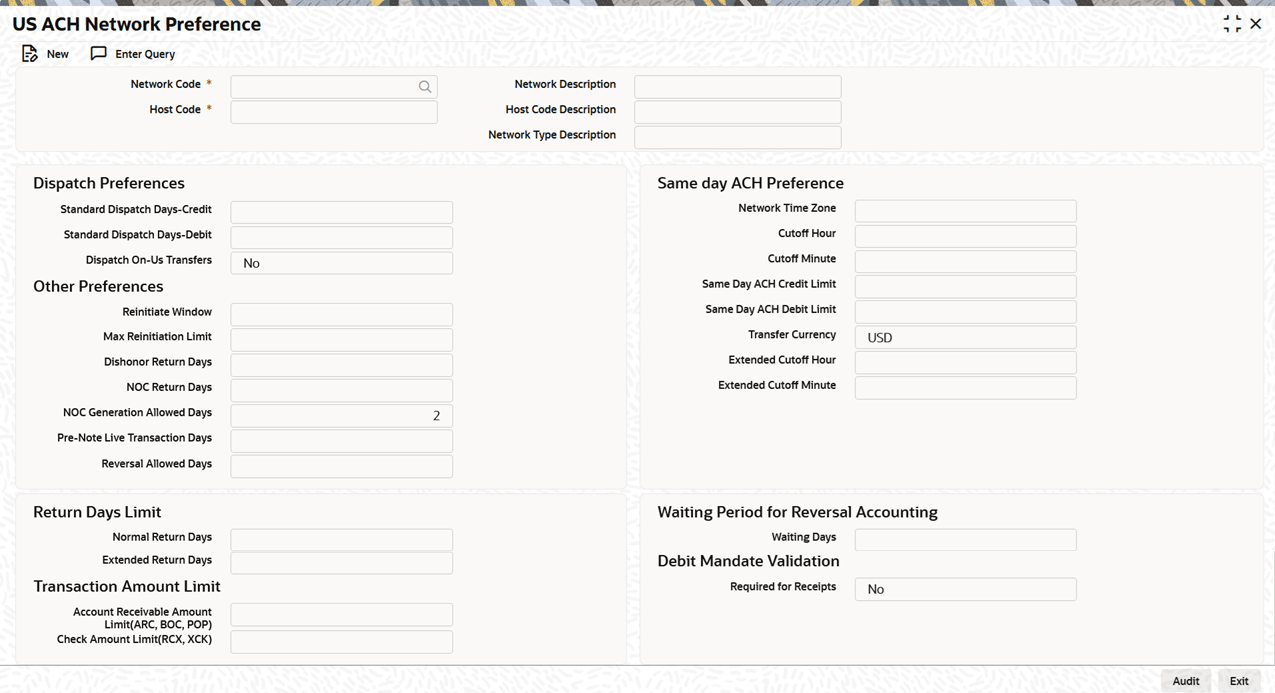
Use US ACH Network Preference screen to capture ACH Network cutoff time for same day and extended ACH transactions.
- On Homepage, specify PNDNWPRF in the text box, and click next
arrow.The US ACH Network Preference screen is displayed.
- On US ACH Network Preference screen, click New to
specify the fields.For more information about the fields, refer to field description table.
Table 1-9 US ACH Network Preference - Field Description
Field Description Network Code Select the appropriate ACH Network Code from the list of values. Network Code Description System defaults the description on the Network Code selected. Network Type Description System defaults the Network Type Description on the Network Code selected. Host Code System defaults the Host Code of transaction branch when the user clicks the New button. Host Code Description System defaults the description on the Host Code selected. Other Preferences This section displays the Other Preferences details. Reinitiate Window Specify the Reinitiate Window. Max Reinitiation Limit Specify the maximum reinitiation limit. Dishonor Return Days Specify the Dishonor Return Days. NOC Return Days Specify the NOC Return Days. NOC Generation Allowed Days System displays the allowed days for NOC generation. Pre-Note Live Transaction Days Specify the Pre-Note Live Transaction Days. Reversal Allowed Days Specify the number of days within which a reversal is allowed. Dispatch On-Us Transfers Determines whether on-us transfers should be processed internally or dispatched through the external ACH Network. By default, the system sets this value to No. Network Time Zone This field displays the Time Zone of the current host. Same day ACH Preferences This section displays the Same day ACH Preferences details. Cutoff Hour Specify the Cuttoff Hour for Same day transactions. Cutoff Minute Specify the Cuttoff Minute for Same day transactions. Same Day ACH Credit Limit Specify the Same Day ACH Credit Limit. Same Day ACH Debit Limit Specify the Same Day ACH Debit Limit. Process as Standard ACH after Cutoff Time Select Yes or No from the drop-down list.
This option indicates whether transactions are to be processed as Standard ACH after Same day cutoff time.
If Process as Standard ACH after Cutoff Time is enabled, transactions received after the Same day cutoff and before the Standard cutoff are processed as Standard transactions on the same day, with the Effective Date updated to the next Banking Day.
If this preference is not enabled, transactions received after the cutoff time are routed to the warehouse queue and processed as same day transactions on the next Banking Day.
Standard ACH Preferences This section displays the Standard ACH Preferences details. Cutoff Hour Specify the Cuttoff Hour for Standard ACH transactions. Cutoff Minute Specify the Cuttoff Minute for Standard ACH transactions. Dispatch Days-Credit Specify the Dispatch Days for ACH Credit transactions. For example, if you set it to 1 day, Standard ACH Credit transactions will be dispatched at least one banking day before the effective date. Dispatch Days-Debit Specify the Dispatch Days for ACH Debit transactions. For example, if you set it to 1 day, Standard ACH Debit transactions will be dispatched at least one banking day before the effective date. Earliest Dispatch Days for Credits Specify the Earliest Dispatch Days for Credits. If it is set to 2, Standard ACH Credit transactions can be dispatched earliest by two banking days from the effective date. Other Preferences This section displays the Other Preferences details. Return Days Limit This section displays the Return Days Limit details. Normal Return Days Specify the normal return days. Extended Return Days Specify the extended return days. Waiting Period for Reversal Accounting This section displays the Waiting Period for Reversal Accounting details. Waiting Days Specify the waiting days. This is to be maintained as 0 if the reversal accounting is to be posted on reversal day itself. Debit Mandate Validation This section displays the Debit Mandate Validation details. Required for Receipts Select Yes or No from the drop-down list.
This option indicates whether mandate validation is required for debit receipts. The default value is No.
Transaction Amount Limit This section displays the Transaction Amount Limit details. Account Receivable Amount Limit(ARC, BOC, POP) Specify the maximum amount that can be received for transactions initiated for Accounts Receivable Conversion (ARC), Back Office Conversion (BOC), or Point-of-Purchase (POP) payment method. Check Amount Limit(RCX, XCK) Specify the maximum transaction amount permitted for check-based payments initiated for Represented Check Entry (RCX) or Destroyed Check Entry (XCK).
- US ACH Network Preference Summary
This topic provides the instructions to view the details of the selected records.
Parent topic: US ACH Maintenance