Main Tab
This topic provides the systematic instructions of the Main tab. This tab is displayed in the Generic Wires ISO Outbound FI to FI Payment Cancellation Request View screen.
Navigate to the main screen Process Generic Wires ISO Outbound FI to FI Payment Cancellation Request View.
- From the main screen, select the Main tab.The Main tab is displayed.
Figure 9-10 Generic Wires ISO Outbound FI to FI Payment Cancellation Request View - Main Tab
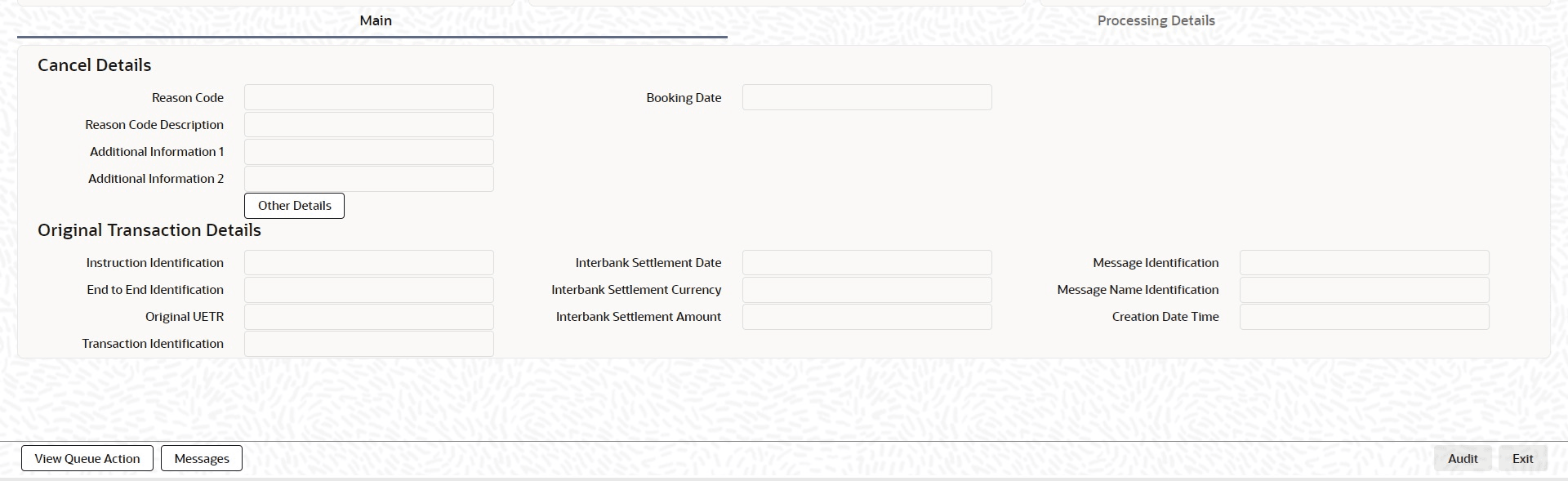
Description of "Figure 9-10 Generic Wires ISO Outbound FI to FI Payment Cancellation Request View - Main Tab" - In the Main tab, specify the fields. For more
information about the fields, refer to field description below:
Table 9-10 Generic Wires ISO Outbound FI to FI Payment Cancellation Request View_Main Tab - Field Description
Field Description Cancel Details This section displays the cancel details. The following fields are displayed in this section: - Reason Code
- Booking Date
- Reason Code Description
- Additional Information 1
- Additional Information 2
Other Details Click Other Details from the Generic Wires ISO Outbound FI to FI Payment Cancellation Request View (PSDOCNCV) screen to launch the Cancel Transaction Details screen. For more details, refer Other Details section. Original Transaction Details This section displays the cancel details. The following fields are displayed in this section: - Instruction Identification
- Inter Bank Settlement Date
- Message Identification
- End to End Identification
- Inter Bank Settlement Currency
- Message Name Identification
- Original UETR
- Inter Bank Settlement Amount
- Creation Date Time
- Transaction Identification
From Main tab, navigate to
Processing Details tab.