1.4.1 Inbound US ACH Acknowledgement Receipt Summary
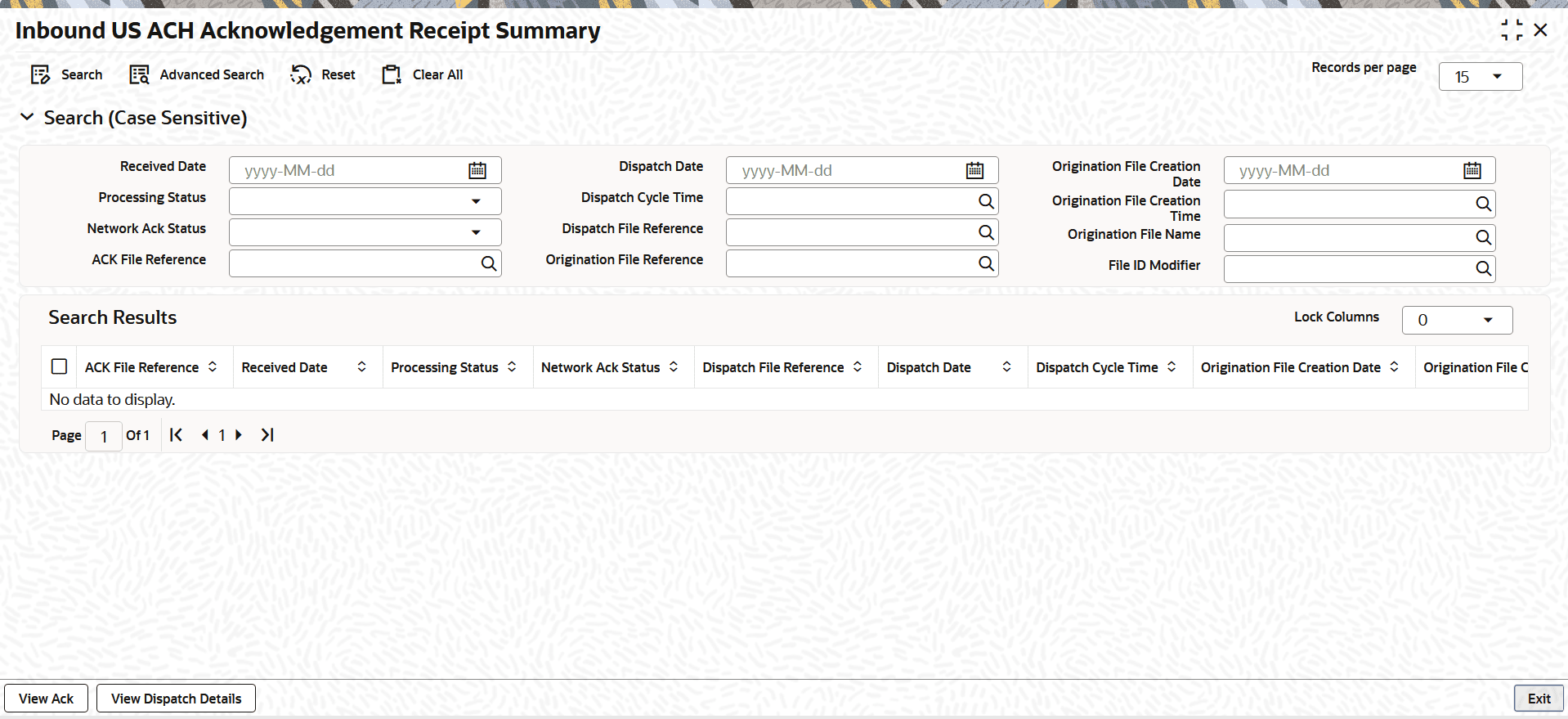
The Inbound US ACH Acknowledgement Receipt Summary screen allows users to view the details of acknowledgement (ACK) files that are uploaded from File Envelope screen or through API.
- On Homepage, specify PNSACKSM in the text box, and click
next arrow.The Inbound US ACH Acknowledgement Receipt Summary screen is displayed.
Figure 1-129 Inbound US ACH Acknowledgement Receipt Summary
- On the Inbound US ACH Acknowledgement Receipt Summary
screen, search using one or more of the following parameters:
Table 1-96 Inbound US ACH Acknowledgement Receipt Summary - Field Description
Field Description Received Date Date the ACK file was uploaded. Processing Status Indicates if the ACK file matches the dispatch file. The options include:- Matched
- Unmatched
- Exception
Note: Dispatch details and Origination file details are only available when the Processing Status is Matched.
Network ACK Status Indicates the mapped status in the system corresponding to the ACK status received in the ACK file. The available drop-down values are:- Accepted
- Partially Accepted
- Pended
- Rejected
ACK File Reference Reference number for the ACK file, as generated on the File Envelope screen or in the API response. Dispatch Date Date the dispatch file was sent to the Federal Reserve (FED) Operator. Dispatch Cycle Time Time the dispatch file was sent to the Federal Reserve Operator. Dispatch File Reference System-generated reference for the dispatch file. Origination File Reference Reference for the origination file linked to the dispatch file. Origination File Creation Date Creation date of the origination file. Origination File Creation Time Creation time of the origination file. Origination File Name Name of the origination file. File ID Modifier File ID modifier as specified in the ACK file. - Once you specified the parameters, click the Search button.The system displays the records that match the search criteria.
- Double-click a record or click the Details button after selecting a record to view the detailed screen.
- User can perform the following actions from the Inbound US ACH
Acknowledgement Receipt Summary screen.
Table 1-97 User Action and Description
User Action Description View Ack This opens a sub-screen displaying the ACK file contents as received from the ACH operator.
View Dispatch Details Available only when the Processing Status is Matched.
If you select this option for an Unmatched or Exception status, the system will display an error: This option is allowed only for Processing Status Matched.
If the ACK file matches the Dispatch file, the system displays the Dispatch Reference Number generated for the dispatched file. When you select this option, the system launches the US ACH Dispatch Log Summary (Function ID: PMSDNLOG), retrieves the record based on the Dispatch Reference Number, and displays the corresponding details of the ACK file for your review.
- View Acknowledgement
This topic provides step-by-step instructions to view ACK files and related error details using the View ACH Acknowledgement screen. - View Dispatch Details
This topic explains how to view dispatch details only when the processing status is matched.
Parent topic: US ACH Payment Browser