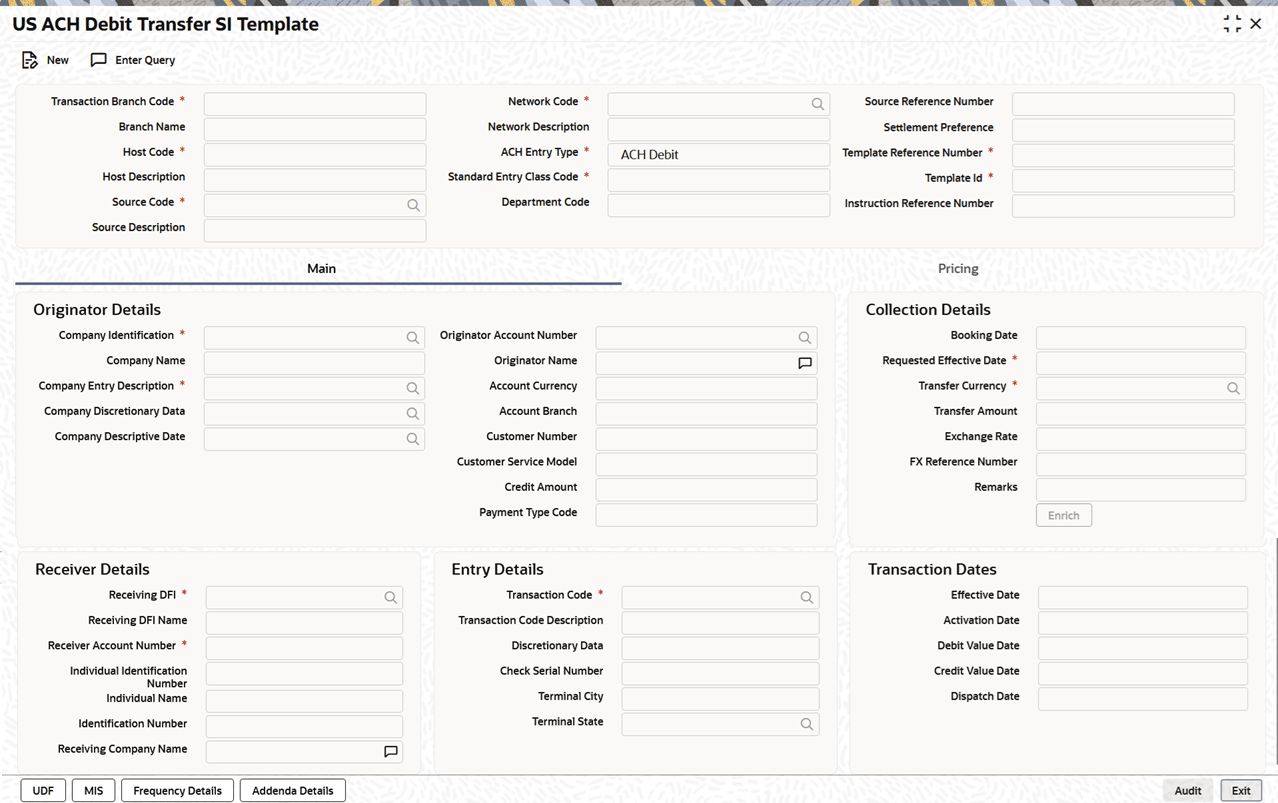
| Transaction Branch
Code |
System defaults the transaction branch to
the user’s branch. |
| Branch Name |
System defaults the corresponding branch
name. |
| Host Code |
System defaults the Host
Code of transaction branch when the user
clicks the New button.
|
| Host
Description |
System defaults the description of the
Host Code.
|
| Source Code |
If only one source code with the type
Manual Input is maintained in PMDSORCE,
the system defaults it automatically. In all other cases,
the user must select the source code from the LOV.
|
| Source
Description |
System defaults the description of the
Source Code.
|
| Account
Currency |
Specify the Account
Currency.
|
| Network Code |
System defaults the network code if only one
network of type US ACH is defined in PNDNWPRF.
Otherwise, all networks of type US ACH are listed for
selection.
|
| Network
Description |
System defaults the description of the
network code. |
| ACH Entry
Type |
This field is defaulted to ACH
Debit, indicating that SI template is a US
ACH Debit transfer.
|
| Standard Entry Class
Code |
Select the required SEC codes from the
drop-down list. The available options are:
|
| Source Reference
Number |
If the user does not enter a source
reference number, the system defaults it to the Template
Reference upon saving.
|
| Pre Notification
Entry |
Enable this flag to specify whether a
pre-notification message should be generated. |
| Zero Dollar
Entry |
Enable this flag to indicate that
transactions or entries with a value of zero dollars are
allowed and should be processed or recorded in the
system. |
| Settlement
Preference |
Select the required Settlement
Preference from the drop-down list. The
available options are:
|
| Template Reference
Number |
System displays the Template
Reference Number. This is system generated
unique reference number.
|
| Template Id |
Specify the Template
Id.
|
| Instruction Reference
Number |
System displays the Instruction
Reference Number.
|