3 File Upload
The file upload process facilitates users in submitting flat files containing pre-filled data to initiate the migration process. Flat files are specific to entities. This streamlined approach ensures a seamless and accurate transfer of information during the data migration.
To initiate file upload:
- On the Home screen, click Loan Services. From Loan Services, click Data Migration.
- From Data Migration, click
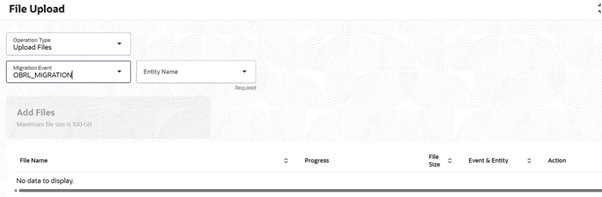
File Upload.The File Upload screen is displayed.The File Upload screen allows users to:
- Upload File - To upload a new file.
- View File - To view previously uploaded files.
- Select the operation type as Upload File from the drop-down list.
- Select Migration Event as OBRL_Migration .
- Select Entity Name from the drop-down
list. The available options and their applicability with
respect to the respective data being mandatory or
conditional are detailed below :
Table 3-1 Entity Name and their applicability
Entity Details Mandatory/Optional Description Disbursement Instructions Optional This entity is about the disbursements that has happened on the account in question. It also provides information for scheduled disbursements, if any. Disbursement Settlement Details Optional This entity is an extension of the previous one on disbursement wherein it provides the settlement data, as applicable to the said account. Bundle Details Optional A product may have a bundle associated to it. The account may or may not be extended the bundle benefits, depending on the bundle definition and the customer involved. This entity provides a comprehensive information on the bundle associated to the account in terms of its contents and applicability. Insurance Details Optional Insurance is one of the many components applicable to a loan product. If applicable, this entity provides details on the type of insurance and related aspects. AccountMaster Mandatory This entity provides a complete repository of the loan account in terms of the branch, product segment and product that it falls under, alongside further details in the form of currency and associated party. Account Component Mandatory An account will have multiple components derived from the Product. This data represents the applicability of the respective component to the account and related details in terms of interest basis, accrual applicability, waiver – to name a few. Interest Spreads Mandatory A product can have multiple spreads, an account may or may not inherit all the applicable spreads depending on the applicable circumstances, the said entity provides details regarding all the relevant spreads for the account. Bill Details Optional As the name suggests, this entity provides comprehensive information on the bills generated for the customer with the due dates and amounts. Bill Transaction Details Optional This entity is an extension of the Bill details data wherein it provides further information on the bills getting satisfied on the customer making a payment against the same. Additional Preference Details Optional - InterestPreferences Mandatory Interest preferences are details with respect to the applicability of interest rates and index to the account considering the type of index, rate application and refresh frequency along with the final rate. CommonSettlementDetails Mandatory Details regarding the settlement and liquidation mode for transactions like disbursement and repayment are provided under this entity. CollateralDetails Optional Details regarding the collateral applicable to the account during disbursement are stored in this entity. The collateral details are in the form of collateral particulars and the amount that is considered for the loan account in question. AccountDisbursement Mandatory This entity provides details about the disbursement taken place on the account along with additional details on the transaction date and amount considering other components that may be involved during disbursement. AccountPartyRelationship Mandatory This entity, as the name suggests provides details about the party’s relationship with the account from a borrowing perspective – type of relationship, primary or secondary . Preferences Mandatory The retail lending product enables defining quite a few basic as well as advanced customer facing preferences that are in the form of events in a loan life cycle. This entity provides data regarding the said preferences since onboarding so as to validate the same in the future life cycle in retail lending. Stagedefinition Mandatory A loan account can have multiple repayment stages starting with equated periodic instalment, moratorium and interest only stages. Each stage can have its own features and interest distribution treatment, as applicable. This entity provides details regarding all such repayment stages, as applicable to the account. LendingBalanceBasisDetails Mandatory This entity holds the details of the past schedules of interest in terms of basis balance used and also the amount, since it is not going to be calculated. Oracle Banking Retail Lending Servicing (OBRLS) also expects at present the due dates for all the future schedules to be present in this table. Schedules which are entirely in the future need not have the amounts populated here as OBRLS calculates them. For schedules within which migration date falls work on a hybrid mode – amount till the migration date is expected to be populated in the amount_due column and the rest of it would be calculated in OBRLS and the sum of the two would become the total interest amount due for the schedule. This table can also hold the data for the past unpaid fees, which OBRLS applies as-it-is. AccountAddress Optional As the name suggests, this entity provides the address of the account. PaymentInstruction Mandatory Payment instructions are about the pre-configured auto-payment instructions applicable for an account for a certain date range. The auto payment instructions are effected based on the payment instructions. StatementMaster Optional This entity provides the master details of the statements generated for the account considering the statement frequencies defined at the Product level. Statement Entries Optional This entity is an extension of the Statement master wherein it provides the detailed data extracts of the statement for the account for the same to be stored and made available, as required, based on customer request. It can also hold the historical data, for inquiry purposes. Amendment Counter Optional The counters as applicable in the existing system need to be populated in this entity, since they are used for validations during future amendments being done in OBRLS.
- View File
The View File is to view previously uploaded migration flat files.