2.4.1 Create Business Component

This topic describes the systematic procedure for creating the component using various preferences.

  1. From Home screen, click Retail Lending. Under Retail Lending, click Maintenance.
  2. Under Maintenance, click Business Components, then click Create Business Component.
    The Create Business Component screen is displayed.

    Figure 2-7 Create Business Component


  3. Specify the fields on Create Business Component screen.

    Note:

    The fields marked as Required are mandatory.
    For more information on fields, refer to the field description table.

    Table 2-7 Create Business Component - Field Description

    Field Description
    Type Select the type from the drop-down list.
    The available options are:
    • Principal
    • Interest
    • Fees
    • Tax
    • Down Payment
    • Insurance
    • Expense

    The allowed values are defined by the lookup type COMP_CODE_TYPES.

    Code Specify the code for component type.
    Description Specify the short description for component type.
  4. Under Type field, select Principal to display the fields on Principal component.
    The Create Business Component - Principal screen is displayed.

    The Principal business component represents the amount of money that has been drawn down or borrowed from the available credit limit. It represents the outstanding balance that the customer owes to the Financial Institution/Bank at any given time.

    Figure 2-8 Create Business Component - Principal


  5. Specify the fields on Create Business Component - Principal screen.

    Note:

    The fields marked as Required are mandatory.
    For more information on fields, refer to the field description table.

    Table 2-8 Create Business Component - Principal - Field Description

    Field Description
    Type Displays the component type as Principal.
    Code Specify the code for component.
    Description Specify the description for component.
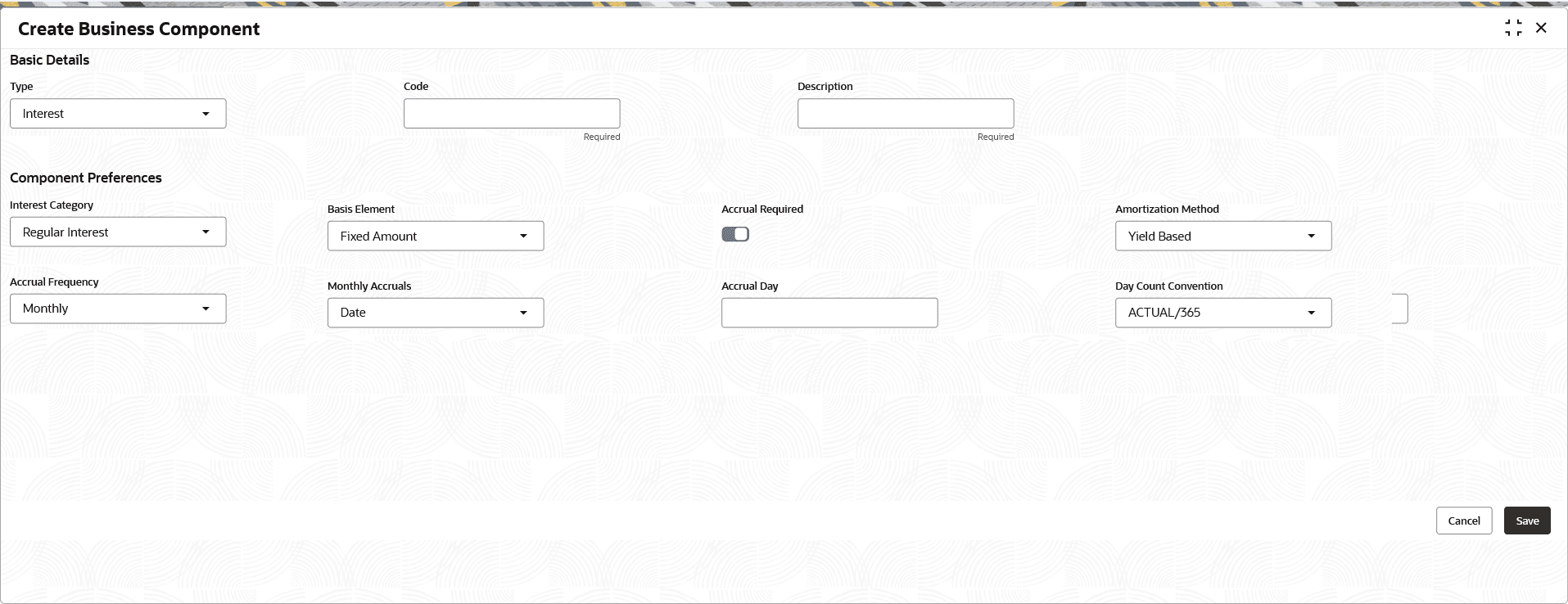
  6. Under Type field, select Interest to display the fields on Interest component.
    The Create Business Component - Interest screen displays.

    Figure 2-9 Create Business Component - Interest


  7. Specify the fields on Create Business Component - Interest screen.

    Note:

    For Interest Component Linkage, the system allow linking to Interest Component Codes where the Interest Category is 'Regular' and the Balance Base is 'Outstanding'.

    Note:

    The fields marked as Required are mandatory.
    For more information on fields, refer to the field description table.

    Table 2-9 Create Business Component - Interest - Field Description

    Field Description
    Type Displays the component type as Interest.
    Code Specify the code for component.
    Description Specify the description for component.
    Interest Category Select the category from the drop-down list.
    The available options are:
    • Regular Interest
    • Penalty Interest - Penalty Interest is applicable for Non-Billing Accounts. Refer Product Segment for enabling Billing Functionality.

      Note: The Penalty Interest is not applicable for Line of Credit products.

    The allowed values are defined by the lookup type INT_CATEGORY. This field is mandatory.

    Basis Component This field refers to the amount basis up on which the business component type will be computed. For regular interest, this component basis will refer to PRINCIPAL.

    Click Search icon and select the basis component from the list.

    This field is displayed only if the Interest Category is selected as Regular Interest.

    This field is displayed as drop-down list if the Interest Category is selected as Penalty Interest.

    The available options are:
    • Principal Overdue
    • Interest Overdue
    • Installment Overdue
    Balance Base Select the balance from the drop-down list.
    The available options are:
    • Expected Balance
    • Outstanding Balance

    This field displays only if the Interest Category is selected as Regular Interest.

    Note: Only Outstanding Balance Base is in scope for Line of Credit. This field is mandatory for Line of Credit.

    The allowed values are defined by the lookup type BALANCE_BASE.

    Accrual Required Click the toggle to enable the accrual.

    Note: For Line of Credit products, Accrual Required is mandatory and will always be enabled, with the Accrual Frequency set to Daily

    When accrual is enabled, interest is recognized as income at the accrual frequency mentioned even before received.

    Amortization Method Select the method from the drop-down list.
    The options are:
    • Linear or Straight Line Method
    • Yield Based

    This field is displayed only if the Accrual Required is enabled.

    Accrual Frequency Select the frequency at which accrual entries are to be posted from the drop-down list.
    The available values are:
    • Daily
    • Monthly

    This field is displayed only if the Accrual Required is enabled.

    Note: For Line of Credit products, Accrual Required is mandatory and will always be enabled, with the Accrual Frequency set to Daily

    The allowed values are defined by the lookup type ACCRUAL_FREQUENCY.

    Monthly Accruals Select the specific Monthly Accrual posting date from the drop-down list.
    The available options are:
    • DATE
    • INSTALMENTDATE - 1

    This field is enabled only if the Monthly option is selected as Accrual Frequency.

    This field is mandatory if the Accrual Frequency is chosen as Monthly.

    Accrual Day Specify the Monthly Accrual posting date.

    This field is enabled only if the Monthly option is selected as Accrual Frequency.

    This field is mandatory if the Accrual Frequency is chosen as Monthly.

    Day Count Convention This field refers to the method used to derive the no of days computed at the time of calculation of interest.

    The numerator refers to method of calculating of no of days in the interest period. If it is ACTUAL, then it is the actual no of days between start date and end date of the interest computation period (including start date and excluding end date).

    Denominator refers to the total no of days in a year. If it is ACTUAL, a leap year will be taken as 366 days and a non-leap year will be taken as 365 days.

    If it is 365/360, no of days is taken as 365/360, irrespective of the leap year.

    Select the value from the drop-down list.
    The available options are:
    • ACTUAL/ACTUAL
    • ACTUAL/365
    • ACTUAL/360
    • 30US/360
    • '30/360ISDA

    The allowed values are defined by the lookup type DAY_COUNT_CONVENTION.

    Grace Days for Penalty Specify the number of days after which penalty interest will be applied. A grace period allows a borrower to postpone payment for a short duration beyond the due date without incurring Penalty Interest or triggering default.

    This field displays only if the Interest Category is selected as Penalty Interest.

    Note: This field is not supported for the Line of Credit products.

    Charging Frequency Select the frequency from the drop-down list.
    The available options are:
    • Daily
    • Installment Due Date and Post Maturity Daily

    Specify the frequency in which Penalty Interest calculated balances to be charged to the account.

    The allowed values are defined by the lookup type PENL_CHARGE_FREQUENCY.

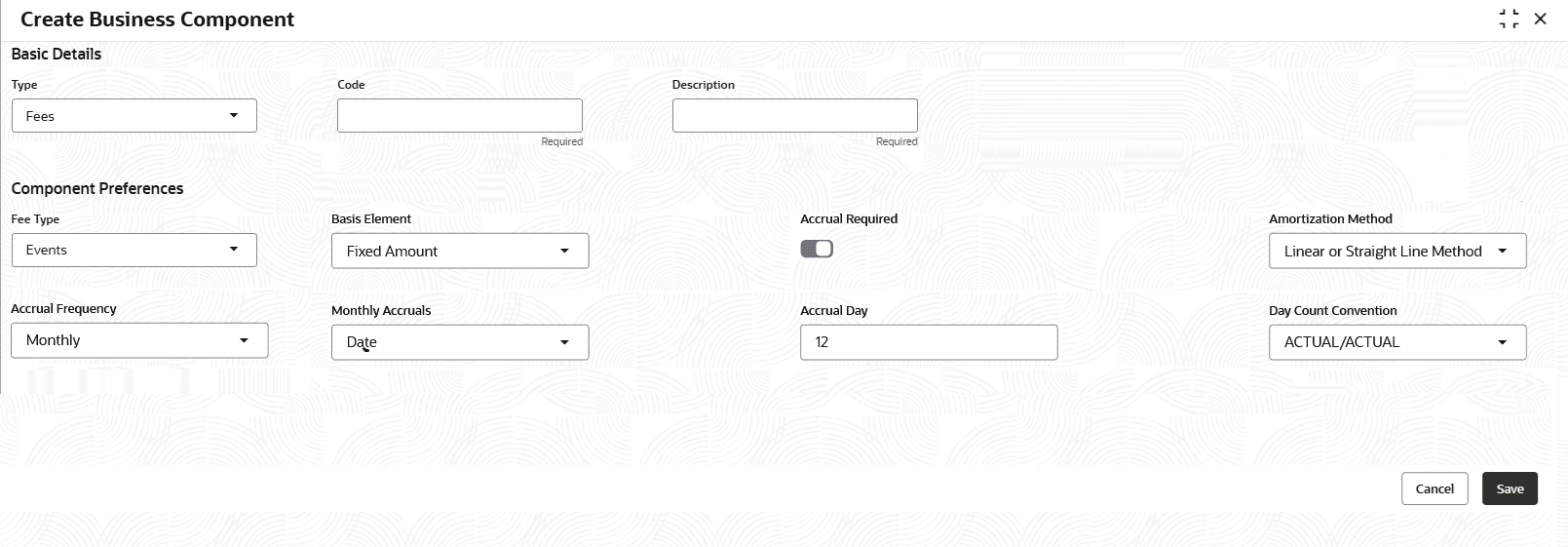
  8. Under Type field, select Fees to display the fields on Fees component.
    The Create Business Component - Fees screen is displayed.

    Note:

    In Fee Component Linkage, the system only supports a Basis Element value of FIXED.

    Figure 2-10 Create Business Component - Fees


  9. Specify the fields on Create Business Component - Fees screen.

    Note:

    The fields marked as Required are mandatory.
    For more information on fields, refer to the field description table.

    Table 2-10 Create Business Component - Fees - Field Description

    Field Description
    Type Displays the component type as Fees.
    Code Specify the code for component.
    Description Specify the description for component.
    Fee Type Select the type from the drop-down list.
    The available options are:
    • Events - In case of fee to be charged on specific event everytime the event occurs or periodic/scheduled in nature or to be raised in manually/adhoc application.
    • Periodic - The fees are defined for a specific periodicity. The Frequency and periodicity are defined further in linking the Fee in Product Segment.

    The allowed values are defined by the lookup type FEE_TYPE.

    Note: The Book Fee, Adhoc Fee, Late Fee, Payoff Quote Fee, and Periodic Fee are examples of common fees that are typically configured for Line of Credit product type to support various servicing & transactional requirements.

    Basis Element Select the element type from the drop-down list.
    The available options are:
    • Fixed Amount
    • Principal Overdue
    • Interest Overdue
    • Installment Overdue
    • Sanctioned Amount
    • Disbursed Amount
    • Principal Outstanding
    • Additional Sanction Amount
    • Prepaid Amount
    • Installment Amount
    • User Input

    The Basis Element is defaulted to Fixed Amount if the Assessment Method is selected as Adhoc Based.

    The allowed values are defined by the lookup type FEE_BASIS_ELEMENT.

    User Input and Fixed Amount are supported for Line of Credit products.

    Accrual Required Click the toggle to enable the accrual.

    The toggle is disabled by default.

    When accrual is enabled, interest is recognized as income at the accrual frequency mentioned, even before fee is due/received

    Amortization Method Select the method from the drop-down list.
    The options are:
    • Linear or Straight Line Method
    • Yield Based

    This field is displayed only if the Accrual Required is enabled.

    Accrual Frequency Select the frequency at which accrual entries are to be posted, from the drop-down list.
    The available values are:
    • Daily
    • Monthly

    This field is displayed only if the Accrual Required is enabled.

    The allowed values are defined by the lookup type ACCRUAL_FREQUENCY.

    Amortization Method Select the method from the drop-down list.
    The options are:
    • Linear or Straight Line Method
    • Yield Based
    Day Count Convention This field refers to the method used to derive the no of days computed at the time of calculation of interest.

    The numerator refers to method of calculating of no of days in the interest period. If it is ACTUAL, then it is the actual no of days between start date and end date of the interest computation period (including start date and excluding end date).

    Denominator refers to the total no of days in a year. If it is ACTUAL, a leap year will be taken as 366 days and a non-leap year will be taken as 365 days.

    If it is 365/360, no of days is taken as 365/360, irrespective of the leap year.

    Select the value from the drop-down list.
    The available options are:
    • ACTUAL/ACTUAL
    • ACTUAL/365
    • ACTUAL/360

    The allowed values are defined by the lookup type FEE_AMORT_METHOD.

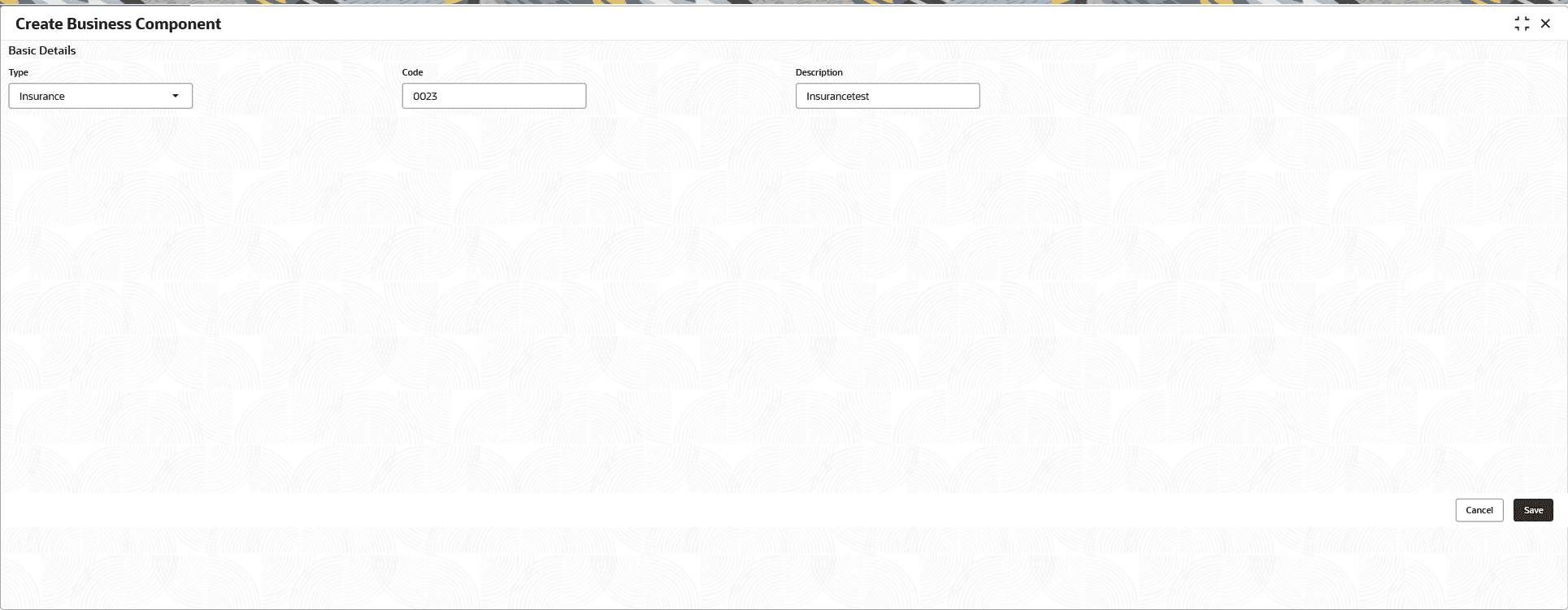
  10. From the Type field, select Insurance option to display the fields on Insurance component.
    The Create Business Component - Insurance screen is displayed.

    Note:

    This section is not supported for the Line of Credit products.

    Figure 2-11 Create Business Component - Insurance


  11. Specify the fields on Create Business Component - Insurance screen.

    Note:

    The fields marked as Required are mandatory.
    For more information on fields, refer to the field description table.

    Table 2-11 Create Business Component - Fees - Field Description

    Field Description
    Type Displays the component type as Insurance.
    Code Specify the code for component.
    Description Specify the description for component.
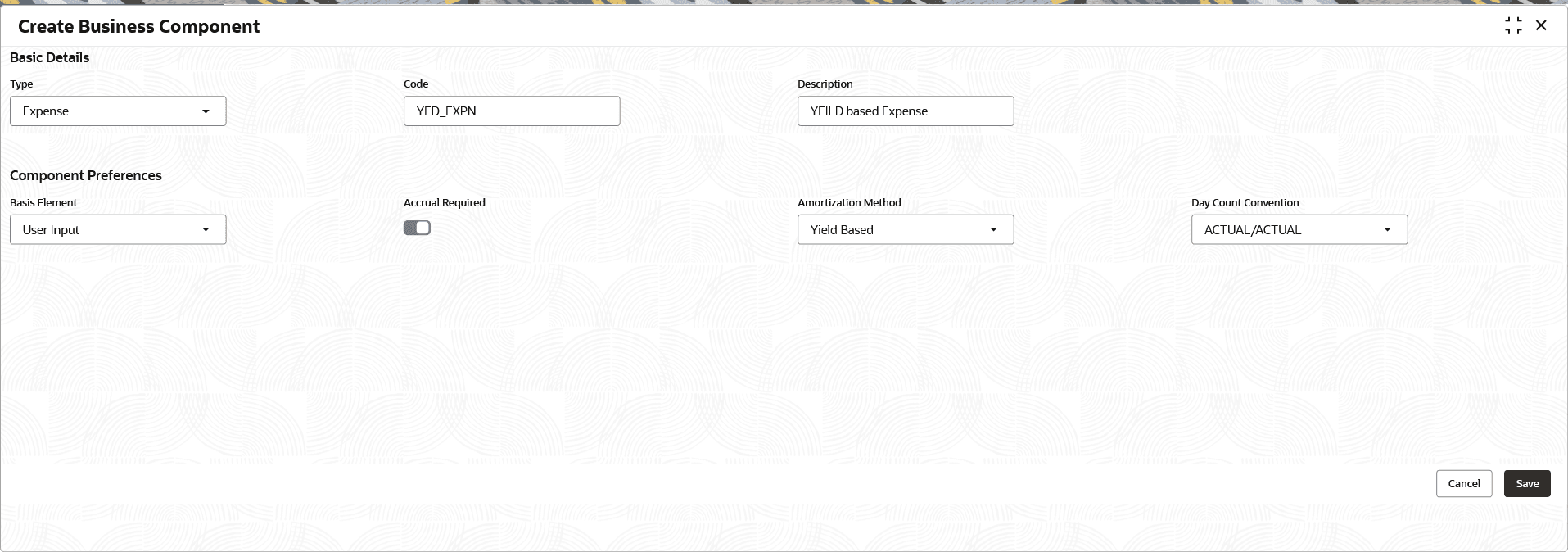
  12. From the Type field, select Expense option to display the fields on Insurance component.
    The Create Business Component - Expense screen is displayed.

    Note:

    This section is not supported for the Line of Credit products.

    Figure 2-12 Create Business Component - Expense



  13. Specify the fields on Create Business Component - Expense screen.

    Note:

    The fields marked as Required are mandatory.
    For more information on fields, refer to the field description table.

    Table 2-12 Create Business Component - Expense - Field Description

    Field Description
    Type Specify the component type as Expense.
    Code Specify the code for component.

    The User defined Code is only applicable for the expense component.

    Description Specify the user defined description for the expense component.
    Component Preferences Section allows to specify the component preferences for Expenses.
    Basis Element The only basis element applicable for expense component is User Input.

    User Input and Fixed Amount are supported for Line of Credit products.

    Accrual Required Click the toggle to enable the accrual.

    The toggle is disabled by default.

    Accrual Frequency Select the frequency at which accrual entries are to be posted, from the drop-down list.
    The available values are:
    • Daily
    • Monthly

    This field is displayed only if the Accrual Required and in Amortization Method field , Linear or Straight Line Method is enabled.

    The allowed values are defined by the lookup type ACCRUAL_FREQUENCY.

    Amortization Method Select the method from the drop-down list.
    The options are:
    • Linear or Straight Line Method
    • Yield Based
    Note: The field sequence has been updated to ensure the Amortization Method appears before the Accrual Frequency.
    • BOOK Event: Unamortizable expense incurred prior to and for the loan account , whereas Straight line based expense incurred prior to and for the loan account
    • DSBR Event: Unamortizable expense incurred prior to and for the loan account, whereas Straight line based expense incurred prior to and for the loan account . And Yield based expense incurred prior to and for the loan account
    • EXPB Event: Unamortizable expense incurred during the loan life-cycle, whereas Straight line based expense incurred during the loan life-cycle
    Day Count Convention This field refers to the method used to derive the no of days computed at the time of calculation of interest.

    The numerator refers to method of calculating of no of days in the interest period. If it is ACTUAL, then it is the actual no of days between start date and end date of the interest computation period (including start date and excluding end date).

    Denominator refers to the total no of days in a year. If it is ACTUAL, a leap year will be taken as 366 days and a non-leap year will be taken as 365 days.

    If it is 365/360, no of days is taken as 365/360, irrespective of the leap year.

    Select the value from the drop-down list.
    The available options are:
    • ACTUAL/ACTUAL
    • ACTUAL/365
    • ACTUAL/360

    The allowed values are defined by the lookup type FEE_AMORT_METHOD.

  14. Click Save to save the details.
    The Business Components is successfully created and can be viewed using the View Business Component screen.