2.14 Replay Events
This topic describes the systematic procedures for the Reversal and Replay of Events.
It is used in case of any back dated transaction or back dated reversal posted.
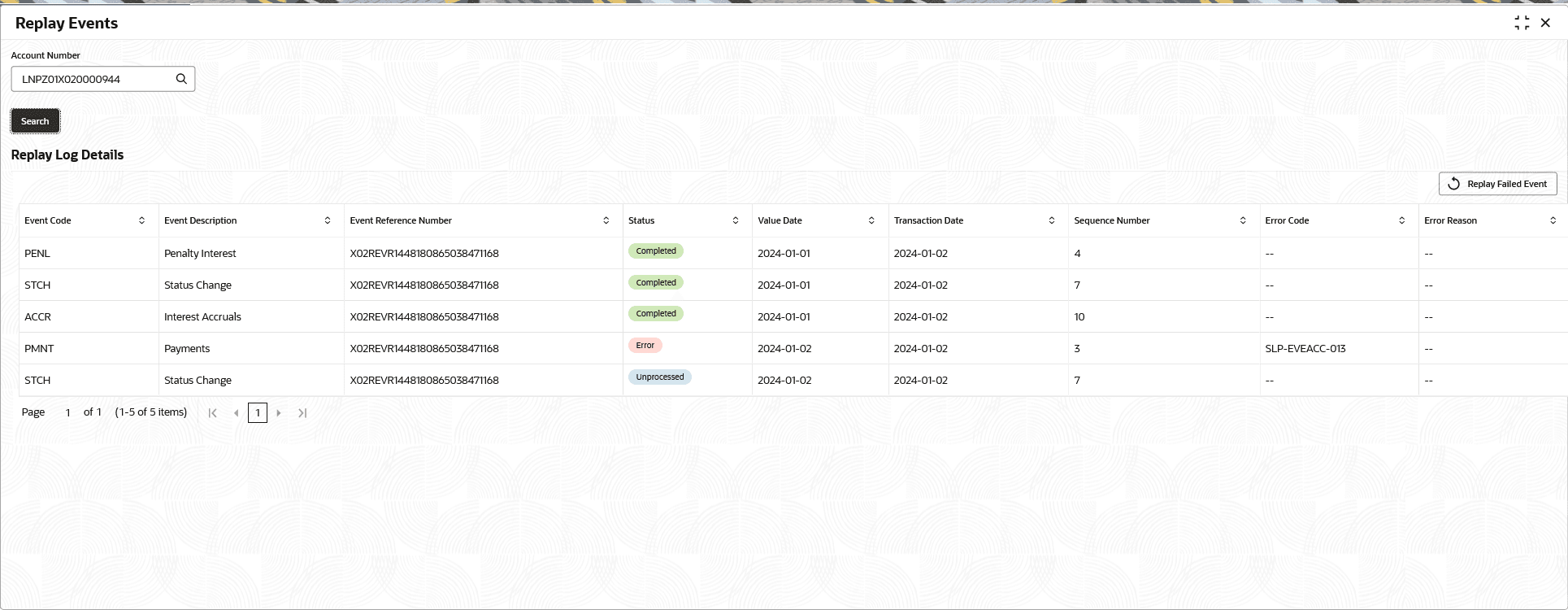
- Under Loan Services, click Replay Events.The Replay Events screen is displayed.
- Specify the fields on Replay Events screen.
Table 2-84 Replay Events - Field Description
Field Description Account Number Click  icon and select the accounts from the list which are currently in replay failed State only.
Replay Log Details In this section, system displays the list of Events replay details. Replay Failed Event Click to resubmit for re-trigger the replay. Note: This button is enabled only for the Events which is in Error Status.
Event Code Displays the name of the Event Code. Event Description Displays the description of the Event Code . Event Reference Number Displays the Replay Event Reference Number generated by the system. Status Displays the status of the replay. The options are:- Completed - The Replay completed
- Error - The replay failed for the Error
- Unprocessed - Events yet to be processed
Value Date Displays the value date of the Event Replay. Transaction Date Displays the transaction date of the Event Replay. Sequence number Displays the event sequence number marked for the replay. Error Code Displays the error code if any when the status is in Error. Error Reason Displays the error code description. - In the Account Number field, click icon and select an account for which user wish to re-initiate the replay. The Replay Events screen, fetches all the accounts which are currently in replay failed State.
Parent topic: Maintenance