3.4.1 Maintain Bank Parameters

In the Securities Bank Parameters screen, you can maintain certain basic information regarding the processing of Auto Deals.

  1. On the Home page, specify SEDXBNPM in the text box, and click next arrow.
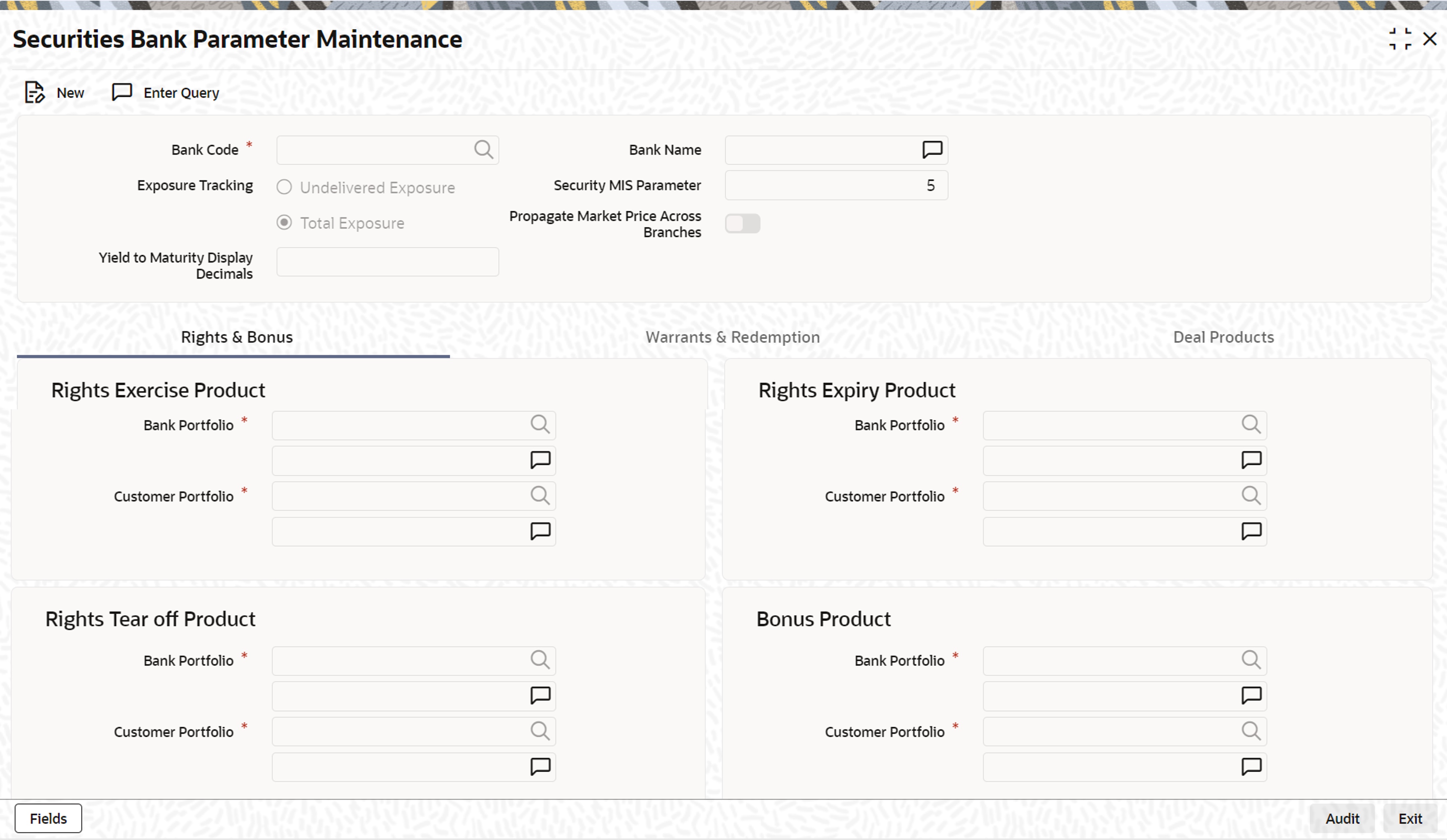
    The Securities Bank Parameter Maintenance screen is displayed.

    Figure 3-1 Securities Bank Parameter Maintenance
    Description of Figure 3-1 follows
    Description of "Figure 3-1 Securities Bank Parameter Maintenance"
  2. On the Securities Bank Parameter Maintenance screen, specify the fields.

    For more information about the fields, refer to the below table.

    If you are calling a record that has already been created, click on the Summary view. From the Summary screen, you can open an existing record. Highlight the record you wish to view and double click on it. The details of the bank parameter record will be displayed in a tabular form.

    Table 3-1 Securities Bank Parameter Maintenance

    Field Description
    Security MIS Parameter

    In Oracle Banking Treasury Management, a maximum of 10 transaction classes is maintained for security and portfolio.

    By specifying the security MIS parameter, you can indicate how the MIS transaction classes for a security position (Portfolio plus Security combination), is built from the respective transaction classes of the security and portfolio.

    The number that you enter in this field denotes the number of MIS transaction classes of the security that should be picked up, to determine the MIS transaction of the security position.

    Year to Month Display Decimals

    The YTM values, which you can view through the Yield to Maturity details sub-screen of the Deal Online screen, are rounded off to the number of decimal places that you specify on this screen.

    Indicate the deal combination product code, which should be picked up, in case of declaration of one of the following:

    • Rights
    • Tear-off
    • Expiry
    • Expiry
    • Bonus
    • Warrants
    • Tear-off
    • Exercise
    • Redemption

    Deal combination product codes are maintained in the Deal Combination Product definition screen. All the product codes defined on that screen will be reflected in the pick list available.

    The attributes defined for a particular deal combination product will be inherited by the auto dealer to which it is linked. The parameters maintained in this screen are applicable across the bank.

  3. On the Securities Bank Parameter Maintenance screen, click Warrants & Redemption.

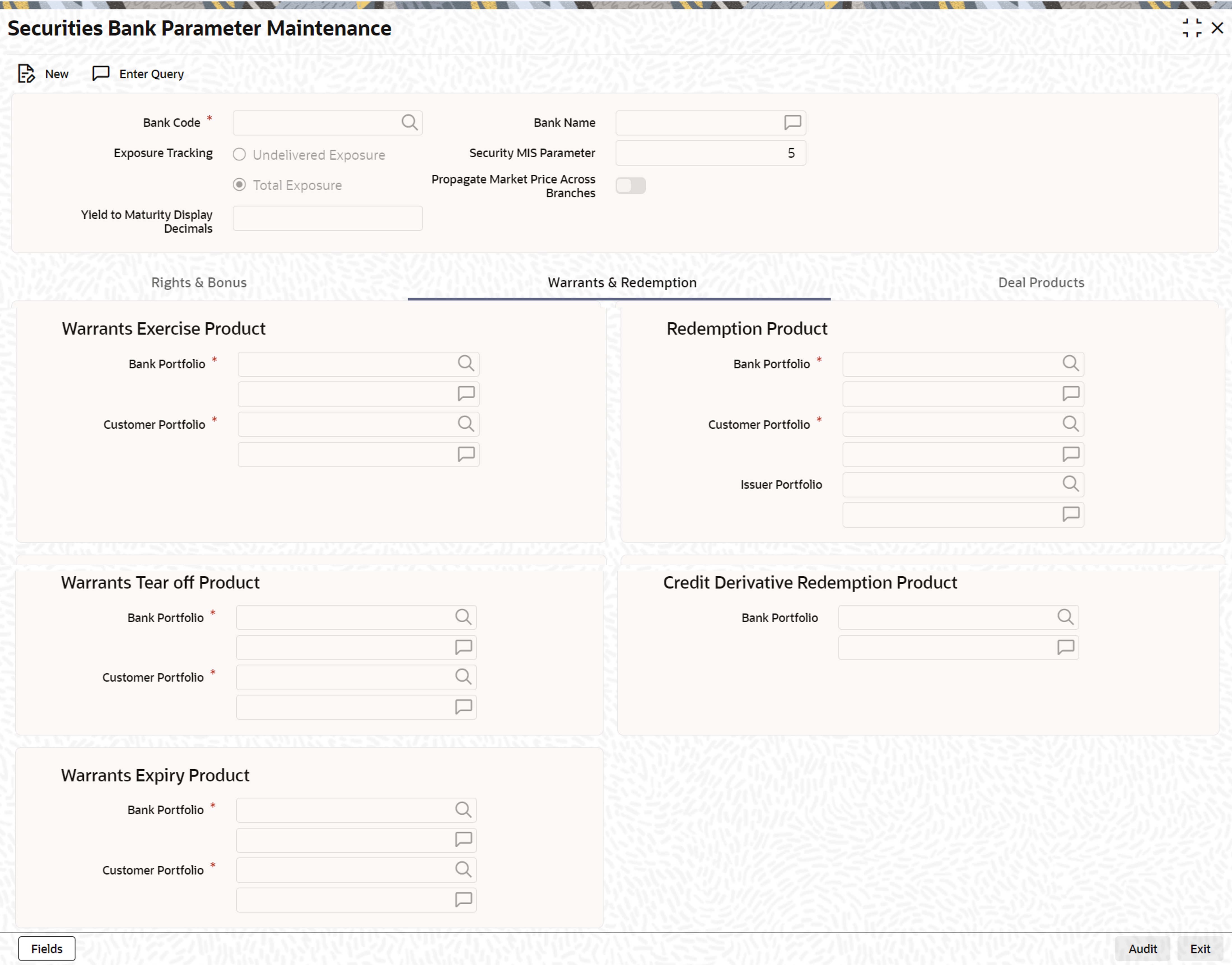
    The Securities Bank Parameter Maintenance - Warrants & Redemption screen is displayed.

    Figure 3-2 Securities Bank Parameter Maintenance- Warrants & Redemption

    Description of Figure 3-2 follows
    Description of "Figure 3-2 Securities Bank Parameter Maintenance- Warrants & Redemption"
  4. On the Warrants & Redemption tab screen, specify the details as required.

    For information on fields, see the below table.

    Table 3-2 Warrants & Redemption - Field Description

    Field Description

    Bank Portfolio

    Select the portfolio details from the drop-down list as required.

    Note: Only the combination where both the buy product and sell product from Credit Derivative Deal Product Definition screen are populated in LOV.

  5. On the Securities Bank Parameter Maintenance screen, click Deal Products.
    The Securities Bank Parameter Maintenance - Deal Products screen is displayed.
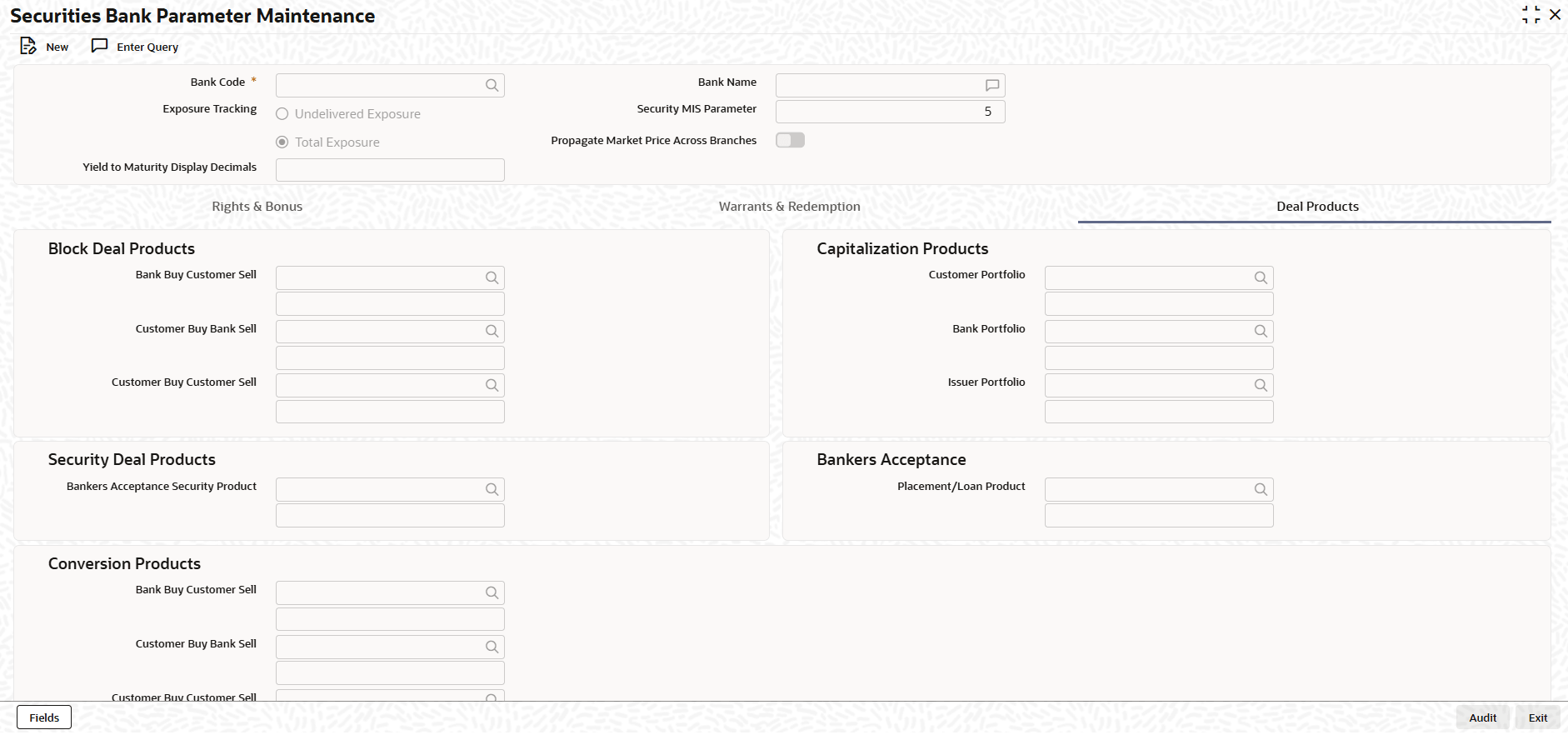
  6. On the Deal Products tab screen, specify the details as required.

    For information on fields, see the below table.

    Table 3-3 Deal Products - Field Description

    Field Description
    Bank Buy Customer Sell Select the product to be used/blocked when the bank buys and the customer sells.
    Customer Buy Bank Sell Select the product to be used/blocked when the customer buys and the bank sells.
    Customer Buy Customer Sell Select the product to be used/blocked when customer buys and customer sells.
    Customer Portfolio Select the product used for capitalization events in the customer’s portfolio.
    Bank Portfolio Select the product used for capitalization events in the bank’s own portfolio.
    Issuer Portfolio Select the product used for capitalization events in the issuer portfolio.
    Bankers Acceptance Security Product Select the product code to be used for securities processing related to Banker’s Acceptance (BA) security deals.
    Placement/Loan Product Select the product used for BA placement or loan processing linkage.
    Conversion Products This section explain about the following fields.
    Bank Buy Customer Sell Select the product for conversion where bank buys and customer sells.
    Customer Buy Bank Sell Select the product for conversion where customer buys and bank sells.
    Customer Buy Customer Sell Select the product for conversion where customer buys and customer sells.